
如何在BFF中使用Azure AD的AuthorizeforScopes在根上提供SPA
在这个问题上,我不知道是否有人能帮我解决这个问题。如果没有,有人知道谁能做到吗?
我的情况是,我有一个BFF (后端为前端),服务于我的角度SPA。我用的是Azure广告。我使用.NET核心5和最新的Azure AD nuget库
BFF是有用的,因为它防止我的Auth令牌保存在浏览器中;BFF将其保存在仅限于http的安全cookie中,因此SPA不了解用户;它必须询问API有关用户的信息。BFF还确保只有当您登录BFF时才能访问SPA,还可以将对/api的代理调用反向调用到实际API;它驻留在我们的k8s集群中,因此您无法从internet访问它。
图表基本上是这样的。见图像。
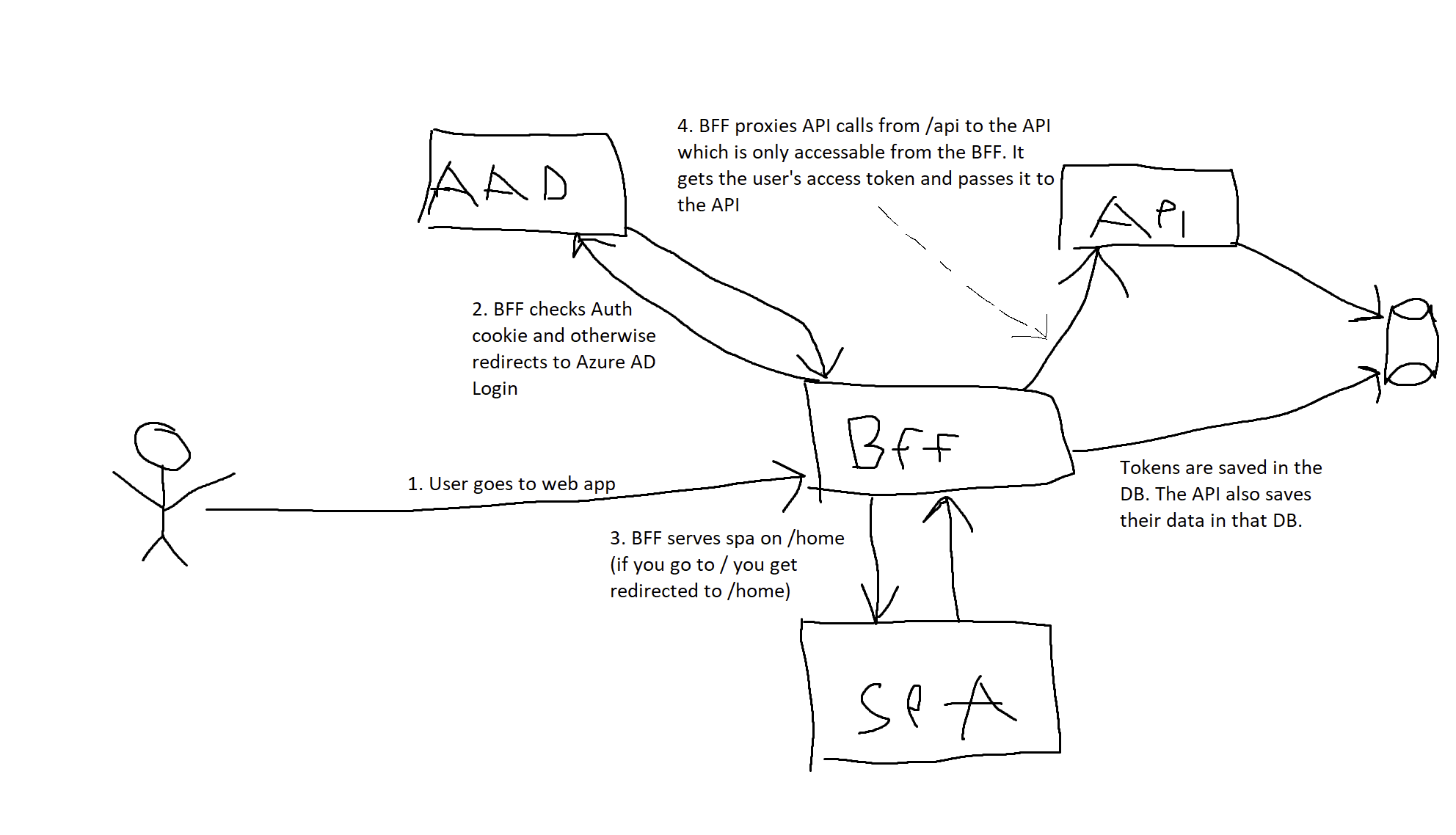
我的问题是,我需要使用AuthorizeForScopes的Azure广告八月,但这需要愚蠢的解决办法。就我在网上所能找到的内容而言,我必须将其放在控制器/Action上,如下所示:
[HttpGet]
[Authorize]
[AuthorizeForScopes(ScopeKeySection = "Scopes")]
public IActionResult Index()
{
    return PhysicalFile($"{_webHostEnvironment.ContentRootPath}/ClientApp/dist/index.html", "text/html");
}这意味着,如果您进入/,您将到达这个端点并获得index.html服务。这不是一个超级整洁的设置,因为我宁愿让Startup.cs中的Startup.cs处理这个问题。但我认为这是必要的,因为我不能只在中间件中使用AuthorizeForScopes。
另一个问题是,这在开发过程中不起作用,因为Startup.cs中的Startup.cs处理了所有这些。如果您在开发期间运行这个程序,就会得到一个错误,因为它找不到index.html
当前的解决方案是,我上面发布的代码将重定向到SPA处理的/home,因此如果您转到/,您将被重定向到/home和BFF管道,然后将您重定向到SPA和boom,这一切都是有效的。但这意味着我不能在/上运行我的SPA
我现在已经为我的管道设置了以下Startup.cs。我删除了不必要的代码。
app.UseStaticFiles();

app.UseStatusCodePagesWithReExecute("/errorstatus/{0}");

app.UseRouting();
app.UseCors();

app.UseAuthentication();
app.UseAuthorization();

// Proxy calls to the API through the BFF so the API can only be reached from within the cluster. This is more secure
app.Map("/api", true, config => RunApiProxy(/* Stuff here */));

app.UseEndpoints(endpoints =>
{
    endpoints.MapControllerRoute(
        name: "default",
        pattern: "{controller}/{action=Index}/{id?}");

    endpoints.MapHealthChecks("/health");
});

if (!Environment.IsDevelopment())
{
    // During development we serve files from the dev-server, not from the location of the spa static files
    app.UseSpaStaticFiles();
}

// Redirect the user to authenticate if the user isnt at this moment
// All static frontend related files are served using the UseSpaStaticFiles middleware
// What's left is the index.html
app.Use(async (context, next) =>
{
    if (context.User?.Identity?.IsAuthenticated != true)
    {
        await context.ChallengeAsync(WellKnownAuthenticationSchemes.OpenIdConnect);
    }
    else
    {
        await next();
    }
});

if (Environment.IsDevelopment())
{
    // Forward devserver socket calls during development
    app.MapWhen(p => p.Request.Path.StartsWithSegments("/sockjs-node"), config =>
    {
        config.UseSpa(spa =>
        {
            spa.UseProxyToSpaDevelopmentServer("http://localhost:4200");
        });
    });
}

// Serve the angular app
app.UseSpa(spa =>
{
    spa.Options.SourcePath = "ClientApp";

    if (Environment.IsDevelopment())
    {
        spa.UseProxyToSpaDevelopmentServer("http://localhost:4200");
    }
});如果没有上面发布的操作方法,我如何实现AuthorizeForScopes / ,以便只有当用户是 [Authorized] 和 [AuthorizeForScopes]**?**时,才能在上服务SPA
回答 1
Stack Overflow用户
发布于 2021-07-29 08:40:25
如何在没有上述操作方法的情况下实现AuthorizeForScopes,以便仅在用户获得授权和AuthorizeForScopes的情况下才能为SPA提供服务
在startup.cs > ConfigureServices(IServiceCollection services)方法中有两种方法可以做到这一点。
备选案文1:
services.AddControllers(o =>
{
    o.Filters.Add(new RequiredScopeAttribute(new[] { "access_as_user" }));
});这将自动向所有控制器添加作用域属性,但如果您在[AllowAnonymous]中有端点,则这将无法工作。
要解决这个问题,另一种方法是在同一个ConfigureServices方法中为作用域添加您自己的授权策略:
services.AddAuthorization(o =>
{
var authPolicy = new AuthorizationPolicyBuilder(new[] { JwtBearerDefaults.AuthenticationScheme })
        .RequireAuthenticatedUser()
        .RequireAssertion(ctx =>
        {
            // Attempt with Scp claim
            Claim scopeClaim = ctx.User.FindFirst(ClaimConstants.Scp);

            // Fallback to Scope claim name
            if (scopeClaim == null)
            {
                scopeClaim = ctx.User.FindFirst(ClaimConstants.Scope);
            }
            return scopeClaim != null && scopeClaim.Value.Split(' ').Intersect(new[] { "access_as_user" }).Any();
        })
        .Build();
    o.DefaultPolicy = authPolicy;
});第二个选项将此auth策略设置为通过o.DefaultPolcy = authPolcy的所有路由的默认策略,但与第一个选项不同,可以通过在方法/控制器上使用[AllowAnonymous]来覆盖该策略。
您还可以使用o.AddPolicy("authMeUpScotty", authPolicy)而不是o.DefaultPolicy,如果只针对特定的端点使用[Authorize(Policy = "authMeUpScotty")]。
希望这能有所帮助!
https://stackoverflow.com/questions/68541952
复制相似问题
腾讯云开发者

Copyright © 2013 - 2026 Tencent Cloud. All Rights Reserved. 腾讯云 版权所有
深圳市腾讯计算机系统有限公司 ICP备案/许可证号:粤B2-20090059  粤公网安备44030502008569号
腾讯云计算(北京)有限责任公司 京ICP证150476号 | 京ICP备11018762号