
如何修复此异常和类型错误?(Django)
我和Tim一起学习了这教程,但是在添加了几行代码之后,当我试图查看我的网页时,我只得到了一些错误或异常错误。
我的代码:
views.py
from django.shortcuts import render
from django.http import HttpResponse, HttpResponseRedirect
from .models import Item, ToDoList
from .forms import CreateNewList
# Create your views here.

def index(response):
    return HttpResponse("<h1>Hello, world!</h1>")


def item_by_id(item_id, id=None):
    item = Item.objects.get(pk=item_id)
    return HttpResponse(f"Item: {item.title}, published on {item.datetime_found}")


def home(response):
    return render(response, "myapp/home.html", {})


def base(response):
    return render(response, "myapp/base.html", {})


def itemlist(response, list_id):
    ls = ToDoList.objects.get(id=list_id)
    return render(response, "myapp/itemlist.html", {"ls": ls})


def create(response):
    if response.method == "POST":
        form = CreateNewList(response.POST)  # Takes POST and uses data for form
        if form.is_valid():  # is_valid() checks class-fields for valid input
            n = form.cleaned_data["name"]  # Clean and un-enc data, specify field "name"
            t = ToDoList(name=n)  # Use data to create new ToDoList
            t.save()
        return HttpResponseRedirect("itemlist/%i" % t.id)  # Redirect to page that shows the list
    else:
        form = CreateNewList()
    return render(response, "myapp/create.html", {"form": form})
models.py
from django.db import models
from django.forms import model_to_dict
from django.utils.timezone import now

class Item(models.Model):
    title = models.CharField(max_length=200)  # Short description of the item
    datetime_found = models.DateTimeField(default=now, blank=True)  # Date and time of when the item was found


def items():
    res = []
    for i in Item.objects.all():
        res.append(model_to_dict(i))
    return res


class ToDoList(models.Model):
    name = models.CharField(max_length=200)

    def __str__(self):
        return self.name


class ListItem(models.Model):
    todolist = models.ForeignKey(ToDoList, on_delete=models.CASCADE)  # related to ToDoList
    text = models.CharField(max_length=300)
    complete = models.BooleanField()  # Boolean says if we're completed list item

    def __str__(self):
        return self.text
urls.py
from django.urls import path
from . import views

urlpatterns = [
    path('', views.index, name='index'),
    path('item/<int:id>', views.item_by_id, name='item_by_id'),
    path('home', views.home, name='home'),
    path('base', views.base, name='base'),
    path('itemlist/<int:id>', views.itemlist, name='itemlist'),
    path('create/', views.create, name='create'),
]
forms.py
from django import forms


class CreateNewList(forms.Form):
    name = forms.CharField(label="Name", max_length=200)  # Label is the text that shows before the input-box
    check = forms.BooleanField()  # Boolean check button
我的HTML文件:
base.html
<!DOCTYPE html>
<html lang="en">
<head>
    <meta charset="UTF-8">
    <title>{% block title %}My Webite{% endblock %}</title>
</head>
<body>
    <div id="content", name="content">
        {% block content %}
        <h1>Welcome to my website!</h1>
        {% endblock %}
    </div>
</body>
</html>
home.html
{% extends "myapp/base.html" %}

{% block title %}
Home
{% endblock %}

{% block content %}
<h1>Home Page</h1>
{% endblock %}
itemlist.html
{% extends "myapp/base.html" %}
{% block title %}View List of Items{% endblock %}

{% block content %}
    <h1>{{ls.name}}</h1>
    <ul>
        {% for i in ls.listitem_set.all %}
            {% if i.complete == TRUE %}
                <li>{{i.text}} - COMPLETE</li>
            {% else %}
                <li>{{i.text}} - INCOMPLETE</li>
            {% endif %}
        {% endfor %}
    </ul>
{% endblock %}
create.html
{% extends "myapp/base.html" %}
{% block title %} Create new List of Items {% endblock %}
{% block content %}
Create Page
<form method="POST" action="/create/">
    {% csrf_token %}
    {{form.as_p}}
    <button type="submit", name="save">Create New</button>
</form>
{% endblock %}
在我添加创建-部件(create.html和create.html)之前,这是非常有效的。但是现在,即使当我试图输入人们认为不会受到新代码影响的页面时,也会出现错误。
当我运行服务器并尝试输入http://127.0.0.1:8000/base/、http://127.0.0.1:8000/home/或http://127.0.0.1:8000/create/时,它可以工作。
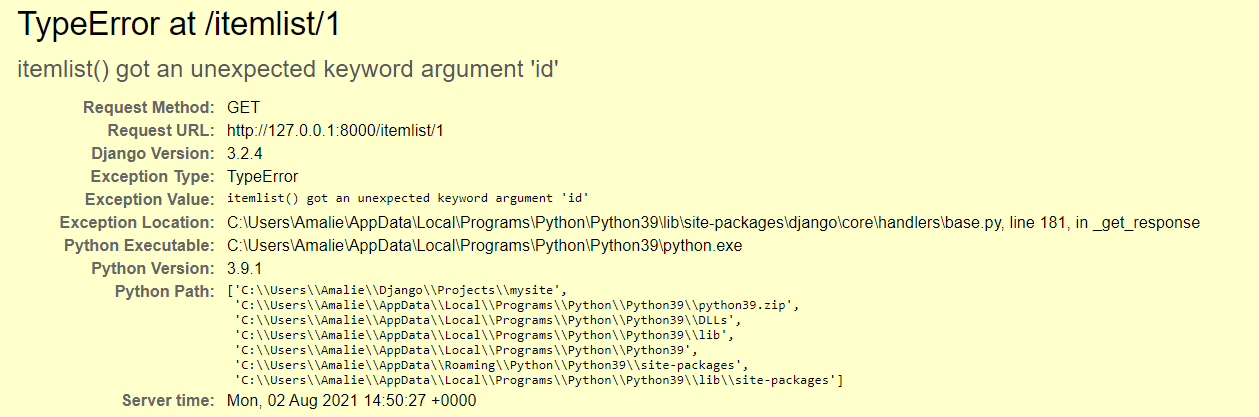
但是,当我尝试转到http://127.0.0.1:8000/itemlist/1或其他数字时,我会得到以下错误:
当我尝试转到http://127.0.0.1:8000/item/1或其他数字时,我会得到以下错误:
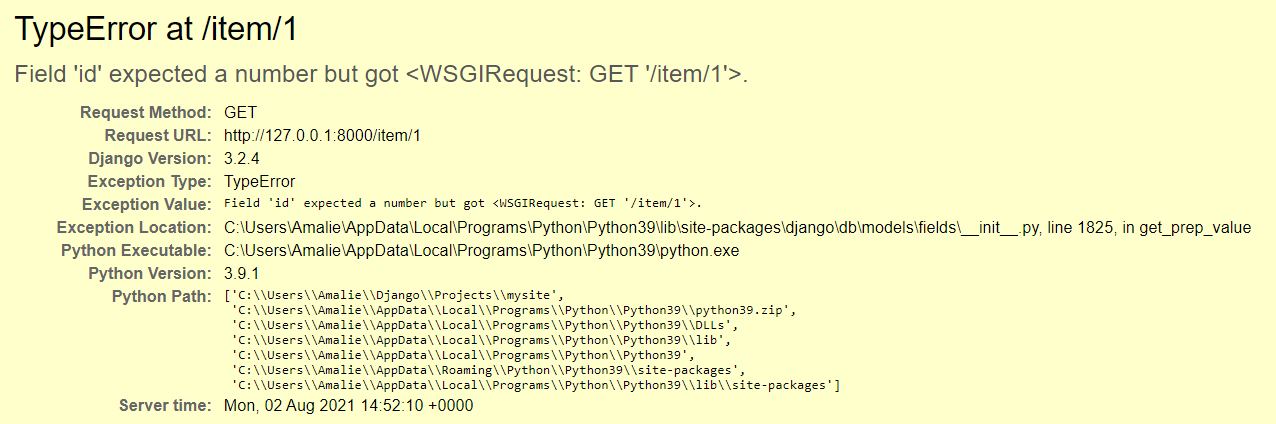
我尝试过修改函数,使其具有像item_by_id(item_id, id=None):这样的参数,而不是item_by_id(response, item_id,):,但是之后,错误消息只会从第一个错误图片更改为最后一个错误图片。
我在这里错过了什么?我怎么才能解决这个问题?感谢所有的帮助!
回答 1
Stack Overflow用户
发布于 2021-08-02 15:10:16
无论传递给视图函数的参数是什么,都应该是传递给视图的相同参数,即相应的url模式
def itemlist(response, list_id):
    ls = ToDoList.objects.get(id=list_id)
return render(response, "myapp/itemlist.html", {"ls": ls})在上面的视图函数中,您以list_id的形式传递了参数,但是在url模式中,您传入了它,因为id...this是导致conflict...resolve的原因,它应该运行得很好。
溶液
#view_function
def itemlist(response, list_id):
    ls = ToDoList.objects.get(id=list_id)
    return render(response, "myapp/itemlist.html", {"ls": ls})
相应的url模式..。
path('itemlist/<int:list_id>', views.itemlist, name='itemlist'),对于第二个Error...you,忘记传递function...the item_id所需的请求参数(在代码中用作响应)不是neccesary..so,删除它并将其引用更改为id。
def item_by_id(response, id=None):
    item = Item.objects.get(pk=id)
return HttpResponse(f"Item: {item.title}, published on {item.datetime_found}")https://stackoverflow.com/questions/68623861
复制相似问题
腾讯云开发者

Copyright © 2013 - 2026 Tencent Cloud. All Rights Reserved. 腾讯云 版权所有
深圳市腾讯计算机系统有限公司 ICP备案/许可证号:粤B2-20090059  粤公网安备44030502008569号
腾讯云计算(北京)有限责任公司 京ICP证150476号 | 京ICP备11018762号