
如何在python中显示当前的虚拟环境?
如何在python中显示当前的虚拟环境?
提问于 2021-08-04 10:05:53
首先,我正在使用hotstick.minimal主题在哦,我的豪华。看起来就像这样。
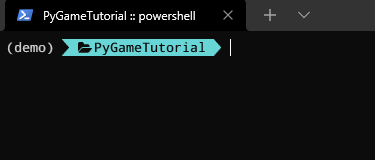
正如你所看到的,现在的复仇者看起来不太好。我在JSON文件中做了一些修改。然后看起来就像这样。
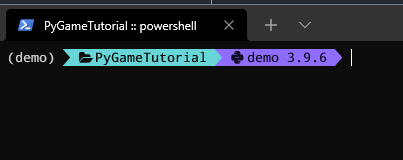
我不想在左边显示文夫的名字。我怎么能这么做?
这是我的JSON文件:
{
"$schema": "https://raw.githubusercontent.com/JanDeDobbeleer/oh-my-posh/main/themes/schema.json",
"final_space": true,
"osc99": true,
"console_title": true,
"console_title_style": "template",
"console_title_template": "{{.Folder}}{{if .Root}} :: root{{end}} :: {{.Shell}}",
"blocks": [
{
"type": "prompt",
"alignment": "left",
"segments": [
{
"type": "root",
"style": "plain",
"foreground": "yellow",
"properties": {
"root_icon": ""
}
},
{
"type": "path",
"style": "powerline",
"foreground": "black",
"background": "#68D6D6",
"powerline_symbol": "",
"leading_diamond": "",
"trailing_diamond": "",
"properties": {
"prefix": " \uF07C ",
"style": "folder"
}
},
{
"type": "python",
"style": "powerline",
"powerline_symbol": "\uE0B0",
"foreground": "#100e23",
"background": "#906cff",
"properties": {
"prefix": " \uE235 "
}
},
{
"type": "git",
"style": "powerline",
"powerline_symbol": "",
"foreground": "black",
"background": "green",
"properties": {
"display_stash_count": true,
"display_upstream_icon": true,
"display_status": true,
"display_status_detail": true,
"branch_icon": " ",
"branch_identical_icon": "≡",
"branch_ahead_icon": "↑",
"branch_behind_icon": "↓",
"branch_gone": "≢",
"local_working_icon": "",
"local_staged_icon": "",
"stash_count_icon": "",
"commit_icon": "▷ ",
"tag_icon": "▶ ",
"rebase_icon": "Ɫ ",
"cherry_pick_icon": "✓ ",
"merge_icon": "◴ ",
"no_commits_icon": "[no commits]",
"status_separator_icon": " │",
"status_colors_enabled": true,
"color_background": true,
"local_changes_color": "yellow"
}
}
]
}
]
}备注:由于字体的原因,某些符号可能不会出现。
回答 1
Stack Overflow用户
回答已采纳
发布于 2021-11-05 05:30:47
您必须在$PROFILE (profile.ps1)中包括以下内容:
$env:VIRTUAL_ENV_DISABLE_PROMPT = 1两个注释:
- 关闭了to
- ,并重新打开终端以使其正常工作。
请参阅此处更全面的讨论:https://github.com/JanDeDobbeleer/oh-my-posh/discussions/390
页面原文内容由Stack Overflow提供。腾讯云小微IT领域专用引擎提供翻译支持
原文链接:
https://stackoverflow.com/questions/68649314
复制相关文章
相似问题
腾讯云开发者

Copyright © 2013 - 2026 Tencent Cloud. All Rights Reserved. 腾讯云 版权所有
深圳市腾讯计算机系统有限公司 ICP备案/许可证号:粤B2-20090059  粤公网安备44030502008569号
腾讯云计算(北京)有限责任公司 京ICP证150476号 | 京ICP备11018762号