
有什么办法不重复股票行情吗?
有什么办法不重复股票行情吗?
提问于 2021-08-06 00:06:48
import json
from io import StringIO
from bs4 import BeautifulSoup
from requests_html import HTMLSession
import time
from selenium import webdriver
import requests
import pandas as pd


PATH = "C:\Program Files (x86)\chromedriver.exe"
driver = webdriver.Chrome(PATH)

url = "https://thestockmarketwatch.com/markets/after-hours/trading.aspx"
driver.minimize_window()
driver.get(url)

time.sleep(5)
content = driver.page_source.encode('utf-8').strip()
soup = BeautifulSoup(content,"html.parser")
Afterhours = soup.find_all('a', {'class': 'symbol'})

for a in Afterhours:
    print(a.text)
    print("")


driver.quit()
嘿,伙计们,我在下班后编写这个Gapper 铲运机,我有一些麻烦。股票经纪人们在重复自己的行为。我怎么能只得到,在网站上显示的,和重复的?
回答 1
Stack Overflow用户
回答已采纳
发布于 2021-08-06 10:31:03
这是因为,如果您查看检查元素选项卡并搜索类名symbol,就会得到超过30个结果,这意味着有更多的类具有该名称,而不是您想要的。
让我给你看看这两张照片:
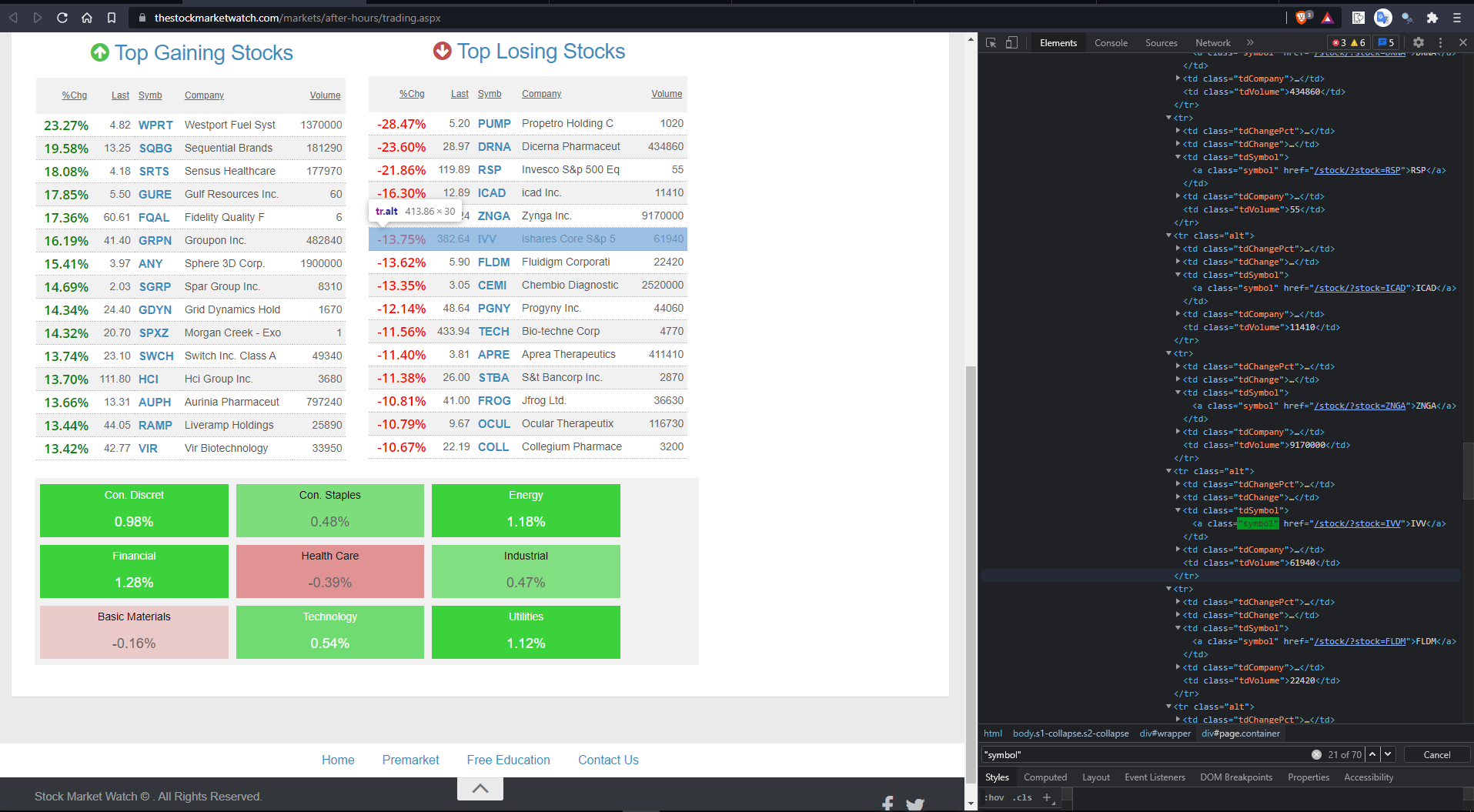
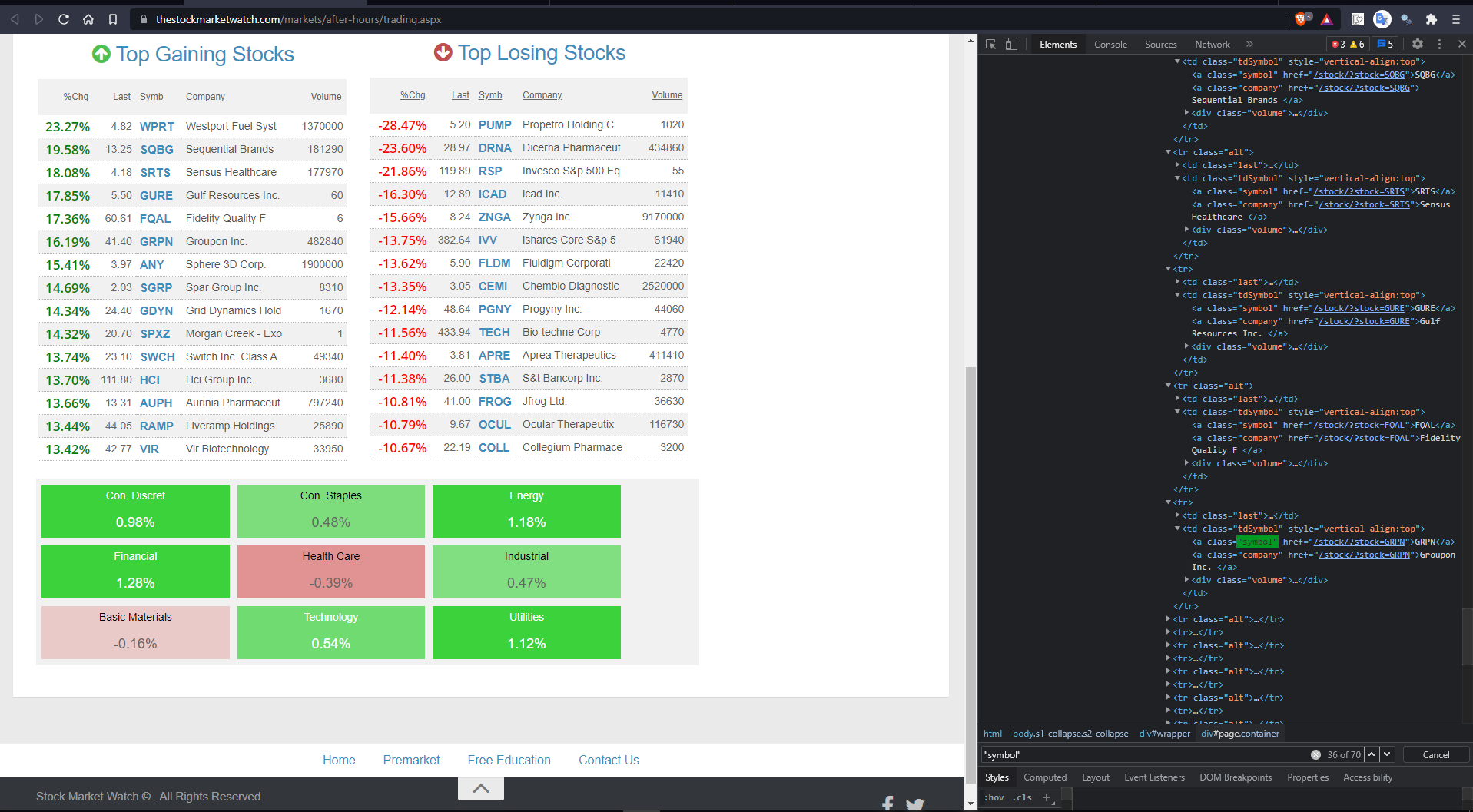
第一个图像有您想要的数据,但是第二个映像在同一个类中也有相同的数据。所以你必须找到一种方法来区分这两者。也许有很多方法可以做到,但是我和你分享的是我发现有帮助的一种方式。
import json
from io import StringIO
from bs4 import BeautifulSoup
from requests_html import HTMLSession
import time
from selenium import webdriver
from webdriver_manager.chrome import ChromeDriverManager    # new import
import requests
import pandas as pd

# better way to initialize the browser and driver than specifying path everytime
option = webdriver.ChromeOptions()
# option.add_argument('--headless') # uncomment to run browser in background when not debugging
option.add_argument("--log-level=3")
option.add_experimental_option('excludeSwitches', ['enable-logging'])
CDM = ChromeDriverManager(log_level='0')
driver = webdriver.Chrome(CDM.install(), options=option)


# PATH = "C:\Program Files (x86)\chromedriver.exe"
# driver = webdriver.Chrome(PATH)

url = "https://thestockmarketwatch.com/markets/after-hours/trading.aspx"
driver.minimize_window()
driver.get(url)

time.sleep(5)
content = driver.page_source.encode('utf-8').strip()
soup = BeautifulSoup(content,"html.parser")
Afterhours = soup.find_all('a', {'class': 'symbol'})
removed_duplicates =[]

for a in Afterhours:
    if a.find_previous().get('style') == None:      # the difference between those two duplicates
        removed_duplicates.append(a)

for i in removed_duplicates:
    print(i.text)
    print()     # just an empty print() would print a new line
driver.quit()现在您可能已经注意到,第一个标记没有任何内联样式,但是第二个标记有一些。使用BeautifulSoup的最佳之处在于它有助于顺利地遍历,这样您就可以上下移动元素,找到所需的任何东西。
我还在您的代码中添加了一些改进和建议,如果您已经意识到它们,请忽略它们。这是个好问题!
页面原文内容由Stack Overflow提供。腾讯云小微IT领域专用引擎提供翻译支持
原文链接:
https://stackoverflow.com/questions/68674713
复制相关文章
相似问题
腾讯云开发者

Copyright © 2013 - 2026 Tencent Cloud. All Rights Reserved. 腾讯云 版权所有
深圳市腾讯计算机系统有限公司 ICP备案/许可证号:粤B2-20090059  粤公网安备44030502008569号
腾讯云计算(北京)有限责任公司 京ICP证150476号 | 京ICP备11018762号