
分隔形状,如行分隔画布+选择点从数组中绘制形状
我想检测不同的形状,因为随机生成的线条分裂画布。我为x和y位置(相同的顺序)将线交点保存在单独的数组中,但不知道如何连接完成多个形状的点。
- 是否有任何方法检测附近的点,以关闭最小可能的形状,无论是三角形,矩形,或多边形(例如,通过使用beginShape和endShape)?
- 如果1)太复杂,是否有任何方法从数组中选择3个或3个以上的随机点?
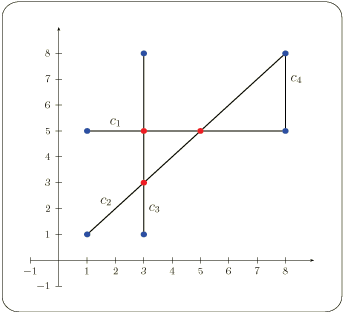
这里有一个示例图像,其中有4行用红色标记的相交点分割画布。我还保存了每个随机生成的行的顶部和底部点(用黑色标记),加上画布的四个角分别位于x和y位置的相同数组中(px,py)。
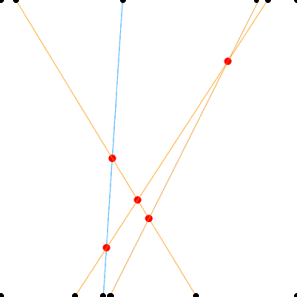
把画布分成几行。
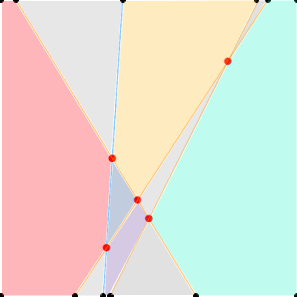
如何在处理过程中按线条分割形状?
我能够得到所有的交点,但在将它们连接成不同的形状时遇到了问题。下面是我正在处理的处理代码:
//Run in Processing.
//Press r to refresh.
//Top and bottom points are added to px and py when refreshed (filled in black).
//Intersection points are added to px and py when detected (filled in red).
int l = 4; //set number of lines
float[] r1 = new float[l];
float[] r2 = new float[l];
float[] px = {}; //array to save x positions of all possible points
float[] py = {}; //array to save y positions of all possible points
boolean added = false;
void setup(){
  size(800, 800);
  background(255);

  refresh();
}
void draw(){
  background(255);
  stroke(0, 150, 255, 150);
  strokeWeight(1);
  for(int i=0; i < r1.length; i++){
    for(int j=0; j < r1.length; j++){
      if(i>j){
      boolean hit = lineLine(r1[i], 0, r2[i], height, r1[j], 0, r2[j], height);
      if (hit) stroke(255, 150, 0, 150);
      else stroke(0, 150, 255, 150);
      }
    line(r1[i], 0, r2[i], height);
    }
  }
  added = true;
  print(px.length);
}
//source: http://jeffreythompson.org/collision-detection/line-line.php
boolean lineLine(float x1, float y1, float x2, float y2, float x3, float y3, float x4, float y4) {
  // calculate the distance to intersection point
  float uA = ((x4-x3)*(y1-y3) - (y4-y3)*(x1-x3)) / ((y4-y3)*(x2-x1) - (x4-x3)*(y2-y1));
  float uB = ((x2-x1)*(y1-y3) - (y2-y1)*(x1-x3)) / ((y4-y3)*(x2-x1) - (x4-x3)*(y2-y1));
  // if uA and uB are between 0-1, lines are colliding
  if (uA >= 0 && uA <= 1 && uB >= 0 && uB <= 1) {
    // optionally, draw a circle where the lines meet
    float intersectionX = x1 + (uA * (x2-x1));
    float intersectionY = y1 + (uA * (y2-y1));
    fill(255,0,0);
    noStroke();
    ellipse(intersectionX,intersectionY, 20,20);
    if(added==false){
      px = append(px, intersectionX);
      py = append(py, intersectionY);
    }
    return true;
  }
  return false;
}
void refresh(){
  added = false;
  px = new float[0];
  py = new float[0];
  r1 = new float[l];
  r2 = new float[l];

  px = append(px, 0);
  py = append(py, 0);
  px = append(px, 0);
  py = append(py, height);
  px = append(px, width);
  py = append(py, 0);
  px = append(px, width);
  py = append(py, height);

  for(int i=0; i< r1.length; i++){
    r1[i] = random(800);
  }
  for(int i=0; i< r2.length; i++){
    r2[i] = random(800);
  }
  for(int i=0; i < r1.length; i++){
      stroke(0);
      line(r1[i], 0, r2[i], height);
      px = append(px, r1[i]);
      py = append(py, 0);
      px = append(px, r2[i]);
      py = append(py, height);
  }
}
void keyReleased() {
  if (key == 'r') refresh();
}回答 3
Stack Overflow用户
发布于 2021-08-09 17:48:20
如果您想要绘制一个由交点组成的形状,那么您的beginShape()/endShape()就在正确的轨道上了。
目前看来,您将所有的-- px,py中的点:交点以及定义用于计算交叉点的直线的点放在首位。
您可能希望将这两个数组分开,例如,一对数组仅用于定义直线,另一对x,y数组仅用于相交点。您只需要迭代交叉坐标就可以将vertex(x, y)调用放在beginShape()/endShape()之间。下面是您的代码的一个修改版本来说明这个想法:
//Run in Processing.
//Press r to refresh.
//Top and bottom points are added to px and py when refreshed (filled in black).
//Intersection points are added to px and py when detected (filled in red).
int l = 4; //set number of lines
float[] r1 = new float[l];
float[] r2 = new float[l];
float[] px = {}; //array to save x positions of all possible points
float[] py = {}; //array to save y positions of all possible points
float[] ipx = {}; // array to save x for intersections only
float[] ipy = {}; // array to save y for intersections only
boolean added = false;

void setup(){
  size(800, 800);
  background(255);

  refresh();
}
void draw(){
  background(255);
  stroke(0, 150, 255, 150);
  strokeWeight(1);
  for(int i=0; i < r1.length; i++){
    for(int j=0; j < r1.length; j++){
      if(i>j){
      boolean hit = lineLine(r1[i], 0, r2[i], height, r1[j], 0, r2[j], height);
      if (hit) stroke(255, 150, 0, 150);
      else stroke(0, 150, 255, 150);
      }
    line(r1[i], 0, r2[i], height);
    }
  }
  added = true;

  // draw intersections
  beginShape();
  for(int i = 0 ; i < ipx.length; i++){
    vertex(ipx[i], ipy[i]);
  }
  endShape();

  //print(px.length);
  //println(px.length, py.length);
}
//source: http://jeffreythompson.org/collision-detection/line-line.php
boolean lineLine(float x1, float y1, float x2, float y2, float x3, float y3, float x4, float y4) {
  // calculate the distance to intersection point
  float uA = ((x4-x3)*(y1-y3) - (y4-y3)*(x1-x3)) / ((y4-y3)*(x2-x1) - (x4-x3)*(y2-y1));
  float uB = ((x2-x1)*(y1-y3) - (y2-y1)*(x1-x3)) / ((y4-y3)*(x2-x1) - (x4-x3)*(y2-y1));
  // if uA and uB are between 0-1, lines are colliding
  if (uA >= 0 && uA <= 1 && uB >= 0 && uB <= 1) {
    // optionally, draw a circle where the lines meet
    float intersectionX = x1 + (uA * (x2-x1));
    float intersectionY = y1 + (uA * (y2-y1));
    fill(255,0,0);
    noStroke();
    ellipse(intersectionX,intersectionY, 20,20);
    if(added==false){
      px = append(px, intersectionX);
      py = append(py, intersectionY);

      // store intersections
      ipx = append(ipx, intersectionX);
      ipy = append(ipy, intersectionY);

    }
    return true;
  }
  return false;
}
void refresh(){
  added = false;
  px = new float[0];
  py = new float[0];
  ipx = new float[0];
  ipy = new float[0];
  r1 = new float[l];
  r2 = new float[l];

  px = append(px, 0);
  py = append(py, 0);
  px = append(px, 0);
  py = append(py, height);
  px = append(px, width);
  py = append(py, 0);
  px = append(px, width);
  py = append(py, height);

  for(int i=0; i< r1.length; i++){
    r1[i] = random(800);
  }
  for(int i=0; i< r2.length; i++){
    r2[i] = random(800);
  }
  for(int i=0; i < r1.length; i++){
      stroke(0);
      line(r1[i], 0, r2[i], height);
      px = append(px, r1[i]);
      py = append(py, 0);
      px = append(px, r2[i]);
      py = append(py, height);
  }

}
void keyReleased() {
  if (key == 'r') refresh();
}
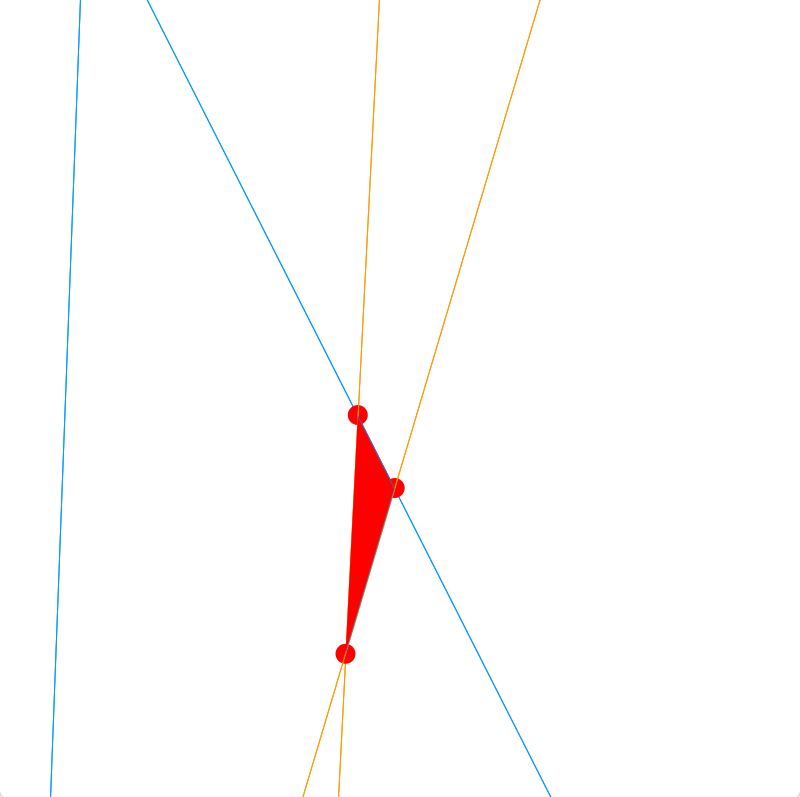
记住,这个简单的绘制点是按照计算交叉点的顺序进行的。在美好的一天,你会得到这样的东西:
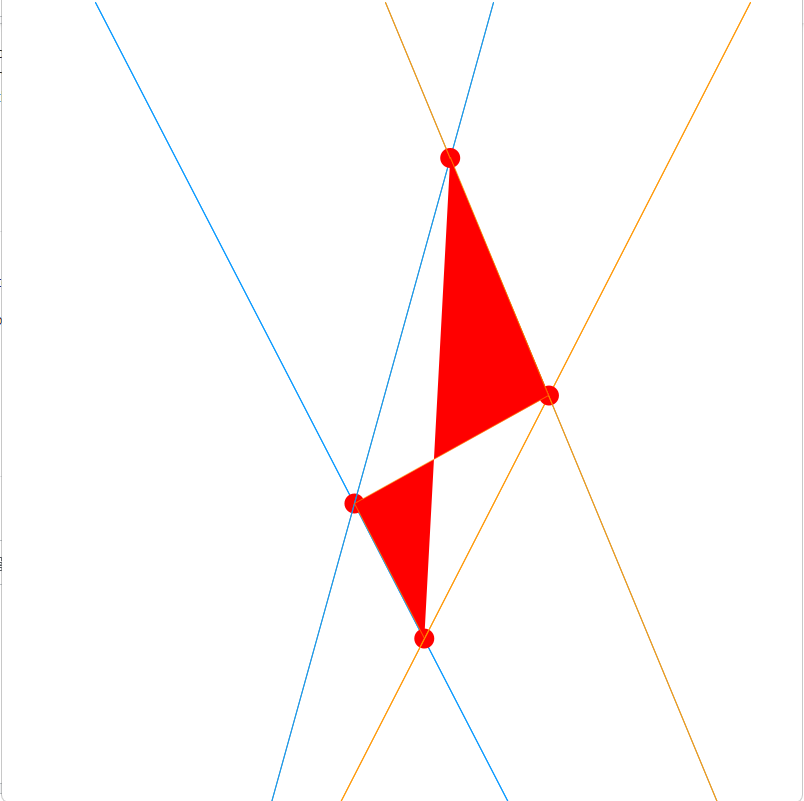
它并不排除具有错误顶点顺序(缠绕)的多边形的可能性:
你可能也会得到凸多边形。
如果您只需要这些交点的外部“外壳”,您可能需要类似于凸壳算法的东西。
至少在视觉上分割形状的一个选项可能是使用beginShape(TRIANGLES);和endShape(CLOSE);,应该迭代点并为每个坐标三角板画一个三角形,但是给定随机点和交点数,您可能会得到一个或两个缺失的三角形(例如,6点=2三角形,7点=2三角形,1点不缺少对)。
我唯一需要注意的是语法:数组可以开始使用,但是您可能需要查看ArrayList和PVector。这将允许您使用具有x,y属性的PVector实例的单个动态数组。
更新
总的来说,代码可以简化。如果我们去掉与行交相关的代码,我们就可以获得如下内容:
int l = 4; //set number of random lines
float[] r1 = new float[l];  // random x top
float[] r2 = new float[l];  // random x bottom

void setup() {
  size(800, 800);
  strokeWeight(3);
  stroke(0, 150, 255, 150);

  refresh();
}

void draw() {
  background(255);

  // random lines
  for (int i=0; i < r1.length; i++) {
    line(r1[i], 0, r2[i], height);
  }

  // borders
  line(0, 0, width, 0);
  line(width, 0, width - 1, height - 1);
  line(0, height - 1, width - 1, height - 1);
  line(0, 0, 0, height - 1);
}

void refresh() {
  r1 = new float[l];
  r2 = new float[l];

  for (int i=0; i< r1.length; i++) {
    r1[i] = random(800);
    r2[i] = random(800);
  }
}

void keyReleased() {
  if (key == 'r') refresh();
}如果我们使用一个基本的Line类并使用PVector和ArrayList,我们可以将上面的内容重写为:
int numRandomLines = 4;
ArrayList<PVector> points = new ArrayList<PVector>();


void setup() {
  size(800, 800);
  stroke(0, 150, 255, 150);
  strokeWeight(3);
  refresh();
}

void refresh(){
  // remove previous points
  points.clear();
  //add borders
  points.add(new PVector(0, 0)); points.add(new PVector(width, 0));
  points.add(new PVector(width, 0));points.add(new PVector(width - 1, height - 1));
  points.add(new PVector(0, height - 1));points.add(new PVector(width - 1, height - 1));
  points.add(new PVector(0, 0)); points.add(new PVector(0, height - 1));
  // add random lines
  for (int i=0; i< numRandomLines; i++) {
    points.add(new PVector(random(800), 0));  points.add(new PVector(random(800), height));
  }
}

void draw(){
  background(255);

  beginShape(LINES);
  for(PVector point : points) vertex(point.x, point.y);
  endShape();
}

void keyReleased() {
  if (key == 'r') refresh();
}并将一对点(PVector)分组为Line类:
int numRandomLines = 4;
ArrayList<Line> lines = new ArrayList<Line>();

void setup() {
  size(800, 800);
  stroke(0, 150, 255, 150);
  strokeWeight(3);
  refresh();
}

void refresh(){
  // remove previous points
  lines.clear();
  //add borders
  lines.add(new Line(new PVector(0, 0), new PVector(width, 0)));
  lines.add(new Line(new PVector(width, 0), new PVector(width - 1, height - 1)));
  lines.add(new Line(new PVector(0, height - 1), new PVector(width - 1, height - 1)));
  lines.add(new Line(new PVector(0, 0), new PVector(0, height - 1)));
  // add random lines
  for (int i=0; i< numRandomLines; i++) {
    lines.add(new Line(new PVector(random(800), 0), new PVector(random(800), height)));
  }
}

void draw(){
  background(255);

  for(Line line : lines) line.draw();
}

void keyReleased() {
  if (key == 'r') refresh();
}

class Line{

  PVector start;
  PVector end;

  Line(PVector start, PVector end){
    this.start = start;
    this.end = end;
  }

  void draw(){
    line(start.x, start.y, end.x, end.y);
  }
}在这个阶段,要像图表所描述的那样获得各个形状,我们可以欺骗并使用像OpenCV这样的计算机视觉库。这是如果过程过度(就像我们get()的PImage绘图副本,将其转换为OpenCV图像),那么只需使用findContours()获取每个形状/轮廓。
回到最初的方法,行到行交叉函数可以集成到Line类中:
int numRandomLines = 4;
ArrayList<Line> lines = new ArrayList<Line>();
ArrayList<PVector> intersections = new ArrayList<PVector>();

void setup() {
  size(800, 800);
  strokeWeight(3);
  refresh();
}

void refresh(){
  // remove previous points
  lines.clear();
  intersections.clear();
  //add borders
  lines.add(new Line(new PVector(0, 0), new PVector(width, 0)));
  lines.add(new Line(new PVector(width, 0), new PVector(width - 1, height - 1)));
  lines.add(new Line(new PVector(0, height - 1), new PVector(width - 1, height - 1)));
  lines.add(new Line(new PVector(0, 0), new PVector(0, height - 1)));
  // add random lines
  for (int i=0; i< numRandomLines; i++) {
    lines.add(new Line(new PVector(random(800), 0), new PVector(random(800), height)));
  }
  // compute intersections
  int numLines = lines.size();
  // when looping only check if lineA intersects lineB but not also if lineB intersects lineA (redundant)
  for (int i = 0; i < numLines - 1; i++){
    Line lineA = lines.get(i);
    for (int j = i + 1; j < numLines; j++){
      Line lineB = lines.get(j);
      // check intersection
      PVector intersection = lineA.intersect(lineB);
      // if there is one, append the intersection point to the list
      if(intersection != null){
        intersections.add(intersection);
      }
    }
  }
}

void draw(){
  background(255);
  stroke(0, 150, 255, 150);
  // draw lines
  for(Line line : lines) line.draw();
  stroke(255, 0, 0, 150);
  // draw intersections
  for(PVector intersection : intersections) ellipse(intersection.x, intersection.y, 9, 9);
}

void keyReleased() {
  if (key == 'r') refresh();
}

class Line{

  PVector start;
  PVector end;

  Line(PVector start, PVector end){
    this.start = start;
    this.end = end;
  }

  void draw(){
    line(start.x, start.y, end.x, end.y);
  }

  //source: http://jeffreythompson.org/collision-detection/line-line.php
  //boolean lineLine(float this.start.x, float this.start.y, float this.end.x, float this.end.y,
                   //float other.start.x, float other.start.y, float other.end.x, float other.end.y) {
  PVector intersect(Line other) {
    // calculate the distance to intersection point
    float uA = ((other.end.x-other.start.x)*(this.start.y-other.start.y) - (other.end.y-other.start.y)*(this.start.x-other.start.x)) / ((other.end.y-other.start.y)*(this.end.x-this.start.x) - (other.end.x-other.start.x)*(this.end.y-this.start.y));
    float uB = ((this.end.x-this.start.x)*(this.start.y-other.start.y) - (this.end.y-this.start.y)*(this.start.x-other.start.x)) / ((other.end.y-other.start.y)*(this.end.x-this.start.x) - (other.end.x-other.start.x)*(this.end.y-this.start.y));
    // if uA and uB are between 0-1, lines are colliding
    if (uA >= 0 && uA <= 1 && uB >= 0 && uB <= 1) {
      // optionally, draw a circle where the lines meet
      float intersectionX = this.start.x + (uA * (this.end.x-this.start.x));
      float intersectionY = this.start.y + (uA * (this.end.y-this.start.y));

      return new PVector(intersectionX, intersectionY);
    }
    return null;
  }
}
下一步将是一个更复杂的算法,根据x,y位置(例如,从上到下,从左到右)对点进行排序,按距离和角度迭代比较第一个点和其余点,并试图计算出具有最小距离和角度变化的连续点是否相连。
在网上快速浏览一下,我可以看到这样的算法,例如:
- 一组直线的多边形检测
- 本文中提到的一种Bentley算法是在CGAL中实现的。(虽然存在CGAL Java绑定,但是可以构建这些接口,或者为处理做一个包装器,这并不简单)。
Stack Overflow用户
发布于 2021-08-09 16:21:42
我可以看到您的代码不是javascript,但是由于您没有指定一种语言,所以我假设您只需要一个方法,并且可以转换成您的语言。
我处理这个问题的方法是给每一行分配一个行号。如果我能在一条线上识别出两个相邻的点,那么我将通过检查是否有一个点在他们不共享的线的交叉点上来知道第三个点是否存在。
示例:有3行(第1、2、3行)
我在第3行和第1行之间有一个交点,现在沿着第3行走,得到一个相邻的点。我找到了一个,它的交点是3和2。我唯一能得到一个三角形的方法是1和2线在某个地方交叉。所以我们可以用编程的方式检查。
请记住,我从来没有实际使用和角度这一点。我确实在函数中计算了它们,但决定不使用它们,因为我使用了上面解释的方法。我用α值0.1对三角形进行了着色,这样你就可以看到有重叠的地方。
这只是检查三角形
let canvas = document.getElementById("canvas");
        let ctx = canvas.getContext("2d");
        canvas.width = 400;
        canvas.height = 400;

        let lines = []; //holds each line
        let points = []; //all intersection point are pushed here [{x: num, y: num}, {x: num, y: num},...]
        let sortedPts = []; //all points sorted bu first number are pushed here in 2d array.
        let lineNum = 15;

        class Lines {
            constructor(num) {
                this.x = Math.round(Math.random() * canvas.width);
                this.x2 = Math.round(Math.random() * canvas.width);
                this.pt1 = {
                    x: this.x,
                    y: 0
                };
                this.pt2 = {
                    x: this.x2,
                    y: canvas.height
                };
                this.num = num;
                this.rads = Math.atan2(this.pt2.y - this.pt1.y, this.pt2.x - this.pt1.x);
                this.angle = this.rads * (180 / Math.PI);
            }
            draw() {
                ctx.beginPath();
                ctx.moveTo(this.pt1.x, this.pt1.y);
                ctx.lineTo(this.pt2.x, this.pt2.y);
                ctx.stroke();
            }
        }

        //creates the lines. I also use this function to prepare the 2d array by pushing an empty array for each line into sortedPts.
        function createLines() {
            for (let i = 0; i < lineNum; i++) {
                lines.push(new Lines(i + 1));
                sortedPts.push([])
            }
        }
        createLines();

        //Visually draws lines on screen
        function drawLines() {
            for (let i = 0; i < lines.length; i++) {
                lines[i].draw();
            }
        }
        drawLines();

        //intersecting formula
        function lineSegmentsIntersect(line1, line2) {
            let a_dx = line1.pt2.x - line1.pt1.x;
            let a_dy = line1.pt2.y - line1.pt1.y;
            let b_dx = line2.pt2.x - line2.pt1.x;
            let b_dy = line2.pt2.y - line2.pt1.y;
            let s =
                (-a_dy * (line1.pt1.x - line2.pt1.x) + a_dx * (line1.pt1.y - line2.pt1.y)) /
                (-b_dx * a_dy + a_dx * b_dy);
            let t =
                (+b_dx * (line1.pt1.y - line2.pt1.y) - b_dy * (line1.pt1.x - line2.pt1.x)) /
                (-b_dx * a_dy + a_dx * b_dy);
            if (s >= 0 && s <= 1 && t >= 0 && t <= 1) {
                //this is where we create our array but we also add the line number of where each point intersects. I also add the angle but have not used it throughout the rest of this...yet.
                points.push({
                    x: Math.round(line1.pt1.x + t * (line1.pt2.x - line1.pt1.x)),
                    y: Math.round(line1.pt1.y + t * (line1.pt2.y - line1.pt1.y)),
                    num: {
                        first: line1.num,
                        second: line2.num
                    },
                    angle: {
                        a1: line1.angle,
                        a2: line2.angle
                    }
                });
            }
        }

        //just checks each line against the others by passing to lineSegmentsIntersect() function
        function callIntersect() {
            for (let i = 0; i < lines.length; i++) {
                for (let j = i + 1; j < lines.length; j++) {
                    lineSegmentsIntersect(lines[i], lines[j]);
                }
            }
        }
        callIntersect();

        function drawPoints() {
            //just draws the black points for reference
            for (let i = 0; i < points.length; i++) {
                ctx.beginPath();
                ctx.arc(points[i].x, points[i].y, 2, 0, Math.PI * 2);
                ctx.fill();
            }
        }
        drawPoints();

        function createSortedArray() {
            //Now we take the points array and sort the points by the first number to make using i and j below possible
            points.sort((a, b) => a.num.first - b.num.first)
            //We push each group of points into an array inside sortedPts creating the 2d array
            for (let i = 0; i < lineNum; i++) {
                for (let j = 0; j < points.length; j++) {
                    if (points[j].num.first == (i + 1)) {
                        sortedPts[i].push(points[j]);
                    }
                }
            }
            //now sort the 2d arrays by y value. This allows or next check to go in order from point to point per line.
            sortedPts.forEach(arr => arr.sort((a, b) => a.y - b.y));

            fillTriangles();
        }
        createSortedArray();

        /*
        The last step iterates through each point in the original points array
        and check to see if either the first or second number matches the second
        number of a point in our sortedPts array AND do the first or second number
        match the next points in the sortedPtsd array. If so then we must have a
        triangle.

        Quick breakdown. If we have 3 lines (line 1, 2, 3) and I have a points on lines
        2 & 3. I also have another point on lines 2 & 1. Then in order to have a triangle
        the last point must be on lines 1 & 3.

        That's all this is doing.
        */
        function fillTriangles() {
            //iterate through each array inside sortedPts array
            for (let i = 0; i < sortedPts.length; i++) {
                //iterate through all points inside each array of points inside the sortedPts array
                for (let j = 0; j < sortedPts[i].length - 1; j++) {
                    //iterate over the original points and compare
                    for (let k = 0; k < points.length; k++) {
                        if (
                            (points[k].num.first == sortedPts[i][j].num.second ||
                                points[k].num.second == sortedPts[i][j].num.second) &&
                            (points[k].num.first == sortedPts[i][j + 1].num.second ||
                                points[k].num.second == sortedPts[i][j + 1].num.second)
                        ) {
                            ctx.fillStyle = "rgba(200, 100, 0, 0.1)";
                            ctx.beginPath();
                            ctx.moveTo(sortedPts[i][j].x, sortedPts[i][j].y);
                            ctx.lineTo(sortedPts[i][j + 1].x, sortedPts[i][j + 1].y);
                            ctx.lineTo(points[k].x, points[k].y);
                            ctx.closePath();
                            ctx.fill();
                        }
                    }
                }
            }
}<canvas id="canvas"></canvas>
我也认为有一个很好的方法来做到这与交叉线的角度,并正在努力做一些事情,这样做。我希望我能根据边数来确定形状的类型,但我不认为这是一个快速的项目。
Stack Overflow用户
发布于 2021-08-09 04:03:33
我不清楚你的目标。您可以以任意顺序连接任意一组点,并称其为形状。你的标准是什么?
如果你想找到连接给定子集的所有点的最短路径,我建议寻找旅行推销员问题。
https://stackoverflow.com/questions/68703215
复制相似问题
腾讯云开发者

Copyright © 2013 - 2026 Tencent Cloud. All Rights Reserved. 腾讯云 版权所有
深圳市腾讯计算机系统有限公司 ICP备案/许可证号:粤B2-20090059  粤公网安备44030502008569号
腾讯云计算(北京)有限责任公司 京ICP证150476号 | 京ICP备11018762号