
不能在多幅画布上画相同的图像
不能在多幅画布上画相同的图像
提问于 2021-08-08 14:49:12
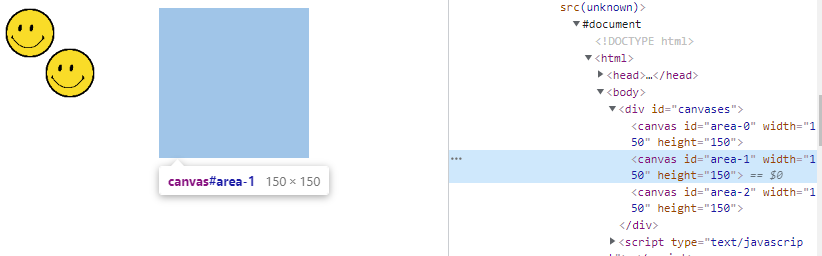
我有三个相邻的画布和一个图像,我想在其中两个画。下面的代码在一个画布上绘制两次图像(如所需),但不会在另一个画布上绘制,如下面的屏幕截图所示。
通过调试,我确定了行c1.drawImage(img, x, y, 50, 50);运行(这可以在控制台中看到“这里”是输出)。这应该会将图像绘制到第二个画布上,但是它不会。
JsFiddle:https://jsfiddle.net/3xnpys9m/1/
var area0 = document.getElementById("area-0");
var area1 = document.getElementById("area-1");
var area2 = document.getElementById("area-2");
var c0 = area0.getContext("2d");
var c1 = area1.getContext("2d");
var c2 = area2.getContext("2d");

// Set height and width of areas
area0.width = area1.width = area2.width = 150;
area0.height = area1.height = area2.height = 150;

var arr; // holds all positions
var img;

populate();

function populate() {
  arr = [
    [0, 0],
    [40, 40],
    [170, 0]
  ];

  img = new Image();
  img.onload = function() {

    // for each position in array
    for (var i = 0; i < arr.length; i++) {
      var x = arr[i][0]; // x position
      var y = arr[i][1]; // y position
      draw(x, y);
    }
  }
  img.src = "https://upload.wikimedia.org/wikipedia/commons/thumb/e/e0/SNice.svg/1200px-SNice.svg.png";
}

// Draw onto canvas
function draw(x, y) {
  var area;
  // Work out which area to draw in
  if (x < area0.width + 1) {
    area = 0;
  } else if (x < (area0.width * 2) + 1) {
    area = 1;
  } else if (x < (area0.width * 3) + 1) {
    area = 2;
  }

  // Draw onto correct area
  if (area == 0) {
    c0.drawImage(img, x, y, 50, 50);
  } else if (area == 1) {
    console.log("here");
    c1.drawImage(img, x, y, 50, 50);
  } else if (area == 2) {
    c2.drawImage(img, x, y, 50, 50);
  }
}#canvases {
width: 470px;
}<div id="canvases">
<canvas id="area-0"></canvas>
<canvas id="area-1"></canvas>
<canvas id="area-2"></canvas>
</div>
我认为这个问题可能与在多个画布上绘制相同的图像有关,但是从数组arr中删除前两项并不能解决问题。
回答 2
Stack Overflow用户
回答已采纳
发布于 2021-08-08 15:39:27
如果您要绘制图像并让您的函数以这种方式计算它们的位置,那么您必须考虑相对于窗口的画布位置。您可以使用getBoundingClientRect()获取坐标,然后从drawImage()中的x中减去x值。Y坐标也一样。这也解释了身体的边际。
var area0 = document.getElementById("area-0");
var area1 = document.getElementById("area-1");
var area2 = document.getElementById("area-2");
var c0 = area0.getContext("2d");
var c1 = area1.getContext("2d");
var c2 = area2.getContext("2d");
// Set height and width of areas
area0.width = area1.width = area2.width = 150;
area0.height = area1.height = area2.height = 150;
let a0Bnds = area0.getBoundingClientRect();
let a1Bnds = area1.getBoundingClientRect();
let a2Bnds = area2.getBoundingClientRect();

var arr; // holds all positions
var img;

populate();

function populate() {
  arr = [
    [0, 0],
    [40, 40],
    [170, 0]
  ];

  img = new Image();
  img.onload = function() {

    // for each position in array
    for (var i = 0; i < arr.length; i++) {
      var x = arr[i][0]; // x position
      var y = arr[i][1]; // y position
      draw(x, y);
    }
  }
  img.src = "https://upload.wikimedia.org/wikipedia/commons/thumb/e/e0/SNice.svg/1200px-SNice.svg.png";
}

// Draw onto canvas
function draw(x, y) {
  var area;
  // Work out which area to draw in
  if (x < area0.width + 1) {
    area = 0;
  } else if (x < (area0.width * 2) + 1) {
    area = 1;
  } else if (x < (area0.width * 3) + 1) {
    area = 2;
  }
//console.log(a1Bnds.x)
  // Draw onto correct area
  if (area == 0) {
    c0.drawImage(img, x - a0Bnds.x, y - a0Bnds.y, 50, 50);
  } else if (area == 1) {
    c1.drawImage(img, x - a1Bnds.x, y - a1Bnds.y, 50, 50);
  } else if (area == 2) {
    c2.drawImage(img, x - a2Bnds.x, y - a2Bnds.y, 50, 50);
  }
}#canvases {
width: 470px;
}<div id="canvases">
<canvas id="area-0"></canvas>
<canvas id="area-1"></canvas>
<canvas id="area-2"></canvas>
</div>
Stack Overflow用户
发布于 2021-08-08 14:55:56
在x坐标170处绘制第三幅图像,但是画布只有150宽。
页面原文内容由Stack Overflow提供。腾讯云小微IT领域专用引擎提供翻译支持
原文链接:
https://stackoverflow.com/questions/68701862
复制相关文章
相似问题
腾讯云开发者

Copyright © 2013 - 2026 Tencent Cloud. All Rights Reserved. 腾讯云 版权所有
深圳市腾讯计算机系统有限公司 ICP备案/许可证号:粤B2-20090059  粤公网安备44030502008569号
腾讯云计算(北京)有限责任公司 京ICP证150476号 | 京ICP备11018762号