
如果文本较长,则颤振中断文本并展开容器。
如果文本较长,则颤振中断文本并展开容器。
提问于 2021-08-09 13:58:00
我有一个Container,它也有一个Text作为child。问题是我的text在右边溢出。但实际上,我希望它中断,并且父容器应该展开。
现在的情况如下:
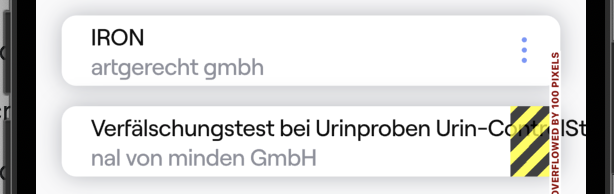
我的密码是:
  Widget build(BuildContext context) {
return GestureDetector(
  onTap: onTap,
  child: Padding(
    padding: EdgeInsets.only(
      bottom: 14.scaled,
    ),
    child: Container(
      // height: 70.scaled,
      decoration: BoxDecoration(
        boxShadow: [verySoftDarkShadow],
        color: white,
        borderRadius: BorderRadius.circular(10.scaled),
      ),
      child: Row(
        crossAxisAlignment: CrossAxisAlignment.center,
        children: [
          SizedBox(
            width: 20.scaled,
          ),
          Column(
            mainAxisAlignment: MainAxisAlignment.center,
            crossAxisAlignment: CrossAxisAlignment.start,
            children: [
              Text(
                shortArticle.label!,
                style: alternativeText,
              ),
              Text(
                shortArticle.manufacturerLabel ?? '',
                style: alternativeText.copyWith(color: darkGray),
              ),
            ],
          ),
          Spacer(),
          SvgIconButton(
            onTap: () {
              print('tapped');
            },
            svgPath: 'images/vertical_menue_dots.svg',
            width: touchTargetSizeForIconButton,
            height: touchTargetSizeForIconButton,
            svgSize: 16.scaled,
          ),
        ],
      ),
    ),
  ),
);


}
}我试图将text-widget封装到Expanded中,但这只会使其溢出,而不会显示任何内容。我在这里错过了什么?我怎么才能解决这个问题?
如果你需要更多的信息,请告诉我!
回答 2
Stack Overflow用户
回答已采纳
发布于 2021-08-09 14:13:24
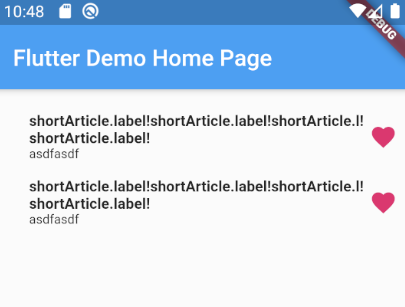
只需用展开的列小部件包装,并向文本小部件添加一个“溢出”参数。
(因为我不知道预先定义的风格和资产,所以我改变了自己。)
请参阅下面基于您的buildWidget的“code.
import 'package:flutter/material.dart';

void main() {
  runApp(MyApp());
}

class MyApp extends StatelessWidget {
  @override
  Widget build(BuildContext context) {
    return MaterialApp(
      title: 'Flutter Demo',
      theme: ThemeData(
        primarySwatch: Colors.blue,
        visualDensity: VisualDensity.adaptivePlatformDensity,
      ),
      home: MyHomePage(title: 'Flutter Demo Home Page'),
    );
  }
}

class MyHomePage extends StatefulWidget {
  MyHomePage({Key key, this.title}) : super(key: key);

  final String title;

  @override
  _MyHomePageState createState() => _MyHomePageState();
}

class _MyHomePageState extends State<MyHomePage> {
  @override
  void initState() {
    super.initState();
  }

  @override
  Widget build(BuildContext context) {
    return Scaffold(
      appBar: AppBar(
        title: Text(widget.title),
      ),
      body: _buildBody(),
      floatingActionButton: FloatingActionButton(
        onPressed: () {},
        tooltip: 'Increment',
        child: Icon(Icons.add),
      ),
    );
  }

  Widget _buildBody() {
    return Container(
      padding: EdgeInsets.symmetric(horizontal: 10, vertical: 20),
      child: Column(children: [
        buildWidget(),
        buildWidget(),
      ]),
    );
  }
}

Widget buildWidget() {
  return GestureDetector(
    onTap: () {},
    child: Padding(
      padding: EdgeInsets.only(
        bottom: 14,
      ),
      child: Container(
        // height: 70.scaled,
        // decoration: BoxDecoration(
        //   boxShadow: [verySoftDarkShadow],
        //   color: white,
        //   borderRadius: BorderRadius.circular(10.scaled),
        // ),
        child: Row(
          crossAxisAlignment: CrossAxisAlignment.center,
          children: [
            SizedBox(
              width: 20,
            ),
            Expanded(
              child: Column(
                mainAxisAlignment: MainAxisAlignment.center,
                crossAxisAlignment: CrossAxisAlignment.start,
                children: [
                  Text(
                    'shortArticle.label!shortArticle.label!shortArticle.l!shortArticle.label!',
                    // overflow: TextOverflow.ellipsis,
                    style: TextStyle(fontSize: 13, fontWeight: FontWeight.bold),
                  ),
                  Text(
                    'asdfasdf',
                    style: TextStyle(fontSize: 11),
                  ),
                ],
              ),
            ),
            Icon(
              Icons.favorite,
              color: Colors.pink,
              size: 24.0,
              semanticLabel: 'Text to announce in accessibility modes',
            ),
          ],
        ),
      ),
    ),
  );
}Stack Overflow用户
发布于 2021-08-09 14:05:12
在文本Widget中添加:
maxLines: null页面原文内容由Stack Overflow提供。腾讯云小微IT领域专用引擎提供翻译支持
原文链接:
https://stackoverflow.com/questions/68713343
复制相关文章
相似问题
腾讯云开发者

Copyright © 2013 - 2026 Tencent Cloud. All Rights Reserved. 腾讯云 版权所有
深圳市腾讯计算机系统有限公司 ICP备案/许可证号:粤B2-20090059  粤公网安备44030502008569号
腾讯云计算(北京)有限责任公司 京ICP证150476号 | 京ICP备11018762号