
在chrome工具中选择元素之后,才能使用xPath找到元素(text())
在chrome工具中选择元素之后,才能使用xPath找到元素(text())
提问于 2021-08-12 18:43:12
我正在尝试点击fakebook的下载您的信息页面上的"Create“按钮。我目前能够进入页面,并等待登录过程完成。但是,当我尝试使用
page.$x("//div[contains(text(),'Create File')]")
什么都没找到。当我试图在chrome dev工具控制台中找到它时,同样的事情会发生,无论是在木偶师窗口中还是在铬傀儡操作者控制的实例之外的常规窗口中:

这是元素的html信息:

但是,在我使用chrome dev tools检查器工具单击元素之后,我能够找到它:
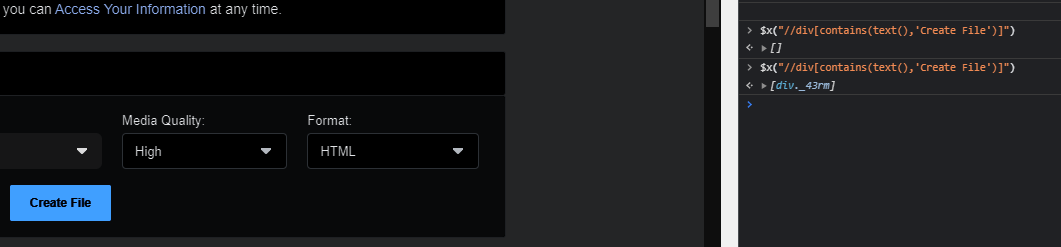
(第二个print语句是在我用元素检查器工具单击它之后生成的)
,我应该如何选择这个元素?,我对傀儡和xpath都是新手,所以如果我错过了一些显而易见的东西,我很抱歉。
我记得以前看过的几个链接:
我的守则:
const StealthPlugin = require("puppeteer-extra-plugin-stealth");

(async () => {
 let browser;
 try {
   puppeteer.use(StealthPlugin());

   browser = await puppeteer.launch({
     headless: false,
     // path: "C:\\Program Files (x86)\\Google\\Chrome\\Application\\chrome.exe",
     args: ["--disable-notifications"],
   });
   const pages = await browser.pages();
   const page = pages[0];

   const url = "https://www.facebook.com/dyi?referrer=yfi_settings";

   await page.goto(url);

   //Handle the login process. Since the login page is different from the url we want, I am going to assume the user
   //has logged in if they return to the desired page.
   //Wait for the login page to process
   await page.waitForFunction(
     (args) => {
       return window.location.href !== args[0];
     },
     { polling: "mutation", timeout: 0 },
     [url]
   );

   //Since multifactor auth can resend the user temporarly to the desired url, use a little debouncing to make sure the user is completely done signing in
   // make sure there is no redirect for mfa
   await page.waitForFunction(
     async (args) => {
       // function to make sure there is a debouncing delay between checking the url
       // Taken from: https://stackoverflow.com/a/49813472/11072972
       function delay(delayInms) {
         return new Promise((resolve) => {
           setTimeout(() => {
             resolve(2);
           }, delayInms);
         });
       }

       if (window.location.href === args[0]) {
         await delay(2000);
         return window.location.href === args[0];
       }
       return false;
     },
     { polling: "mutation", timeout: 0 },
     [url]
   );
   // await page.waitForRequest(url, { timeout: 100000 });

   const requestArchiveXpath = "//div[contains(text(),'Create File')]";
   await page.waitForXPath(requestArchiveXpath);
   const [requestArchiveSelector] = await page.$x(requestArchiveXpath);
   await page.click(requestArchiveSelector);

   page.waitForTimeout(3000);
 } catch (e) {
   console.log("End Error: ", e);
 } finally {
   if (browser) {
     await browser.close();
   }
 }
})();回答 1
Stack Overflow用户
回答已采纳
发布于 2021-08-12 19:15:18
使用上面的注释由@vsemozhebuty和来源解析。只有尝试中的最后几行必须更改:
    const iframeXpath = "//iframe[not(@hidden)]";
    const requestArchiveXpath = "//div[contains(text(),'Create File')]";

    //Wait for and get iframe
    await page.waitForXPath(iframeXpath);
    const [iframeHandle] = await page.$x(iframeXpath);

    //content frame for iframe => https://devdocs.io/puppeteer/index#elementhandlecontentframe
    const frame = await iframeHandle.contentFrame();

    //Wait for and get button
    await frame.waitForXPath(requestArchiveXpath);
    const [requestArchiveSelector] = await frame.$x(requestArchiveXpath);

    //click button
    await requestArchiveSelector.click();
await page.waitForTimeout(3000);页面原文内容由Stack Overflow提供。腾讯云小微IT领域专用引擎提供翻译支持
原文链接:
https://stackoverflow.com/questions/68762712
复制相关文章
相似问题
腾讯云开发者

Copyright © 2013 - 2026 Tencent Cloud. All Rights Reserved. 腾讯云 版权所有
深圳市腾讯计算机系统有限公司 ICP备案/许可证号:粤B2-20090059  粤公网安备44030502008569号
腾讯云计算(北京)有限责任公司 京ICP证150476号 | 京ICP备11018762号