
如何将v-for和发出的值一起使用?
我有一个表格,上面显示了这样的国家列表(下面还有完整的代码框链接):
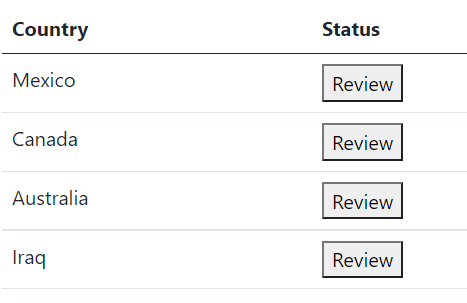
当按下“审查”按钮时,会出现一个模式,用户可以查看有关该国的一些数据,然后从以下选项中进行选择:
[mark as ready] [mark as reject] [mark as pending]
根据他的选择,我需要将国家的id返回到父组件,这样我们就可以将特定国家的状态显示为“拒绝”、“就绪”或“待定”。
我需要帮助的是,如何在逻辑上使这件事尽可能简单,而不变得复杂(这是我很糟糕的事情)。
我可以成功地将数据发送回父程序,但是失败的地方是如何处理父端的逻辑。
让我解释一下:
这是我的表格,显示国家数据和按钮供审阅:App.vue**:**
<template>
  <div id="app" class="container mt-5">
    <table class="table">
      <thead>
        <tr>
          <th scope="col">Country</th>
          <th scope="col">Status</th>
        </tr>
      </thead>
      <tbody>
        <tr v-for="country in countryChanges" :key="country.id">
          <td>{{ country.name }}</td>
          <td>
            <template v-if="ready">
              <button :href="`#modal_${country.id}`" data-bs-toggle="modal">
                Ready
              </button>
            </template>
            <template v-else-if="rejected">
              <button :href="`#modal_${country.id}`" data-bs-toggle="modal">
                Rejected
              </button>
            </template>
            <template v-else>
              <button :href="`#modal_${country.id}`" data-bs-toggle="modal">
                Review
              </button>
            </template>
          </td>
          <AppModal :country="country" @set-as-ready="setAsReady"> </AppModal>
        </tr>
      </tbody>
    </table>
  </div>
</template>

<script>
import AppModal from "@/components/AppModal.vue";
import changedCountryData from "@/assets/data.json";
export default {
  name: "AdminDashboard",
  components: {
    AppModal,
  },
  data() {
    return {
      countryChanges: [],
      ready: false,
      rejected: false,
    };
  },
  async created() {
    this.countryChanges = changedCountryData;
  },
  methods: {
    setAsReady(id) {

    },
  },
};
</script>以下是每个国家详细信息视图的模式屏幕:AppModal.vue**:**
<template>
  <section
    class="modal fade"
    :id="`modal_${country.id}`"
    tabindex="-1"
    aria-labelledby="appModal"
    aria-hidden="true"
  >
    <div class="modal-dialog modal-dialog-scrollable modal-fullscreen">
      <div class="modal-content">
        <div class="modal-header">
          <h5 class="modal-title fw-bold fs-2">
            <slot name="heading"></slot>
          </h5>
          <button
            type="button"
            class="btn-close"
            data-bs-dismiss="modal"
            aria-label="Close"
          ></button>
        </div>
        <div class="modal-body">
          <div class="container-fluid">
            <ul class="list-inline fw-bold mb-4">
              <li class="list-inline-item me-4">
                <span class="badge rounded-pill bg-light text-secondary"
                  >Baseline Type</span
                >
                <slot name="baselineType"></slot>
              </li>
              <li class="list-inline-item me-4">
                <span class="badge rounded-pill bg-light text-secondary">
                  Submitter</span
                >
                Doe, John
              </li>
              <li class="list-inline-item me-4">
                <span class="badge rounded-pill bg-light text-secondary">
                  Submitted</span
                >
                March 2, 2021
              </li>
              <li class="list-inline-item">
                <span class="badge rounded-pill bg-light text-secondary me-2"
                  >Status</span
                >
                <span class="badge rounded-pill bg-warning text-dark"
                  >Review Changes</span
                >
              </li>
            </ul>

            <table class="table table-bordered table-striped">
              <thead class="table-dark fs-5">
                <tr>
                  <th scope="col" class="text-muted">Field/Entity</th>
                  <th scope="col">{{ country.name }}</th>
                </tr>
              </thead>
              <tbody>
                <tr>
                  <th scope="row">Full Name</th>
                  <td>
                    Original Value
                    <div class="ps-2 fw-bold text-success">
                      <svg
                        xmlns="http://www.w3.org/2000/svg"
                        width="16"
                        height="16"
                        fill="currentColor"
                        class="bi bi-arrow-return-right"
                        viewBox="0 0 16 16"
                      >
                        <path
                          fill-rule="evenodd"
                          d="M1.5 1.5A.5.5 0 0 0 1 2v4.8a2.5 2.5 0 0 0 2.5 2.5h9.793l-3.347 3.346a.5.5 0 0 0 .708.708l4.2-4.2a.5.5 0 0 0 0-.708l-4-4a.5.5 0 0 0-.708.708L13.293 8.3H3.5A1.5 1.5 0 0 1 2 6.8V2a.5.5 0 0 0-.5-.5z"
                        />
                      </svg>
                      Updated Value
                    </div>
                  </td>
                </tr>
                <tr>
                  <th scope="row">Local Short Name</th>
                  <td>
                    Original Value
                    <div class="ps-2 text-success fw-bold">
                      <svg
                        xmlns="http://www.w3.org/2000/svg"
                        width="16"
                        height="16"
                        fill="currentColor"
                        class="bi bi-arrow-return-right"
                        viewBox="0 0 16 16"
                      >
                        <path
                          fill-rule="evenodd"
                          d="M1.5 1.5A.5.5 0 0 0 1 2v4.8a2.5 2.5 0 0 0 2.5 2.5h9.793l-3.347 3.346a.5.5 0 0 0 .708.708l4.2-4.2a.5.5 0 0 0 0-.708l-4-4a.5.5 0 0 0-.708.708L13.293 8.3H3.5A1.5 1.5 0 0 1 2 6.8V2a.5.5 0 0 0-.5-.5z"
                        />
                      </svg>
                      Updated Value
                    </div>
                  </td>
                </tr>
              </tbody>
            </table>
          </div>
        </div>

        <div class="modal-footer border-top-0">
          <button type="button" class="btn btn-link" data-bs-dismiss="modal">
            Close
          </button>
          <button
            type="button"
            class="btn btn-success"
            data-bs-dismiss="modal"
            @click="setAsReady(country)"
          >
            Mark as Ready
          </button>
          <button type="button" class="btn btn-danger">Mark as Reject</button>
          <button type="button" class="btn btn-warning">Mark as Pending</button>
        </div>
      </div>
    </div>
  </section>
</template>

<script>
export default {
  props: {
    country: {
      type: Object,
      required: true,
    },
  },
  methods: {
    setAsReady(country) {
      // console.log(country.id);
      this.$emit("set-as-ready", country.id);
    },
  },
};
</script>如果按下“标记为就绪”按钮,例如,我想显示一个更新的按钮,其状态为该国(在本例中为墨西哥),如下所示:。
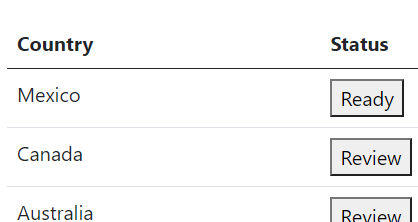
有人建议我如何合理有效地做这件事吗?我在这里有一个代码框演示:https://codesandbox.io/s/tender-black-zn9nt?file=/src/App.vue
回答 1
Stack Overflow用户
发布于 2021-08-13 14:14:48
最简单的方法是操纵数据的中心状态。在表项上设置新属性"status“。然后根据从表发出的事件切换该值。
<template v-if="country.status === 1">
    <button :href="`#modal_${country.id}`" data-bs-toggle="modal">
       Ready
    </button>
</template>


 methods: {
    setAsReady(id) {
      let country = this.countryChanges.find((e) => e.id === id);
      country.status = 1;
    },
},参见工作代码框:https://codesandbox.io/s/dry-water-gl2q9?file=/src/App.vue
https://stackoverflow.com/questions/68773552
复制相似问题
腾讯云开发者

Copyright © 2013 - 2026 Tencent Cloud. All Rights Reserved. 腾讯云 版权所有
深圳市腾讯计算机系统有限公司 ICP备案/许可证号:粤B2-20090059  粤公网安备44030502008569号
腾讯云计算(北京)有限责任公司 京ICP证150476号 | 京ICP备11018762号