
元素的类使用javascript更改
元素的类使用javascript更改
提问于 2021-08-15 13:36:28
目前,我正试图使用javascript实现元素类中的更改,目前的问题是,当我按下主页时,最后一个页面不会被取消选择。我的javascript代码是
 var pageLayout = document.getElementById("page-layout");
 var contactPage = document.getElementById("contact-page");
 var aboutPage = document.getElementById("about-page");
 var home = document.getElementById("Home");

 home.onclick= function () {
   for (var i = 0, j = contactPage.length; i < j; i++){
     if(homepages[i].classList.contains("current-page")){
        homepages[i].classList.remove("current-page");
     }
   }
   home.classList.add("current-page");
}
我的DOM元素
 <ul>
   <li><a href="#" class="current-page" id="Home">Home</a></li>
   <li><a href="#" id="about-page">About</a></li>
   <li><a href="#" id="contact-page">Contact</a></li>
 </ul>
有什么问题吗?如何改进?
编辑:那天我确实使用了代码。
   var pageLayout = document.getElementById("page-layout");
    var contactPage = document.getElementById("contact-page");
    var aboutPage = document.getElementById("about-page");
    var home = document.getElementById("Home");

    homepages = [contactPage ,aboutPage, home];

    home.onclick= function () {
        for (var i = 0, j = homepages.length - 1; i < j; i++) {
            if(homepages[i].classList.contains("current-page")){
            homepages[i].classList.remove("current-page");

        }
        }
        home.classList.add("current-page");


    }
    aboutPage.onclick = function () {
        for (var i = 0, j = homepages.length - 1; i < j; i++) {
            if (homepages[i].classList.contains("current-page")) {
            homepages[i].classList.remove("current-page");

                }
            }
            aboutPage.classList.add("current-page");

        }
        contactPage.onclick = function () {
                for (var i = 0, j = homepages.length - 1; i < j; i++) {
                    if (homepages[i].classList.contains("current-page")) {
                        homepages[i].classList.remove("current-page");

                    }
                }
                contactPage.classList.add("current-page");

            }
然而,遇到这个问题:
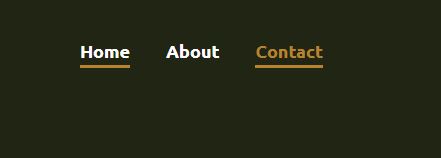
回答 4
Stack Overflow用户
回答已采纳
发布于 2021-08-15 13:55:01
它看起来像这一行:
for (var i = 0, j = contactPage.length; i < j; i++){应:
for (var i = 0; j = homepages.length - 1; i < j; i++){或者更好的是:
for (var i = 0; i < homepages.length - 1; i++){下面是演示的片段:
var pageLayout = document.getElementById("page-layout");
var contactPage = document.getElementById("contact-page");
var aboutPage = document.getElementById("about-page");
var home = document.getElementById("Home");

homepages = [contactPage, aboutPage, home];

home.onclick = function() {
  for (var i = 0; i < homepages.length - 1; i++){
    if (homepages[i].classList.contains("current-page")) {
      homepages[i].classList.remove("current-page");

    }
  }
  home.classList.add("current-page");
}.current-page {
color: red;
}<ul>
<li><a href="#" class="current-page" id="Home">Home</a></li>
<li><a href="#" id="about-page">About</a></li>
<li><a href="#" id="contact-page">Contact</a></li>
</ul>
Stack Overflow用户
发布于 2021-08-15 13:59:32
您将沿着一条路径前进,通过多次复制代码块来复制onclick功能。
您可以通过单击<ul>上的事件侦听器并查询当前页面类将其删除并将该类添加到事件的目标中,从而使整个事件变得通用。
const nav = document.querySelector('#nav');

nav.addEventListener('click', function(e){
   // remove current claass from whichever element already has it
   nav.querySelector('.current-page').classList.remove('current-page');
   // add current class to  element that was clicked
   e.target.classList.add('current-page');
   // use the id to do some conditional logic if needed
   console.log('Selected =',e.target.id)
})#nav a.current-page{color:red}<ul id="nav">
<li><a href="#" class="current-page" id="Home">Home</a></li>
<li><a href="#" id="about-page">About</a></li>
<li><a href="#" id="contact-page">Contact</a></li>
</ul>
Stack Overflow用户
发布于 2021-08-15 14:00:15
您只能将i与数组长度进行比较。应该是这样的
 var pageLayout = document.getElementById("page-layout");
 var contactPage = document.getElementById("contact-page");
 var aboutPage = document.getElementById("about-page");
 var home = document.getElementById("Home");

 home.onclick= function () {
   for (var i = 0; i < contactPage.length; i++){
     if(homepages[i].classList.contains("current-page")){
        homepages[i].classList.remove("current-page");
     }
   }
   home.classList.add("current-page");
}但我认为你必须确定contactPage和homepages是从哪里来的
页面原文内容由Stack Overflow提供。腾讯云小微IT领域专用引擎提供翻译支持
原文链接:
https://stackoverflow.com/questions/68792037
复制相关文章
相似问题
腾讯云开发者

Copyright © 2013 - 2026 Tencent Cloud. All Rights Reserved. 腾讯云 版权所有
深圳市腾讯计算机系统有限公司 ICP备案/许可证号:粤B2-20090059  粤公网安备44030502008569号
腾讯云计算(北京)有限责任公司 京ICP证150476号 | 京ICP备11018762号