
带地形图的barh :二次x轴上的数据不能得到不同的比例
带地形图的barh :二次x轴上的数据不能得到不同的比例
提问于 2021-08-14 16:08:04
我无法得到情节的两种不同尺度:
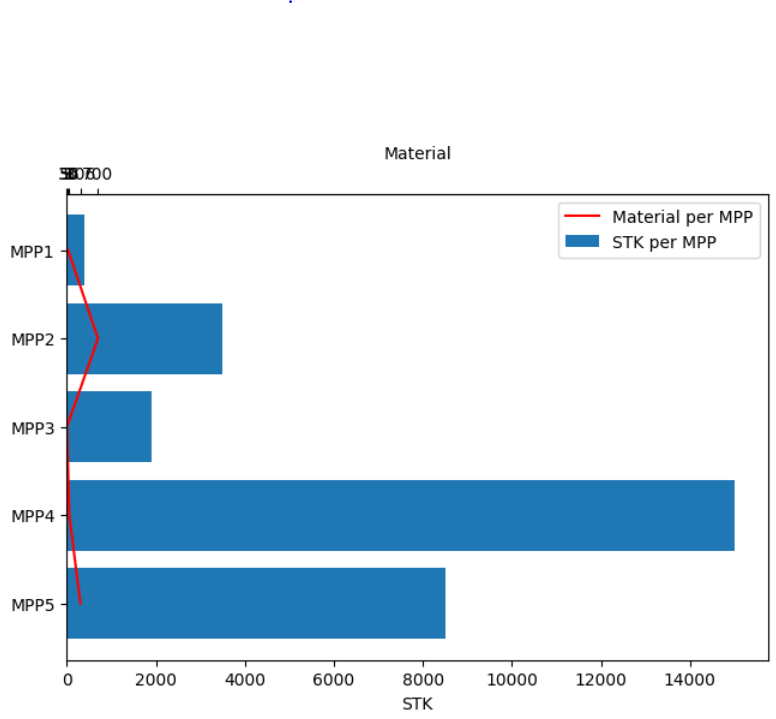
我不知道如何激活二级x轴的比例。
"STK"和"Material"应该在不同的尺度上显示。
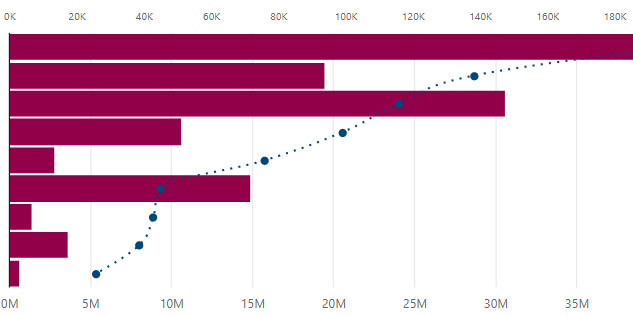
如何在自己的标度(0,max)上显示"Material",就像"STK"自动完成的那样
我需要它显示在下面的图片上:
下面是代码:
import numpy as np
import pandas as pd
import matplotlib.pyplot as plt

df = [['MPP1',400,30],['MPP2',3500,700], ['MPP3',1900,3], ['MPP4',15000,56], ['MPP5',8500,306]]
df = pd.DataFrame(df)
df.columns =['MPP', 'STK', 'Material']

plt.rcdefaults()

fig, ax = plt.subplots(constrained_layout=True)
xdata = df.STK
x2data = df.Material
ydata = df.MPP
y_pos = np.arange(len(ydata))

ax.barh(y_pos, df.STK , label='STK per MPP')
ax.invert_yaxis()


ax.plot(x2data, ydata, label='Material per MPP', color='red')
ax.set_xlabel('STK')
ax.legend()

ax2 = ax.secondary_xaxis('top')
ax2.set_xlabel('Material')

ax2.set_xticks(df.Material)
ax2.set_xticklabels(df.Material)
ax2.set_xlabel(r"Material")

plt.show()回答 1
Stack Overflow用户
回答已采纳
发布于 2021-08-14 16:53:44
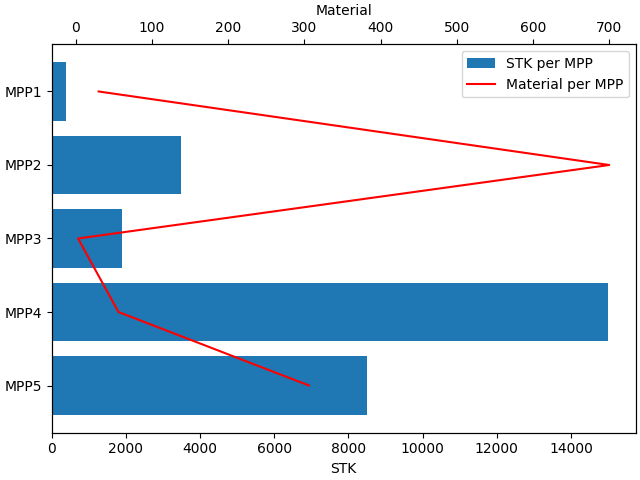
您应该使用以下内容创建次轴:
ax2 = ax.twiny()并在上面绘制你的数据:
ax2.plot(x2data, ydata, label='Material per MPP', color='red')注意:ax2.plot,而不是ax.plot。
完整代码
import numpy as np
import pandas as pd
import matplotlib.pyplot as plt

df = [['MPP1',400,30],['MPP2',3500,700], ['MPP3',1900,3], ['MPP4',15000,56], ['MPP5',8500,306]]
df = pd.DataFrame(df)
df.columns =['MPP', 'STK', 'Material']


plt.rcdefaults()

fig, ax = plt.subplots(constrained_layout=True)
xdata = df.STK
x2data = df.Material
ydata = df.MPP
y_pos = np.arange(len(ydata))

ax.barh(y_pos, df.STK , label='STK per MPP')
ax.invert_yaxis()
ax.set_xlabel('STK')
leg = plt.legend()


ax2 = ax.twiny()
ax2.plot(x2data, ydata, label='Material per MPP', color='red')
ax2.set_xlabel('Material')
leg2 = plt.legend()

plt.legend(leg.get_patches()+leg2.get_lines(),
           [text.get_text() for text in leg.get_texts()+leg2.get_texts()])
leg.remove()

plt.show()
页面原文内容由Stack Overflow提供。腾讯云小微IT领域专用引擎提供翻译支持
原文链接:
https://stackoverflow.com/questions/68785016
复制相关文章
相似问题
腾讯云开发者

Copyright © 2013 - 2026 Tencent Cloud. All Rights Reserved. 腾讯云 版权所有
深圳市腾讯计算机系统有限公司 ICP备案/许可证号:粤B2-20090059  粤公网安备44030502008569号
腾讯云计算(北京)有限责任公司 京ICP证150476号 | 京ICP备11018762号