
如何从多个Cardview中选择一个Cardview
如何从多个Cardview中选择一个Cardview
提问于 2021-08-16 08:45:10
我想从3个卡视图中选择性别,用户不能选择多个卡视图,用户只能选择一个卡片视图,如下:
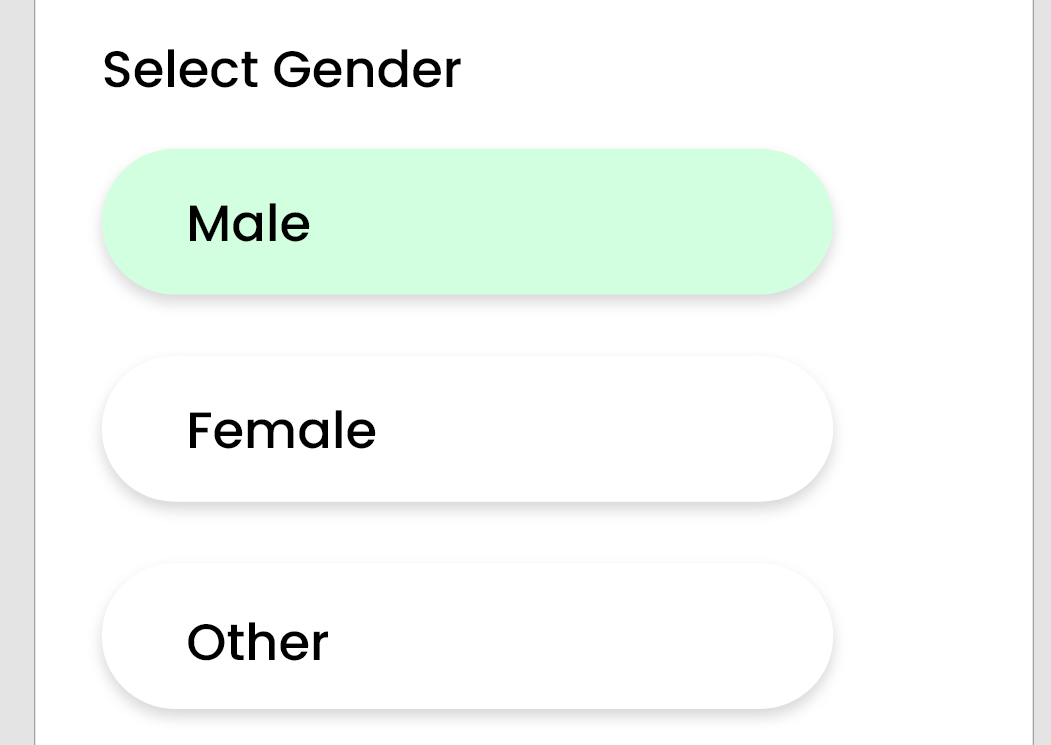
我知道我也可以使用旋转器来完成这项工作,但是我想知道如何处理卡视图
编辑的
.......................
<TextView
    android:id="@+id/textView"
    android:layout_width="wrap_content"
    android:layout_height="wrap_content"
    android:text="select Gender"
    android:textColor="@color/black"
    android:textSize="30sp"
    android:textStyle="bold" />

<androidx.cardview.widget.CardView
    android:id="@+id/maleCardView"
    android:layout_width="match_parent"
    android:layout_height="70dp"
    android:layout_margin="16dp"
    android:elevation="6dp"
    app:cardElevation="6dp">

    <TextView
        android:layout_width="wrap_content"
        android:layout_height="wrap_content"
        android:text="Male"
        android:textStyle="bold"
        android:textColor="@color/black"
        android:layout_gravity="center"
        android:textSize="22sp"/>


</androidx.cardview.widget.CardView>

<androidx.cardview.widget.CardView
    android:id="@+id/femaleCardView"
    android:layout_width="0dp"
    android:layout_height="70dp">

    <TextView
        android:layout_width="wrap_content"
        android:layout_height="wrap_content"
        android:layout_gravity="center"
        android:text="Female"/>

</androidx.cardview.widget.CardView>

<androidx.cardview.widget.CardView
    android:id="@+id/otherCardView"
    android:layout_width="0dp">

    <TextView
        android:layout_width="wrap_content"
        android:layout_height="wrap_content"
        android:text="Other"/>

</androidx.cardview.widget.CardView>
.............回答 2
Stack Overflow用户
回答已采纳
发布于 2021-08-16 11:19:32
输出
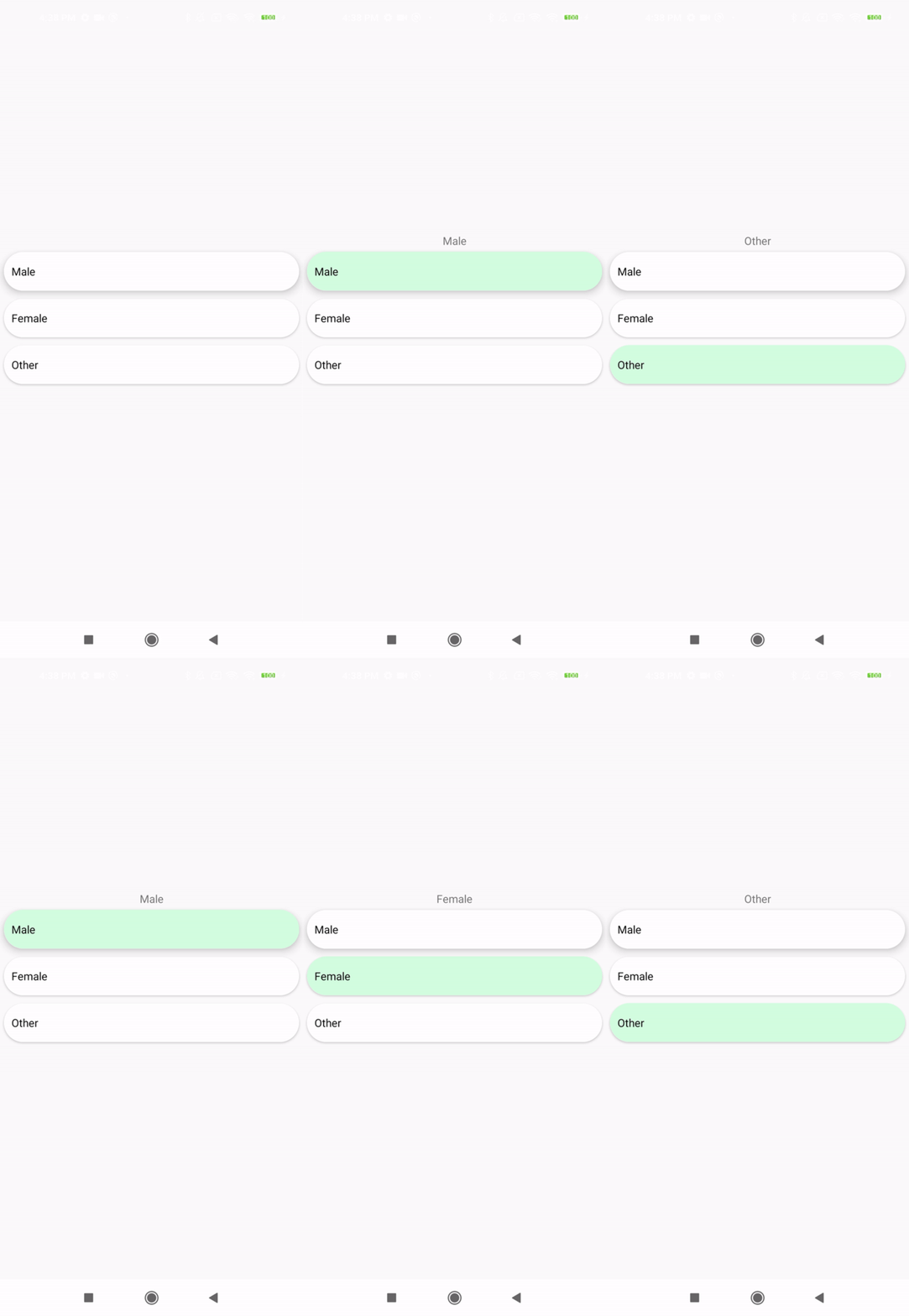
使用RadioButton inCardView并不适用于RadioGroup,您必须单独添加CardView中的每个单选按钮,并手动处理检查选择和取消选择。试试下面的代码:
主布局
<?xml version="1.0" encoding="utf-8"?>
<RelativeLayout
 xmlns:android="http://schemas.android.com/apk/res/android"
 xmlns:app="http://schemas.android.com/apk/res-auto"
 xmlns:tools="http://schemas.android.com/tools"
 android:layout_width="match_parent"
 android:layout_height="match_parent">
<LinearLayout
    android:id="@+id/radioGrpGender"
    android:layout_width="match_parent"
    android:orientation="vertical"
    android:layout_centerInParent="true"
    android:layout_marginTop="30dp"
    android:layout_height="wrap_content">
    <TextView
        android:id="@+id/txtGender"
        android:layout_width="match_parent"
        android:text=""
        android:gravity="center"
        android:layout_height="wrap_content"/>
    <androidx.cardview.widget.CardView
        android:layout_width="match_parent"
        android:layout_margin="5dp"
        app:cardCornerRadius="50dp"
        app:cardElevation="7dp"
        android:layout_height="50dp">
        <RadioButton
            android:id="@+id/radioMale"
            android:text="Male"
            android:paddingStart="10dp"
            android:background="@drawable/radio_flat_selector"
            android:button="@android:color/transparent"
            android:layout_width="match_parent"
            android:layout_height="match_parent"/>
    </androidx.cardview.widget.CardView>
    <androidx.cardview.widget.CardView

        android:layout_width="match_parent"
        android:layout_margin="5dp"
        app:cardCornerRadius="50dp"
        android:layout_height="50dp">
        <RadioButton
            android:id="@+id/radioFemale"
            android:text="Female"
            android:paddingStart="10dp"
            android:background="@drawable/radio_flat_selector"
            android:button="@android:color/transparent"
            android:layout_width="match_parent"
            android:layout_height="match_parent"/>
    </androidx.cardview.widget.CardView>
    <androidx.cardview.widget.CardView
        android:layout_width="match_parent"
        android:layout_margin="5dp"
        app:cardCornerRadius="50dp"
        android:layout_height="50dp">
        <RadioButton
            android:id="@+id/radioOther"
            android:text="Other"
            android:paddingStart="10dp"
            android:background="@drawable/radio_flat_selector"
            android:button="@android:color/transparent"
            android:layout_width="match_parent"
            android:layout_height="match_parent"/>
    </androidx.cardview.widget.CardView>
</LinearLayout>
radio_flat_selector.xml
<?xml version="1.0" encoding="utf-8"?>
<selector xmlns:android="http://schemas.android.com/apk/res/android">
<item android:drawable="@drawable/radio_flat_selected"
 android:state_checked="true" />
<item android:drawable="@drawable/radio_flat_regular" />
radio_flat_selected.xml
<?xml version="1.0" encoding="utf-8"?>
<shape xmlns:android="http://schemas.android.com/apk/res/android"
  android:shape="rectangle">
  <corners android:radius="1dp" />
  <solid android:color="#D2FFDF" />
</shape>
radio_flat_regular.xml
<?xml version="1.0" encoding="utf-8"?>
 <shape xmlns:android="http://schemas.android.com/apk/res/android"
   android:shape="rectangle">
   <solid android:color="#ffffff" />
 </shape>
主Java代码:
public class YourActivityName extends AppCompatActivity implements CompoundButton.OnCheckedChangeListener {


private RadioButton radioMale;
private RadioButton radioFemale;
private RadioButton radioOther;
private TextView txtGender;

@Override
protected void onCreate(Bundle savedInstanceState) {
    super.onCreate(savedInstanceState);
    setContentView(R.layout.your_layout_nanme);

    radioMale = findViewById(R.id.radioMale);
    radioFemale = findViewById(R.id.radioFemale);
    radioOther = findViewById(R.id.radioOther);
    txtGender = findViewById(R.id.txtGender);

    radioMale.setOnCheckedChangeListener(this);
    radioFemale.setOnCheckedChangeListener(this);
    radioOther.setOnCheckedChangeListener(this);

}


@Override
public void onCheckedChanged(CompoundButton buttonView, boolean isChecked) {

    if (isChecked) {
        txtGender.setText(buttonView.getText().toString());
        if (R.id.radioMale == buttonView.getId()) {
            radioFemale.setChecked(false);
            radioOther.setChecked(false);
        } else if (R.id.radioFemale == buttonView.getId()) {
            radioMale.setChecked(false);
            radioOther.setChecked(false);
        } else {
            radioFemale.setChecked(false);
            radioMale.setChecked(false);
        }
    }
  }
}Stack Overflow用户
发布于 2021-08-16 08:57:05
因为您有3个卡片视图,所以只需要在您的活动中实现一个onClickListener,并将这3个视图设置为这个侦听器。所以在你的活动中应该是这样的:
    public class MainActivity extends AppCompatActivity implements View.onClickListener{
      ...
      CardView male;
      CardView female;
      CardView other;


      @Override
      protected void onCreate(Bundle savedInstanceState) {
            super.onCreate(savedInstanceState);
            setContentView(R.layout.activity_main);

            male = (CardView)findViewById(R.id.maleCardView);
            female = (CardView)findViewById(R.id.femaleCardView);
            other = (CardView)findViewById(R.id.otherCardView);
            //Set listeners to your view
            male.setOnClickListener(this);
            female.setOnClickListener(this);
            other.setOnClickListener(this);
      }

      @Override
    public void onClick(View v) {
        switch(v.getId()){
            case R.id.maleCardView:
                Toast.makeText(this,"MALE",Toast.LENGTH_LONG).show;
                break;
            case R.id.femaleCardView:
                Toast.makeText(this,"MALE",Toast.LENGTH_LONG).show;
                break;
            case R.id.otherCardView:
                Toast.makeText(this,"MALE",Toast.LENGTH_LONG).show;
                break;
        }
    }

 }
在处理侦听器之后,可以相应地更改视图,并将答案存储在数组中。
注意:上面的代码没有经过测试--我刚刚试过给你一个大致的想法,它可能会正常工作,但我不能肯定地说。
页面原文内容由Stack Overflow提供。腾讯云小微IT领域专用引擎提供翻译支持
原文链接:
https://stackoverflow.com/questions/68799823
复制相关文章
相似问题
腾讯云开发者

Copyright © 2013 - 2026 Tencent Cloud. All Rights Reserved. 腾讯云 版权所有
深圳市腾讯计算机系统有限公司 ICP备案/许可证号:粤B2-20090059  粤公网安备44030502008569号
腾讯云计算(北京)有限责任公司 京ICP证150476号 | 京ICP备11018762号