
在转换到加载的React.lazy组件时闪烁
在转换到加载的React.lazy组件时闪烁
提问于 2021-08-24 07:08:17
关于这个回购:https://github.com/tlg-265/react-app-vanilla
$ git clone https://github.com/tlg-265/react-app-vanilla
$ cd react-app-vanilla
$ yarn
$ yarn start我有一个只有3页的虚拟应用程序:{ Page1, Page2, Page3 }。
我的目标是:拆分和延迟加载Page3,并防止在转换到Page3时闪烁。
对于我现有的代码,拆分和延迟加载工作良好,但是当从Page2转换到Page3时会出现闪烁。
以下是一些主要文件:
react-app-vanilla/src/App.js
import React, { Suspense } from 'react';
import { BrowserRouter as Router, Route, Switch } from 'react-router-dom';
import { ReactLazyPreload } from './utils/Functions';
import './App.css';

import Page1 from './components/Page1';
import Page2 from './components/Page2';
const Page3 = ReactLazyPreload(() => import(/* webpackChunkName: "page-3" */ './components/Page3'));

function App() {
  return (
    <Router history={window.history}>
      <Switch>
        <Route exact path="/" component={Page1} />
        <Route path="/page-2" component={Page2} />
        <Suspense fallback={"Loading"}>
          <Route path="/page-3" component={Page3} />
        </Suspense>
      </Switch>
    </Router>
  );
}

export default App;
react-app-vanilla/src/components/Page2.js
import React from 'react';
import { ReactLazyPreload } from '../utils/Functions';

const Page3 = ReactLazyPreload(() => import(/* webpackChunkName: "page-3" */ './Page3'));

class Page2 extends React.Component {

  componentDidMount() {
    Page3.preload();
  }

  handleNext = (e) => {
    e.preventDefault();
    this.props.history.push('/page-3');
  };

  render() {
    return (
        <>
        <h1>Page 2</h1>
        <p>Lorem ipsum dolor sit amet, consectetur adipiscing elit. Integer gravida leo in pharetra sagittis. Donec sed tempus ex, nec rhoncus justo. Phasellus auctor diam eleifend, vestibulum justo ac, ultrices ipsum. Donec pretium augue ante, eget eleifend mi vehicula eu. Donec vitae sem erat. Vestibulum tincidunt suscipit ex, vitae condimentum odio ornare in. Vestibulum erat neque, semper sit amet suscipit vel, malesuada in diam. Morbi ut eros eget lectus sodales rhoncus.</p>
        <div style={{ textAlign: 'center' }}>
          <button type="button" onClick={this.handleNext} className="button-next">NEXT</button>
        </div>
      </>
    )
  }
}

export default Page2;
react-app-vanilla/src/utils/Functions.js
import React from "react";

export const ReactLazyPreload = importStatement => {
  const Component = React.lazy(importStatement);
  Component.preload = importStatement;
  return Component;
};
我最后一次提交是基于我在这个链接上找到的一些建议:
https://blog.maximeheckel.com/posts/preloading-views-with-react/
但不幸的是,它仍在闪烁。
在这里,您可以预览我的更改:
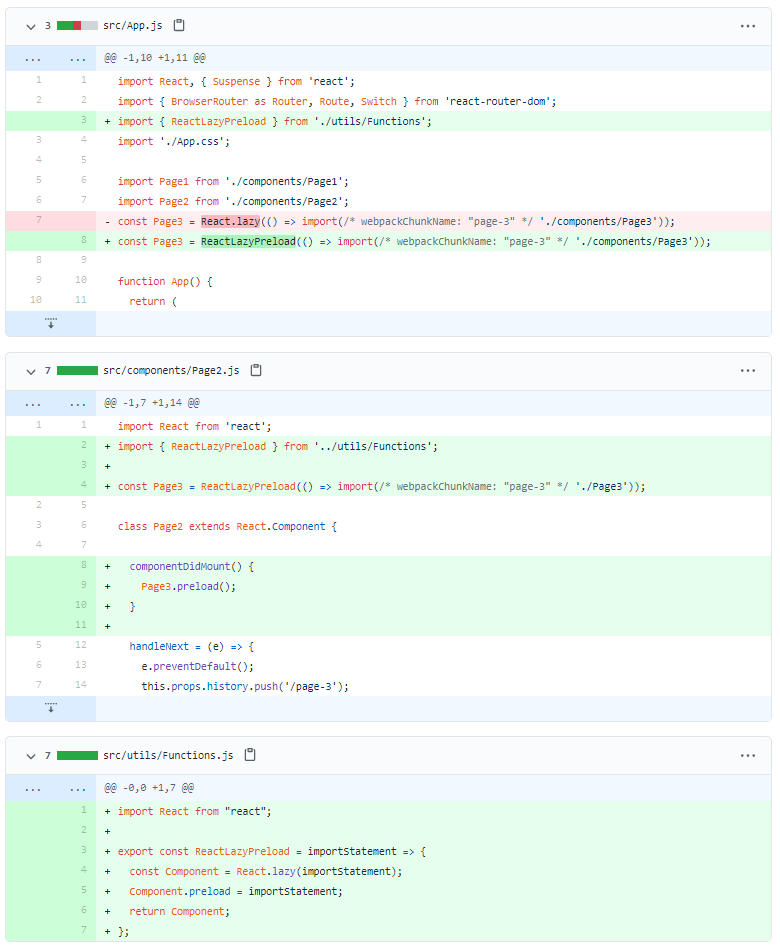
如何防止从Page2到Page 3的闪烁
欢迎您按照上面的说明自行尝试。
谢谢!
回答 1
页面原文内容由Stack Overflow提供。腾讯云小微IT领域专用引擎提供翻译支持
原文链接:
https://stackoverflow.com/questions/68903168
复制相关文章
相似问题
腾讯云开发者

Copyright © 2013 - 2026 Tencent Cloud. All Rights Reserved. 腾讯云 版权所有
深圳市腾讯计算机系统有限公司 ICP备案/许可证号:粤B2-20090059  粤公网安备44030502008569号
腾讯云计算(北京)有限责任公司 京ICP证150476号 | 京ICP备11018762号