
Azure CLI - Azure Devops -发布pipline -变量更新
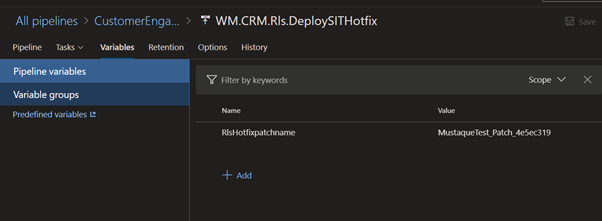
对于Dynamic365HotFixBuild和release,我创建了一个构建管道变量来获取修补程序名。
目前,我正在检查在管道中传递变量以释放并使用它在不同的实例中部署,但不确定如何做到这一点。所有的博客和答案都是与经典管道和Rest相关的。
我想使用Azure脚本来更新发布管道变量,作为构建管道步骤-作为解决办法。
az管道变量列表--org $orgname --项目$projectname --管道名称$pipelinename
上面的脚本非常好,并列出了构建管道中的变量,但是它没有检索发布管道变量,下面显示了错误。
错误:在“Mustaque”项目中没有与名称"WM.CRM.Rls.DeploySITHotfix“相匹配的构建定义。
请告知这是否只适用于构建变量,而不是版本变量?
我是否可以通过ADO管道将动态构建变量传递到发布中并在任务步骤中使用它?
回答 1
Stack Overflow用户
发布于 2021-08-27 03:29:35
Azure Cli az pipelines variable list只适用于构建/yaml管道,而不适用于类发布管道。
目前,我正在检查在管道中传递变量以释放并使用它在不同的实例中部署,但不确定如何做到这一点。
您可以使用rest获得发布定义(定义-获取),然后更新变量(定义-更新)。
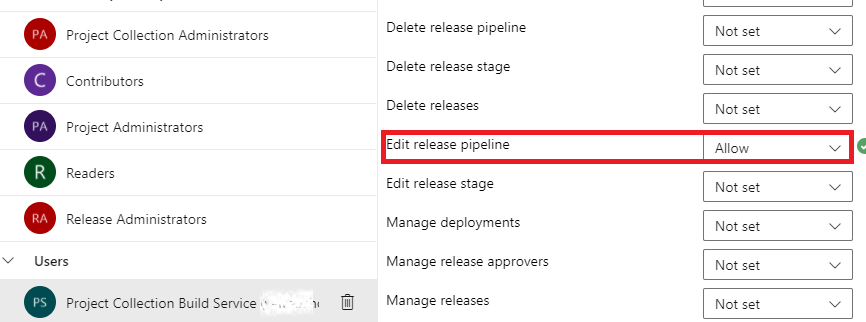
请授予项目收集生成服务(xxx)帐户编辑发布管道许可。(选择发布管道->.->安全性->编辑发布定义设置为允许)
样本如下:
trigger: none

pool:
  vmImage: Windows-latest

steps:
- script: echo $(var1)         # This is variable in build pipeline.

- task: PowerShell@2
  inputs:
    targetType: 'inline'
    script: |
      $url = "https://vsrm.dev.azure.com/{yourorg}/$(System.TeamProject)/_apis/Release/definitions/3?api-version=5.0"
      Write-Host "URL: $url"
      $pipeline = Invoke-RestMethod -Uri $url -Headers @{
          Authorization = "Bearer $env:SYSTEM_ACCESSTOKEN"
      }
      Write-Host "Pipeline = $($pipeline | ConvertTo-Json -Depth 100)"
      # Update an existing variable named var3 to its new value $(var1)
      $pipeline.variables.var3.value = "$(var1)"
      ####****************** update the modified object **************************
      $json = @($pipeline) | ConvertTo-Json -Depth 99
      $updatedef = Invoke-RestMethod -Uri $url -Method Put -Body $json -ContentType "application/json" -Headers @{Authorization = "Bearer $env:SYSTEM_ACCESSTOKEN"}
      write-host "=========================================================="
      Write-host "The value of Varialbe 'var3' is updated to" $updatedef.variables.var3.value
      write-host "=========================================================="
  env:
    SYSTEM_ACCESSTOKEN: $(System.AccessToken)
输油管道结果:
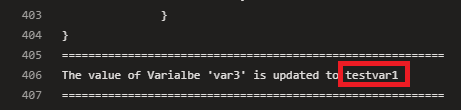
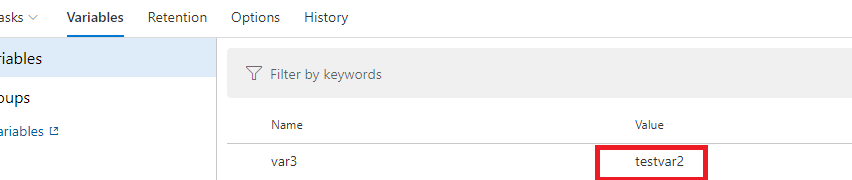
检查释放管道值:

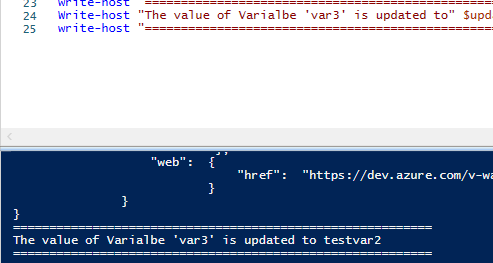
要在本地PS上直接编辑:
Param(
   [string]$org = "yourorgname",
   [string]$projectName = "yourprojectname",
   [string]$releasedefinitionid = "3",
   [string]$user = "",
   [string]$token = "yourPAT",
   [string]$buildvar = "testvar2"
)
# Base64-encodes the Personal Access Token (PAT) appropriately
$base64AuthInfo = [Convert]::ToBase64String([Text.Encoding]::ASCII.GetBytes(("{0}:{1}" -f $user,$token)))


$url = "https://vsrm.dev.azure.com/$org/$projectName/_apis/Release/definitions/$releasedefinitionid"+"?api-version=5.0"
Write-Host "URL: $url"
$pipeline = Invoke-RestMethod -Uri $url -Headers @{
  Authorization=("Basic {0}" -f $base64AuthInfo)
}
Write-Host "Pipeline = $($pipeline | ConvertTo-Json -Depth 100)"
# Update an existing variable named var3 to its new value $buildvar
$pipeline.variables.var3.value = $buildvar
####****************** update the modified object **************************
$json = @($pipeline) | ConvertTo-Json -Depth 99
$updatedef = Invoke-RestMethod -Uri $url -Method Put -Body $json -ContentType "application/json" -Headers @{Authorization=("Basic {0}" -f $base64AuthInfo)}
write-host "=========================================================="
Write-host "The value of Varialbe 'var3' is updated to" $updatedef.variables.var3.value
write-host "=========================================================="
https://stackoverflow.com/questions/68932161
复制相似问题
腾讯云开发者

Copyright © 2013 - 2026 Tencent Cloud. All Rights Reserved. 腾讯云 版权所有
深圳市腾讯计算机系统有限公司 ICP备案/许可证号:粤B2-20090059  粤公网安备44030502008569号
腾讯云计算(北京)有限责任公司 京ICP证150476号 | 京ICP备11018762号