
如何使用Flexbox在其他项目之上显示一项?
如何使用Flexbox在其他项目之上显示一项?
提问于 2021-08-29 07:53:15
通过使用Flexbox,我希望在一张照片中对三个元素进行居中,然后在这三个元素之上放置一个元素:
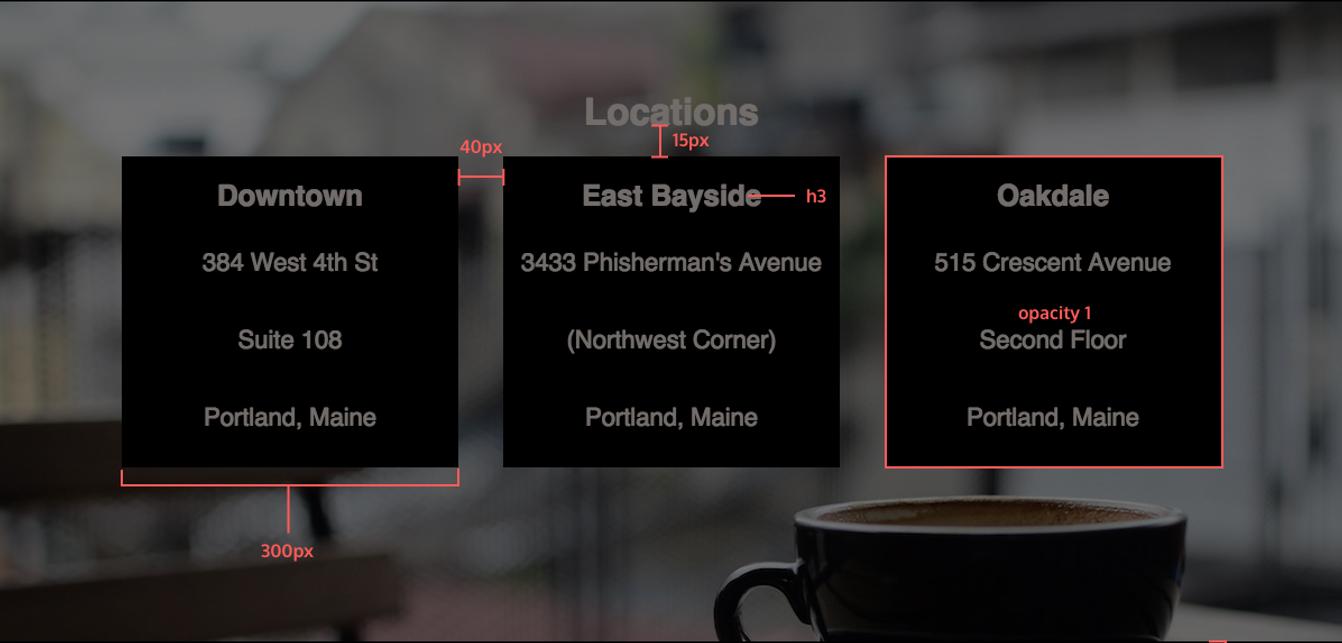
--我试着把它们集中起来,很明显,所有的项目都是居中的,而我只想让这三个框居中:
display: inline-flex;
justify-content: center;
align-items: center;
--这些是特定部分的HTML和CSS代码:
HTML:
        <section class="banner-3">
            <article>
                <h2 id="locations">Locations</h2>
                <div class="address">
                    <h3>Downtown</h3>
                    <p>384 West 4th St</p>
                    <p>Suite 108</p>
                    <p>Portland, Maine</p>
                </div>
                <div class="address">
                    <h3>East Bayside</h3>
                    <p>3433 Phisherman's Avenue</p>
                    <p>(Northwest Corner)</p>
                    <p>Portland, Maine</p>
                </div>
                <div class="address">
                    <h3>Oakdale</h3>
                    <p>515 Crescent Avenue</p>
                    <p>Second Floor</p>
                    <p>Portland, Maine</p>
                </div>
            </article>
        </section>
CSS:
.banner-3 article {
    height: 500px;
    width: 1200px;
    background-image: url("../images/img-locations-background.jpg");
    background-repeat: no-repeat;
    background-position-y: center;
    background-size: cover;
    margin: 0 auto;
    margin-top: 2.5%;
    display: inline-flex;
    justify-content: center;
    align-items: center;
}

.banner-3 .address {
    width: 300px;
    height: 300px;
    display: flex;
    flex-direction: column;
    align-content: center;
    justify-content: center;
    background-color: black;
    opacity: 1;
    margin: 20px;
}

.address h3, p {
    margin: 25px auto;
}
任何帮助都将不胜感激.
回答 1
Stack Overflow用户
回答已采纳
发布于 2021-08-29 08:03:15
您必须将这三个元素用display: flex; flex-direction: row包装到一个display: flex; flex-direction: row中。这将使容器水平显示其内容。也给article风格作为display: flex; flex-direction: column;,这将使h2对齐以上的thode 3卡。
.banner-3 article {
  height: 500px;
  /* width: 100%; */
  width: 1200px;
  background-image: url("https://www.w3schools.com/howto/photographer.jpg");
  background-repeat: no-repeat;
  background-position-y: center;
  background-size: cover;
  margin: 0 auto;
  margin-top: 2.5%;
  display: inline-flex;
  justify-content: center;
  align-items: center;
}

.banner-3 .address {
  width: 300px;
  height: 300px;
  display: flex;
  flex-direction: column;
  align-content: center;
  justify-content: center;
  background-color: black;
  opacity: 1;
  margin: 20px;
  margin-top: 0;
  color: aliceblue;
}

.address h3,
p {
  margin: 25px auto;
}

.container {
  display: flex;
}

article {
  display: flex;
  flex-direction: column;
}

h2 {
  margin-bottom: 15px;
}<section class="banner-3">
<article>
<h2 id="locations">Locations</h2>
<div class="container">
<div class="address">
<h3>Downtown</h3>
<p>384 West 4th St</p>
<p>Suite 108</p>
<p>Portland, Maine</p>
</div>
<div class="address">
<h3>East Bayside</h3>
<p>3433 Phisherman's Avenue</p>
<p>(Northwest Corner)</p>
<p>Portland, Maine</p>
</div>
<div class="address">
<h3>Oakdale</h3>
<p>515 Crescent Avenue</p>
<p>Second Floor</p>
<p>Portland, Maine</p>
</div>
</div>
</article>
</section>
页面原文内容由Stack Overflow提供。腾讯云小微IT领域专用引擎提供翻译支持
原文链接:
https://stackoverflow.com/questions/68970916
复制相关文章
相似问题
腾讯云开发者

Copyright © 2013 - 2026 Tencent Cloud. All Rights Reserved. 腾讯云 版权所有
深圳市腾讯计算机系统有限公司 ICP备案/许可证号:粤B2-20090059  粤公网安备44030502008569号
腾讯云计算(北京)有限责任公司 京ICP证150476号 | 京ICP备11018762号