
将CheckBox列添加到现有的TableView中
最近,我想将CheckBox列添加到现有的TableView中。为了孤立地研究这个问题,我从https://docs.oracle.com/javase/8/javafx/user-interface-tutorial/table-view.htm#JFXUI271开始。我向Person模型类添加了一个Person和访问器,并添加了一个以CheckBoxTableCell作为单元工厂的新TableColumn。如图所示,我在每一行上都看到一个CheckBox。虽然所有的值都是true,但没有一个被选中;复选框是活动的,但从未调用setActive()。最近关于这个主题的问题表明,我遗漏了一些东西;我欢迎您的任何见解。
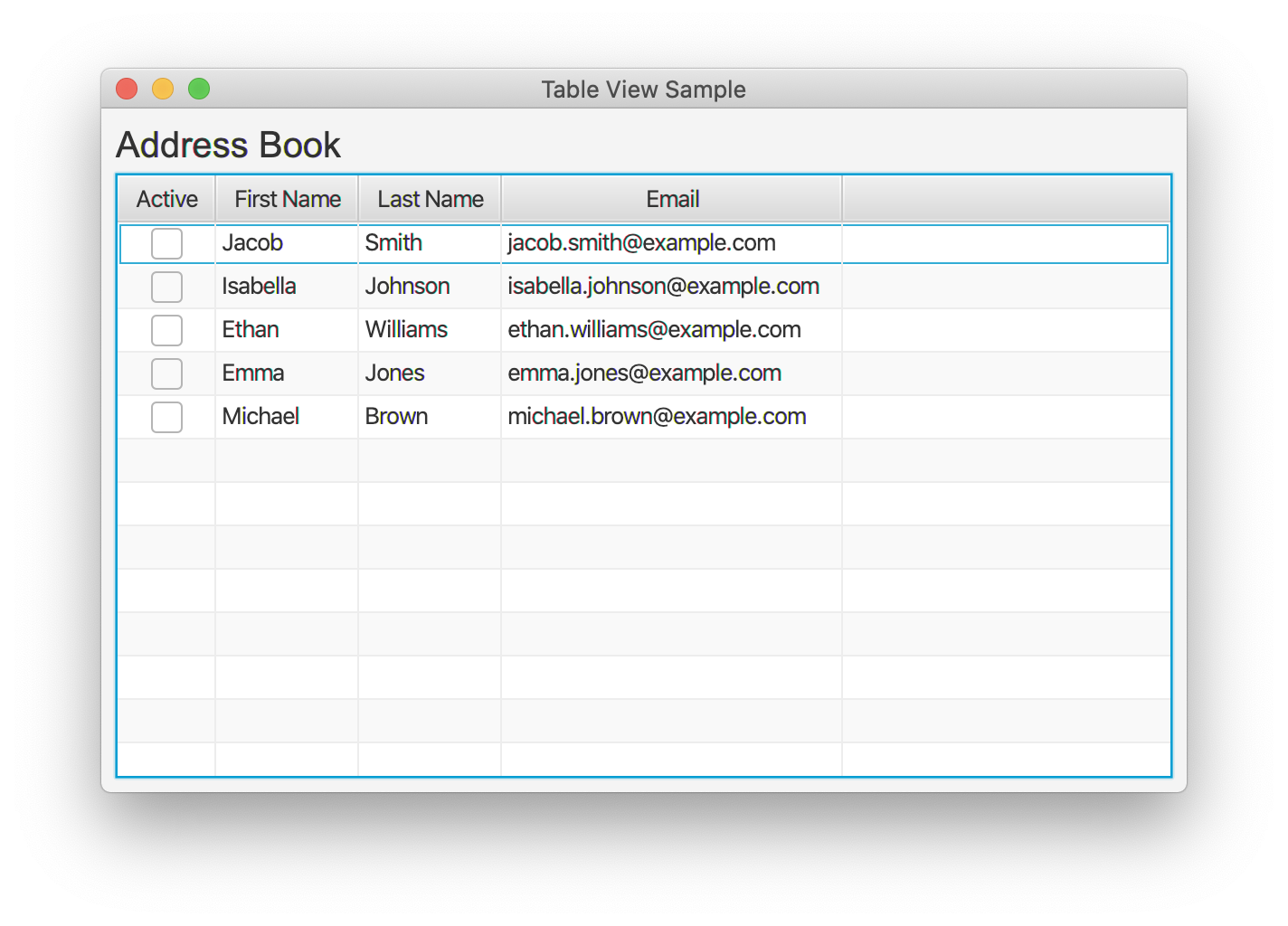
import javafx.application.Application;
import javafx.beans.property.BooleanProperty;
import javafx.beans.property.SimpleBooleanProperty;
import javafx.beans.property.SimpleStringProperty;
import javafx.beans.property.StringProperty;
import javafx.collections.FXCollections;
import javafx.collections.ObservableList;
import javafx.geometry.Insets;
import javafx.scene.Scene;
import javafx.scene.control.Label;
import javafx.scene.control.TableColumn;
import javafx.scene.control.TableView;
import javafx.scene.control.cell.CheckBoxTableCell;
import javafx.scene.control.cell.PropertyValueFactory;
import javafx.scene.layout.VBox;
import javafx.scene.text.Font;
import javafx.stage.Stage;

/**
 * Example 13-6 Creating a Table and Adding Data to It
 * https://docs.oracle.com/javase/8/javafx/user-interface-tutorial/table-view.htm#CJAGAAEE
 */
public class TableViewSample extends Application {

    private final TableView<Person> table = new TableView<>();
    private final ObservableList<Person> data
        = FXCollections.observableArrayList(
            new Person("Jacob", "Smith", "jacob.smith@example.com"),
            new Person("Isabella", "Johnson", "isabella.johnson@example.com"),
            new Person("Ethan", "Williams", "ethan.williams@example.com"),
            new Person("Emma", "Jones", "emma.jones@example.com"),
            new Person("Michael", "Brown", "michael.brown@example.com")
        );

    public static void main(String[] args) {
        launch(args);
    }

    @Override
    public void start(Stage stage) {
        stage.setTitle("Table View Sample");
        stage.setWidth(600);
        stage.setHeight(400);

        final Label label = new Label("Address Book");
        label.setFont(new Font("Arial", 20));

        table.setEditable(true);

        TableColumn<Person, Boolean> active = new TableColumn<>("Active");
        active.setCellValueFactory(new PropertyValueFactory<>("active"));
        active.setCellFactory(CheckBoxTableCell.forTableColumn(active));

        TableColumn<Person, String> firstName = new TableColumn<>("First Name");
        firstName.setCellValueFactory(new PropertyValueFactory<>("firstName"));

        TableColumn<Person, String> lastName = new TableColumn<>("Last Name");
        lastName.setCellValueFactory(new PropertyValueFactory<>("lastName"));

        TableColumn<Person, String> email = new TableColumn<>("Email");
        email.setCellValueFactory(new PropertyValueFactory<>("email"));

        table.setItems(data);
        table.getColumns().addAll(active, firstName, lastName, email);

        final VBox vbox = new VBox();
        vbox.setSpacing(5);
        vbox.setPadding(new Insets(8));
        vbox.getChildren().addAll(label, table);

        stage.setScene(new Scene(vbox));
        stage.show();
    }

    public static class Person {

        private final BooleanProperty active;
        private final StringProperty firstName;
        private final StringProperty lastName;
        private final StringProperty email;

        private Person(String fName, String lName, String email) {
            this.active = new SimpleBooleanProperty(true);
            this.firstName = new SimpleStringProperty(fName);
            this.lastName = new SimpleStringProperty(lName);
            this.email = new SimpleStringProperty(email);
        }

        public boolean getActive() {
            return active.get();
        }

        public void setActive(boolean b) {
            active.set(b);
        }

        public String getFirstName() {
            return firstName.get();
        }

        public void setFirstName(String s) {
            firstName.set(s);
        }

        public String getLastName() {
            return lastName.get();
        }

        public void setLastName(String s) {
            lastName.set(s);
        }

        public String getEmail() {
            return email.get();
        }

        public void setEmail(String s) {
            email.set(s);
        }
    }
}回答 1
Stack Overflow用户
发布于 2021-08-29 01:28:02
摘要:正如注意到的这里,这很可能是一个错误;避免陷阱的步骤包括:
问题是,CheckBoxTableCell无法根据提供的参数查找或绑定ObservableProperty<Boolean>:
active.setCellFactory(CheckBoxTableCell.forTableColumn(active));CheckBoxTableCell提交给表列以访问目标Boolean属性。要查看效果,请将active参数替换为显式返回行i的ObservableValue<Boolean>的Callback:
active.setCellFactory(CheckBoxTableCell.forTableColumn(
(Integer i) -> data.get(i).active));虽然这使复选框正常工作,但根本的问题是Person类需要active属性的访问器。https://docs.oracle.com/javase/8/javafx/properties-binding-tutorial/binding.htm#JFXBD111讨论了属性方法命名约定,tablecellfactory的Person类为每个属性演示了一个带有属性getter的工作模型类,如下所示。
通过这种更改,PropertyValueFactory可以找到新添加的BooleanProperty,并且forTableColumn()的原始形式可以工作。请注意,PropertyValueFactory的便利性伴随着一些局限性。特别是,工厂对以前丢失的属性访问器的失败支持没有引起注意。幸运的是,相同的访问器允许为每个列的值工厂替换一个简单的Callback。如这里所示,而不是PropertyValueFactory,
active.setCellValueFactory(new PropertyValueFactory<>("active"));传递一个返回相应属性的lamda表达:
active.setCellValueFactory(cd -> cd.getValue().activeProperty());还请注意,Person现在可以是private。此外,显式类型参数的使用在编译期间提供了更强的类型检查。

import javafx.application.Application;
import javafx.beans.property.BooleanProperty;
import javafx.beans.property.SimpleBooleanProperty;
import javafx.beans.property.SimpleStringProperty;
import javafx.beans.property.StringProperty;
import javafx.collections.FXCollections;
import javafx.collections.ObservableList;
import javafx.geometry.Insets;
import javafx.scene.Scene;
import javafx.scene.control.Label;
import javafx.scene.control.TableColumn;
import javafx.scene.control.TableView;
import javafx.scene.control.cell.CheckBoxTableCell;
import javafx.scene.layout.VBox;
import javafx.scene.text.Font;
import javafx.stage.Stage;

/**
 * https://stackoverflow.com/a/68969223/230513
 */
public class TableViewSample extends Application {

    private final TableView<Person> table = new TableView<>();
    private final ObservableList<Person> data
        = FXCollections.observableArrayList(
            new Person("Jacob", "Smith", "jacob.smith@example.com"),
            new Person("Isabella", "Johnson", "isabella.johnson@example.com"),
            new Person("Ethan", "Williams", "ethan.williams@example.com"),
            new Person("Emma", "Jones", "emma.jones@example.com"),
            new Person("Michael", "Brown", "michael.brown@example.com")
        );

    public static void main(String[] args) {
        launch(args);
    }

    @Override
    public void start(Stage stage) {
        stage.setTitle("Table View Sample");
        stage.setWidth(600);
        stage.setHeight(400);

        final Label label = new Label("Address Book");
        label.setFont(new Font("Arial", 20));

        table.setEditable(true);

        TableColumn<Person, Boolean> active = new TableColumn<>("Active");
        active.setCellValueFactory(cd -> cd.getValue().activeProperty());
        active.setCellFactory(CheckBoxTableCell.forTableColumn(active));

        TableColumn<Person, String> firstName = new TableColumn<>("First Name");
        firstName.setCellValueFactory(cd -> cd.getValue().firstNameProperty());

        TableColumn<Person, String> lastName = new TableColumn<>("Last Name");
        lastName.setCellValueFactory(cd -> cd.getValue().lastNameProperty());

        TableColumn<Person, String> email = new TableColumn<>("Email");
        email.setCellValueFactory(cd -> cd.getValue().emailProperty());

        table.setItems(data);
        table.getColumns().addAll(active, firstName, lastName, email);

        final VBox vbox = new VBox();
        vbox.setSpacing(5);
        vbox.setPadding(new Insets(8));
        vbox.getChildren().addAll(label, table);

        stage.setScene(new Scene(vbox));
        stage.show();
    }

    private static class Person {

        private final BooleanProperty active;
        private final StringProperty firstName;
        private final StringProperty lastName;
        private final StringProperty email;

        private Person(String fName, String lName, String email) {
            this.active = new SimpleBooleanProperty(true);
            this.firstName = new SimpleStringProperty(fName);
            this.lastName = new SimpleStringProperty(lName);
            this.email = new SimpleStringProperty(email);
        }

        public BooleanProperty activeProperty() {
            return active;
        }

        public StringProperty firstNameProperty() {
            return firstName;
        }

        public StringProperty lastNameProperty() {
            return lastName;
        }

        public StringProperty emailProperty() {
            return email;
        }
    }
}https://stackoverflow.com/questions/68969222
复制相似问题
腾讯云开发者

Copyright © 2013 - 2026 Tencent Cloud. All Rights Reserved. 腾讯云 版权所有
深圳市腾讯计算机系统有限公司 ICP备案/许可证号:粤B2-20090059  粤公网安备44030502008569号
腾讯云计算(北京)有限责任公司 京ICP证150476号 | 京ICP备11018762号