
错误:必须使用导入来加载ES模块:d:\node_Module\react markdown\index.js不支持ES模块的要求()
错误:必须使用导入来加载ES模块:d:\node_Module\react markdown\index.js不支持ES模块的要求()
提问于 2021-09-01 05:27:56
目前,我使用的是"react": "17.0.2",我已经通过npm i react-markdown安装了"react-markdown": "^7.0.1",我使用这个包裹显示我从Strapi中获取的富文本。我使用了以下代码来显示内容:
import ReactMarkdown from "react-markdown";

export default function name({ posts }) {
  return (
    <>
      <div>
        <div>
          {posts.Title}
        </div>
      </div>
      <div>
        <ReactMarkdown source={posts.Content} escapeHtml={false} />
      </div>
    </>
  );
}

export async function getStaticProps() {
  const res = await fetch("http://localhost:1337/blogs");
  const posts = await res.json();

  return {
    props: { posts },
  };
}
但是,当我运行这个程序时,它会给出以下错误:
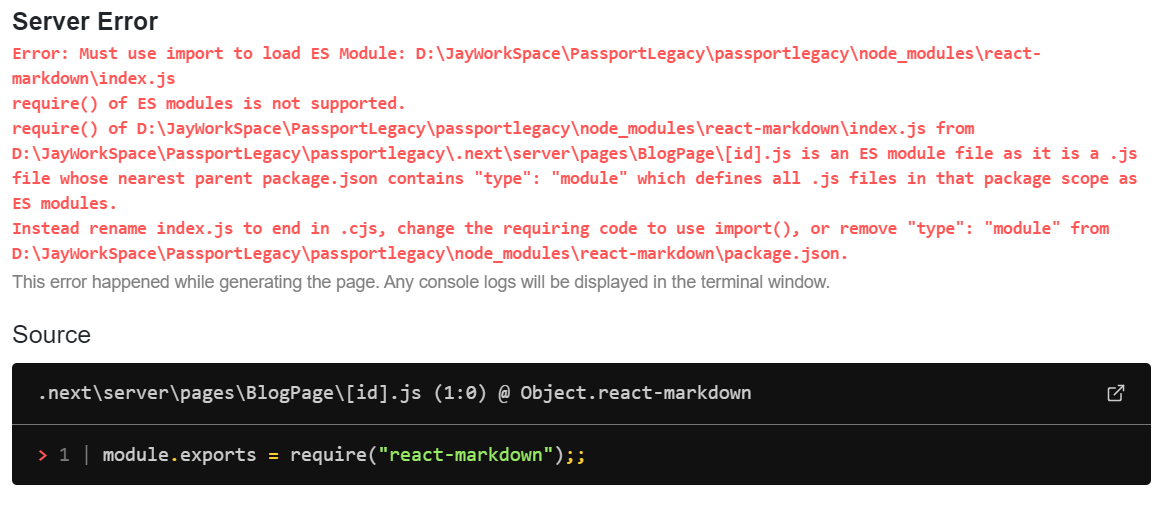
我使用节点v14.17.0并尝试添加"type": "module"。
我的package.json:
{
  "name": "passportlegacy",
  "version": "0.1.0",
  "private": true,
  "scripts": {
    "dev": "next dev",
    "build": "next build",
    "start": "next start",
    "lint": "next lint"
  },
  "dependencies": {
    "axios": "^0.21.1",
    "babel-plugin-inline-react-svg": "^2.0.1",
    "next": "11.0.1",
    "next-images": "^1.8.1",
    "react": "17.0.2",
    "react-dom": "17.0.2",
    "react-map-gl": "^6.1.16",
    "react-markdown": "^7.0.1",
  },
  "devDependencies": {
    "@svgr/webpack": "^5.5.0",
    "@types/react": "17.0.16",
    "eslint": "7.32.0",
    "eslint-config-next": "11.0.1",
    "typescript": "4.3.5"
  }
}回答 3
Stack Overflow用户
回答已采纳
发布于 2021-10-06 16:44:05
Stack Overflow用户
发布于 2021-09-01 07:16:47
节点当前将您的.js文件视为CommonJS。您需要告诉Node将其视为ES模块。
尝试在您的"type": "module"文件中添加package.json。
你可以把它放在最高层的任何地方。例如:
{
  "name": "passportlegacy",
  "version": "0.1.0",
  "type": "module",
  "private": true,
  "scripts": {
    ...
  }
  ...
}Stack Overflow用户
发布于 2022-02-12 20:46:09
使用此版本
"dependencies": {
    "react-markdown": "^6.0.0"
  }
然后发布
npm install 页面原文内容由Stack Overflow提供。腾讯云小微IT领域专用引擎提供翻译支持
原文链接:
https://stackoverflow.com/questions/69008215
复制相关文章
相似问题
腾讯云开发者

Copyright © 2013 - 2026 Tencent Cloud. All Rights Reserved. 腾讯云 版权所有
深圳市腾讯计算机系统有限公司 ICP备案/许可证号:粤B2-20090059  粤公网安备44030502008569号
腾讯云计算(北京)有限责任公司 京ICP证150476号 | 京ICP备11018762号