
如何从https://rbs.indianrail.gov.in/ShortPath/ShortPath.jsp中抓取列车线路数据
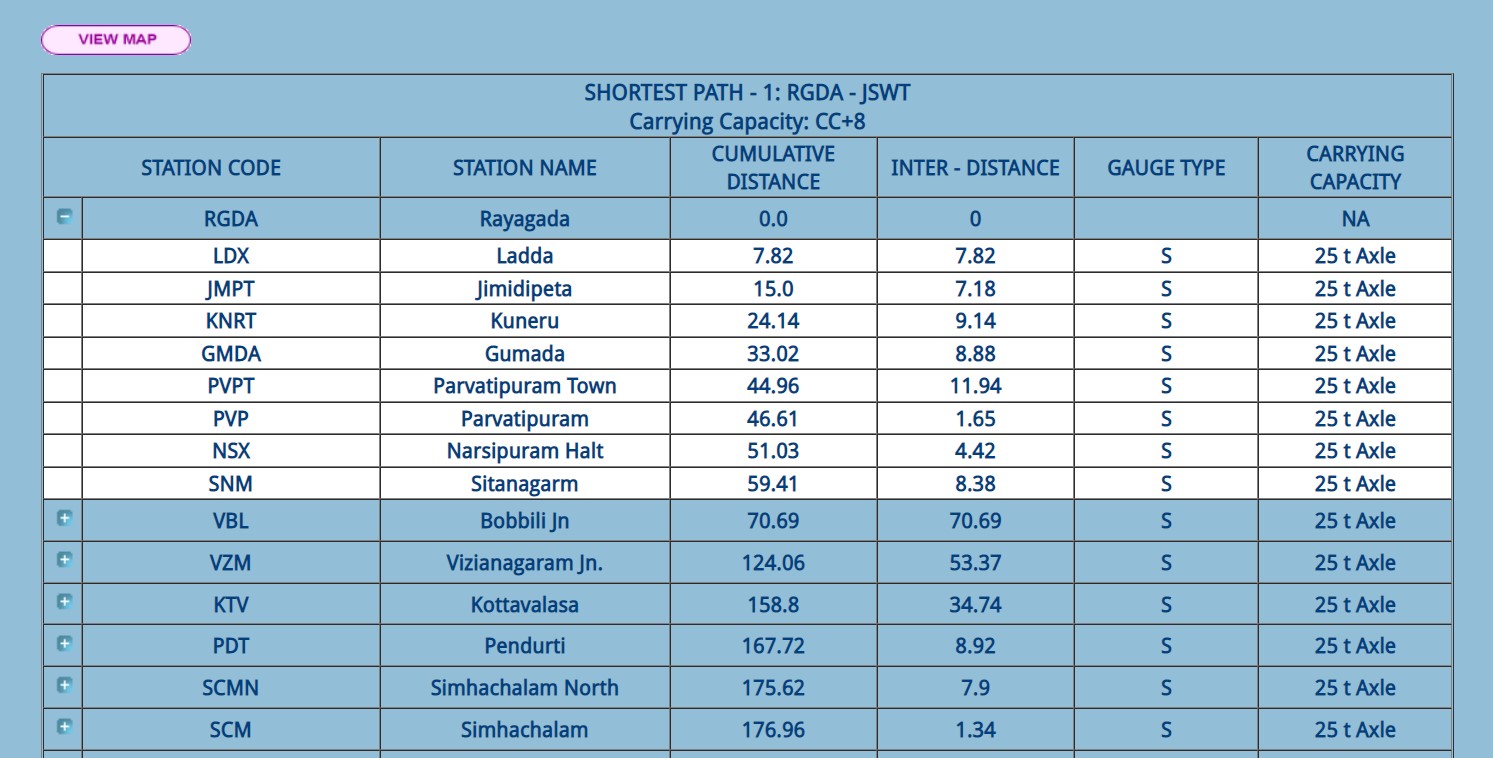
我正在尝试从https://rbs.indianrail.gov.in/ShortPath/ShortPath.jsp获取中间站信息列表,通过提供源站和目的地站,它在表中显示中间站的列表。但我认为,它把一些中间站隐藏在几个按钮下面,以限制桌子的大小。在单击按钮时,它会将隐藏的数据推到表上。我可以在表中使用jsoup获得初始数据。但是不知道如何获取隐藏的数据。在单击按钮时,一个javascript函数通过传递"route=inter、index=1、distance=goods、PageName=ShortPath“作为参数,使用POST方法请求数据,响应以json表示。由于参数与显示的表无关,所以我不能直接请求https://rbs.indianrail.gov.in/ShortPath/StationXmlServlet。
        private void shortestPath(String source, String destination) {

        Document doc;
        try {
            doc = Jsoup.connect(url)
                    .data("srcCode", source.toUpperCase())
                    .data("destCode", destination.toUpperCase())
                    .data("guageType", "S")
                    .data("transhipmentFlag", "false")
                    .data("distance", "goods")
                    .post();
            Element table = doc.select("tbody").get(0);
            Elements rows = table.select("tr");
            stationCodeList = new String[rows.size() - 3];
            jsonPath = new JSONObject();
            for (int row = 3; row < rows.size(); row++) {
                JSONObject jsonObject = new JSONObject();
                Elements cols = rows.get(row).select("td");
                String code = cols.get(1).text();
                String name = cols.get(2).text();
                String cum_dist = cols.get(3).text();
                String inter_dist = cols.get(4).text();
                String gauge = cols.get(5).text();
                String carry_cap = cols.get(6).text();

                jsonObject.put("Code", code);
                jsonObject.put("Name", name);
                jsonObject.put("Cumulative Distance", cum_dist);
                jsonObject.put("inter Distance", inter_dist);
                jsonObject.put("Gauge Type", gauge);
                jsonObject.put("Carrying Capacity", carry_cap);
                jsonPath.put(code, jsonObject);
                stationCodeList[row - 3] = code;
            }
        } catch (Exception e) {
            e.printStackTrace();
        }
        this.destination =new Station(stationCodeList[stationCodeList.length-1]);
    }
先谢谢你
回答 1
Stack Overflow用户
发布于 2021-09-02 18:27:59
如果您查看一下this answer,您将看到如何获得与浏览器完全相同的请求。
使用您的示例,对StationXmlServlet的最小和有效的POST请求将与curl类似
curl --request POST 'https://rbs.indianrail.gov.in/ShortPath/StationXmlServlet' \
  -H 'Content-Type: application/x-www-form-urlencoded' \
  -H 'Cookie: JSESSIONID1=0000ob7e89cT3vUAYkBxF6oyW4w:APP2SERV1' \
  --data-raw 'route=inter&index=1&distance=goods&PageName=ShortPath'
由于
的参数与所显示的表无关,所以不能直接向https://rbs.indianrail.gov.in/ShortPath/StationXmlServlet提出请求。
我不认为那是真的。请求正文中的index是主表中行的基于零的索引。
解决方案
事实证明,当您在web浏览器中使用页面时,您只需遵循完全相同的顺序。换句话说,您必须首先加载主表,以便站点知道在查询详细信息时查看的是哪个表。会话cookie跟踪此状态。
首先,打开着陆页面并获得一个Cookie
HttpRequest cookieRequest = HttpRequest.newBuilder()
    .uri(URI.create("https://rbs.indianrail.gov.in/ShortPath/ShortPath.jsp"))
    .GET()
    .build();
HttpResponse<String> cookieResponse =
    client.send(cookieRequest, BodyHandlers.ofString());
String cookie = cookieResponse.headers().firstValue("Set-Cookie").get();
接下来,给出指定的表单参数,加载主表:
HttpRequest masterRequest = HttpRequest.newBuilder()
    .uri(URI.create("https://rbs.indianrail.gov.in/ShortPath/ShortPathServlet"))
    .header("Content-Type", "application/x-www-form-urlencoded")
    .header("Cookie", cookie)
    .POST(BodyPublishers.ofString("srcCode=RGDA&destCode=JSWT&findPath0.x=42&findPath0.y=13&gaugeType=S&distance=goods&PageName=ShortPath"))
    .build();
HttpResponse<String> masterResponse =
    client.send(masterRequest, BodyHandlers.ofString());
String masterTableHTML = masterResponse.body();
// Document masterTablePage = Jsoup.parse(masterTableHTML);
// ...
最后,您可以查询主表的每一行的详细信息。在下面的示例中,我们查询第一行的详细信息。
HttpRequest detailsRequest = HttpRequest.newBuilder()
    .uri(URI.create("https://rbs.indianrail.gov.in/ShortPath/StationXmlServlet"))
    .header("Content-Type", "application/x-www-form-urlencoded")
    .header("Cookie", cookie)
    .POST(BodyPublishers.ofString("route=inter&index=0&distance=goods&PageName=ShortPath"))
    .build();
HttpResponse<String> detailsResponse =
    client.send(detailsRequest, BodyHandlers.ofString());
String jsonResponse = detailsResponse.body();
System.out.println(jsonResponse);https://stackoverflow.com/questions/69029607
复制相似问题
腾讯云开发者

Copyright © 2013 - 2026 Tencent Cloud. All Rights Reserved. 腾讯云 版权所有
深圳市腾讯计算机系统有限公司 ICP备案/许可证号:粤B2-20090059  粤公网安备44030502008569号
腾讯云计算(北京)有限责任公司 京ICP证150476号 | 京ICP备11018762号