
连续监视屏幕上的文本更改。
连续监视屏幕上的文本更改。
提问于 2021-09-04 15:17:57
我想知道是否有可能监视屏幕上的文字变化。例如,以这个健康栏为例:
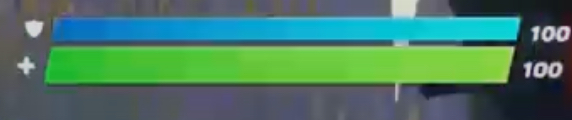
这将产生以下结果:
盾牌: 100健康: 100
或者如果它看到这个:
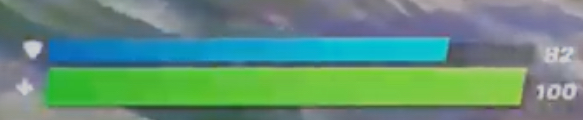
它将返回:
盾牌: 82健康: 100
总的来说,我想要的输出是这样的:
盾牌: 100健康: 100
盾牌: 100健康: 100
盾: 100健康: 99
回答 1
Stack Overflow用户
回答已采纳
发布于 2021-09-04 16:07:26
是的,这是绝对可能的。您可以使用PIL.ImageGrab获取屏幕的该部分的屏幕截图,并使用pytesseract OCR将其转换为值。
你可以使用这样的东西:
#Import the required libraries
import PIL.ImageGrab
import pytesseract

#INPUT the screen pixel coordinates of a box that surrounds the two numerical values (health and shields)
cropRect = (x1,y1,x2,y2)

#Grab the screenshot, crop it to the box that you input, and then use OCR to convert the values on the image to a string
values = pytesseract.image_to_string(PIL.ImageGrab.grab().crop(cropRect))

#Use the OCR output to extract the values that you need (using normal string manipulation)
shields = int(values[:values.find("/n")])
health = int(values[values.find("/n")+1:])
print(f"Shields: {shields} Health: {health}")
您必须检查OCR输出,看看可以使用哪个字符来拆分“value”变量(有时可以用"\n“、有时"\t”或“/”分隔)。您可以使用print(Value)检查以找到正确的字符串分隔符。
如果您想要连续地监视这些值,请将其放在while(True)循环中(或者放在它自己的线程中)。就像这样:
import PIL.ImageGrab
import pytesseract
import time

cropRect = (x1,y1,x2,y2)
while(True):
    values = pytesseract.image_to_string(PIL.ImageGrab.grab().crop(cropRect))
    shields = int(values[:values.find("/n")])
    health = int(values[values.find("/n")+1:])
    print(f"Shields: {shields} Health: {health}")
    time.sleep(1)
希望这能有所帮助
页面原文内容由Stack Overflow提供。腾讯云小微IT领域专用引擎提供翻译支持
原文链接:
https://stackoverflow.com/questions/69056598
复制相关文章
相似问题
腾讯云开发者

Copyright © 2013 - 2026 Tencent Cloud. All Rights Reserved. 腾讯云 版权所有
深圳市腾讯计算机系统有限公司 ICP备案/许可证号:粤B2-20090059  粤公网安备44030502008569号
腾讯云计算(北京)有限责任公司 京ICP证150476号 | 京ICP备11018762号