
如何使用反应弹簧+衰变在最近的一排停车?
我实现了日历,它可以被鼠标实际拖动。我想有一些惰性的鼠标释放。我通过使用use-gesture + react-spring库实现了这个功能。
这就是它的样子
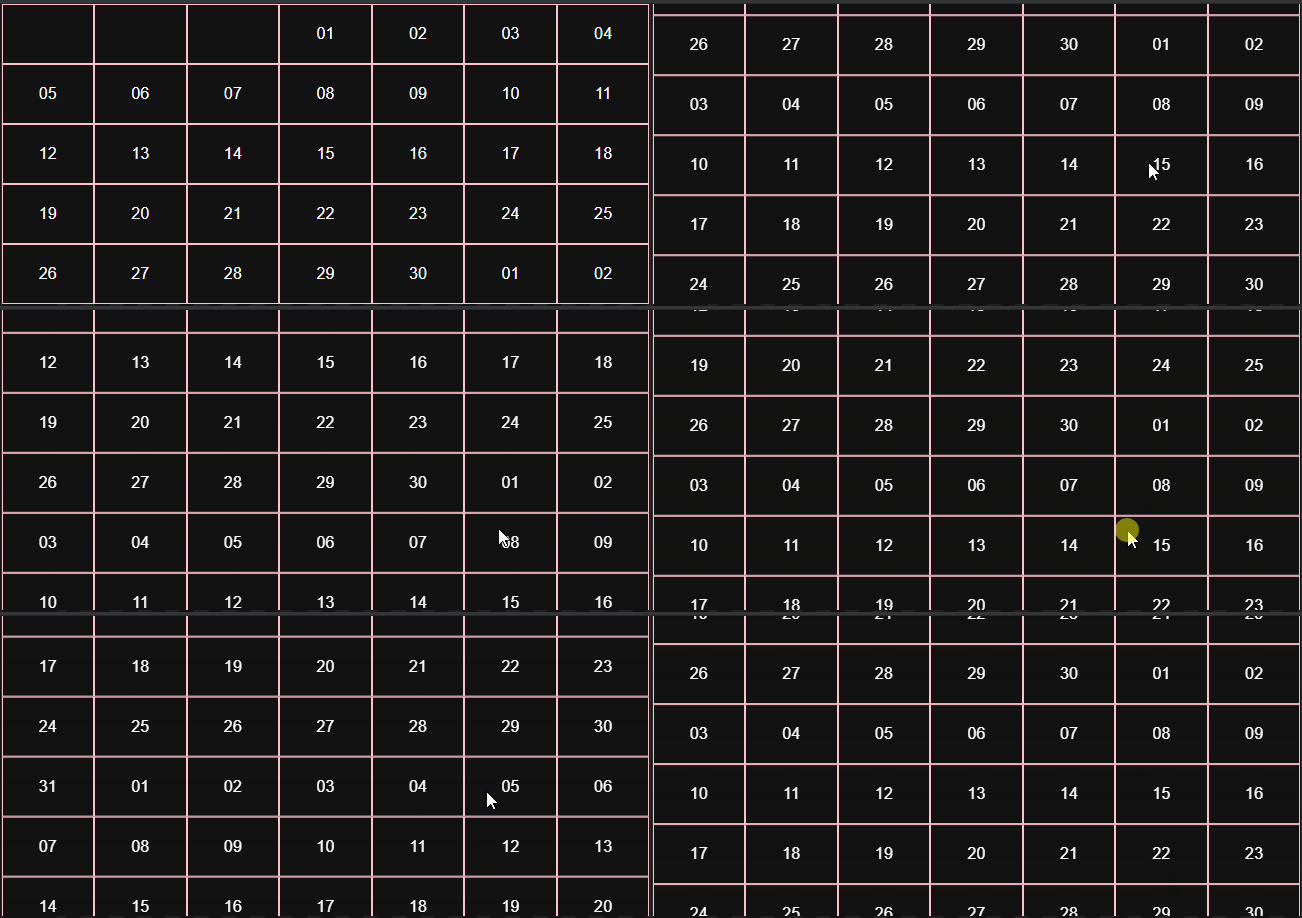
我想解决的问题是如何强制惯性停在最近的行?目前,它可以在行中间停止。
这是我的密码。为了简单起见,我去掉了一些零件。
[...]
const [animatedOffsetY, animatedOffsetYProps] = useSpring(() => ({
  offsetY: 0,
  config: {
    decay: true
    frequency: 5.5,
  }
}))

[...]

const bind = useDrag((state) => {
  const [, currentY] = state.movement
  const [, lastOffsetY] = state.lastOffset
  const offsetY = lastOffsetY + currentY

  if (state.down) {
    setOffsetY(offsetY)
    animatedOffsetYProps.set({ offsetY: offsetY })
  } else {
    animatedOffsetYProps.start({
      offsetY: offsetY,
      config: {
        velocity: state.direction[1] * state.velocity[1],
      }
    })
  }
}, {
  from: [0, offsetY],
  bounds: { bottom: 0, top: (totalHeight - containerHeight) * -1 },
  rubberband: true
})

[...]
更新
我调查了一下,popmotion和framer-motion (他们在引擎盖下使用popmotion ),他们有解决我问题的modifyTarget支柱。我更喜欢使用react-spring或自定义解决方案。
回答 2
Stack Overflow用户
发布于 2021-09-13 00:24:03
由于某种原因,在春季使用decay,config给我带来了很多麻烦。我已经让它在一个标准的基于friction/tension的spring中运行得很好。
当结束拖动时,您想要动画到一个位于最近行的精确顶部的位置。拖着走.if (state.down),你想要动画到精确的坐标。当鼠标被释放时.else,您想要计算所需的休息位置并将其动画化。
我将这个值称为snapOffsetY,您可以通过舍入滚动的框数来计算它:
const snapIndex = Math.round(offsetY / boxHeight);
const snapOffsetY = snapIndex * boxHeight;我不是在每个动作上调用setOffsetY,而是使用组件状态来存储最后一个被抓取到的偏移量。所以我只是把它设置为拖放。
然后,我们可以使用这个lastOffsetY作为bounds计算的一部分。最初,bottom是0,意思是我们不能拖到顶部以上。但是,一旦你向下滚动列表,你就需要能够向上滚动。因此,bounds需要根据最后一个停止位置进行更改。
bounds: {
  bottom: 0 - lastOffsetY,
  top: -1 * (totalHeight - containerHeight) - lastOffsetY
},
我的代码如下所示:
import React, { useState } from "react";
import { animated, config, useSpring } from "@react-spring/web";
import { useDrag } from "react-use-gesture";
import { range } from "lodash";
import "./styles.css";

export default function SnapGrid({
  boxHeight = 75,
  rows = 10,
  containerHeight = 300
}) {
  const totalHeight = rows * boxHeight;

  const [lastOffsetY, setLastOffsetY] = useState(0);

  const [animation, springApi] = useSpring(
    () => ({
      offsetY: 0,
      config: config.default
    }),
    []
  );

  const bind = useDrag(
    (state) => {
      const [, currentY] = state.movement;
      const offsetY = lastOffsetY + currentY;

      // while animating
      if (state.down) {
        springApi.set({ offsetY: offsetY });
      }
      // when stopping
      else {
        const snapIndex = Math.round(offsetY / boxHeight);
        const snapOffsetY = snapIndex * boxHeight;
        setLastOffsetY(snapOffsetY);
        springApi.start({
          to: {
            offsetY: snapOffsetY
          },
          config: {
            velocity: state.velocity
          }
        });
      }
    },
    {
      axis: "y",
      bounds: {
        bottom: 0 - lastOffsetY,
        top: -1 * (totalHeight - containerHeight) - lastOffsetY
      },
      rubberband: true
    }
  );

  return (
    <div className="container">
      <animated.ul
        {...bind()}
        className="grid"
        style={{
          y: animation.offsetY,
          touchAction: "none",
          height: containerHeight
        }}
      >
        {range(0, 5 * rows).map((n) => (
          <li key={n} className="box" style={{ height: boxHeight }}>
            {n}
          </li>
        ))}
      </animated.ul>
    </div>
  );
}Stack Overflow用户
发布于 2021-09-14 10:24:35
您确定需要将这个逻辑应用到JS中吗?CSS可能是您在这里所需要的全部:
.scroller {
  scroll-snap-type: y mandatory;

  max-height: 16em;
  overflow: scroll;
  letter-spacing: 2em;
}

.row {
  scroll-snap-align: start;
  box-sizing: border;

  padding: 1em;
}
.row:nth-child(2n) {
  background: #bbb;
}<div class = "scroller">
<div class = "row">AAAA</div>
<div class = "row">BBBB</div>
<div class = "row">CCCC</div>
<div class = "row">AAAA</div>
<div class = "row">BBBB</div>
<div class = "row">CCCC</div>
<div class = "row">AAAA</div>
<div class = "row">BBBB</div>
<div class = "row">CCCC</div>
<div class = "row">AAAA</div>
<div class = "row">BBBB</div>
<div class = "row">CCCC</div>
<div class = "row">AAAA</div>
<div class = "row">BBBB</div>
<div class = "row">CCCC</div>
<div class = "row">AAAA</div>
<div class = "row">BBBB</div>
<div class = "row">CCCC</div>
</div>
https://stackoverflow.com/questions/69070171
复制相似问题
腾讯云开发者

Copyright © 2013 - 2026 Tencent Cloud. All Rights Reserved. 腾讯云 版权所有
深圳市腾讯计算机系统有限公司 ICP备案/许可证号:粤B2-20090059  粤公网安备44030502008569号
腾讯云计算(北京)有限责任公司 京ICP证150476号 | 京ICP备11018762号