
使用LINQ对平面数据进行分组以创建分层树
使用LINQ对平面数据进行分组以创建分层树
提问于 2021-09-13 14:54:52
我正在尝试将一个平面数据源投影到一个可以使用Newtonsoft.Json直接序列化到JSON的对象中。我在Linqpad中创建了一个小型程序,其中包含了一个想象中的库存概述,作为一个测试。要求的产出如下:
name
- Weight
- Units
- 站点名称
- 库存名称
- 产品
- 库存名称
- Inventory name
    - Product (etc)
对于我的生活,我不能让它只有一个“网站名称”作为唯一的根对象。我想要列出一个站点内的清单中的内容,但最终结果总是这样:
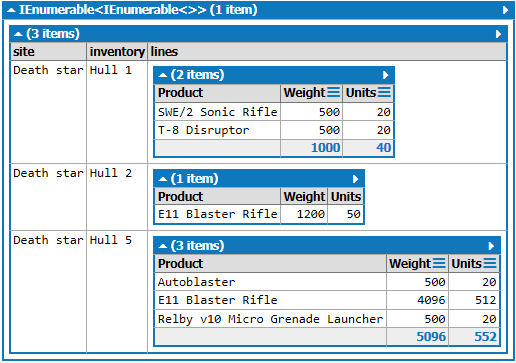
如何使“站点”区别于“库存”的集合,而每个“库存”都有“产品”的集合?
我的实际数据源是一个数据库表,它类似于我的测试对象的结构--它就是这样的。
Linqpad中的测试代码:(注意它引用了Newtonsoft.Json)
void Main()
{
    var contents = new List<DatabaseRecord>()
    {
        new DatabaseRecord{Product="Autoblaster", Inventory="Hull 5", Site="Death star", Units=20,Weight=500},
        new DatabaseRecord{Product="E11 Blaster Rifle", Inventory="Hull 5", Site="Death star", Units=512,Weight=4096},
        new DatabaseRecord{Product="SWE/2 Sonic Rifle", Inventory="Hull 1", Site="Death star", Units=20,Weight=500},
        new DatabaseRecord{Product="Relby v10 Micro Grenade Launcher", Inventory="Hull 5", Site="Death star", Units=20,Weight=500},
        new DatabaseRecord{Product="T-8 Disruptor", Inventory="Hull 1", Site="Death star", Units=20,Weight=500},
        new DatabaseRecord{Product="E11 Blaster Rifle", Inventory="Hull 2", Site="Death star", Units=50,Weight=1200}
    };

    var inventorycontent = from row in contents
                    group row by row.Site into sites
                    orderby sites.Key
                    select from inventory in sites
                        group inventory by inventory.Inventory into inventories
                           orderby inventories.Key
                           select new
                           {
                               site = sites.Key,
                               inventory = inventories.Key,
                               lines = inventories.Select(i => new { i.Product, i.Weight, i.Units })
                           };

    contents.Dump();
    inventorycontent.Dump();

    JsonConvert.SerializeObject(inventorycontent, Newtonsoft.Json.Formatting.Indented).Dump();
}

// Define other methods and classes here
class DatabaseRecord
{
    public string Product { get; set; }
    public string Inventory { get; set; }
    public string Site { get; set; }
    public int Units { get; set; }
    public double Weight { get; set; }

}
JSON产出:
[
  [
    {
      "site": "Death star",
      "inventory": "Hull 1",
      "lines": [
        {
          "Product": "SWE/2 Sonic Rifle",
          "Weight": 500.0,
          "Units": 20
        },
        {
          "Product": "T-8 Disruptor",
          "Weight": 500.0,
          "Units": 20
        }
      ]
    },
    {
      "site": "Death star",
      "inventory": "Hull 2",
      "lines": [
        {
          "Product": "E11 Blaster Rifle",
          "Weight": 1200.0,
          "Units": 50
        }
      ]
    },
    {
      "site": "Death star",
      "inventory": "Hull 5",
      "lines": [
        {
          "Product": "Autoblaster",
          "Weight": 500.0,
          "Units": 20
        },
        {
          "Product": "E11 Blaster Rifle",
          "Weight": 4096.0,
          "Units": 512
        },
        {
          "Product": "Relby v10 Micro Grenade Launcher",
          "Weight": 500.0,
          "Units": 20
        }
      ]
    }
  ]
]
建议的正确输出样本:
{
  "sites":[{
    "site": "Death star",
    "inventories":[
      {
        "name":"Hull 1",
        "lines":[{
          "Product": "SWE/2 Sonic Rifle",
          "Weight": 500.0,
          "Units": 20
        },
        {
          "Product": "T-8 Disruptor",
          "Weight": 500.0,
          "Units": 20
        }]
      },
      {
        "name":"Hull 2",
        "lines":[{
          "Product": "SWE/2 Sonic Rifle",
          "Weight": 500.0,
          "Units": 20
        }]
      }
      ]
    },
    {"site": "Other site",
    "inventories":[
      {
        "name":"Hull 1",
        "lines":[{
          "Product": "SWE/2 Sonic Rifle",
          "Weight": 500.0,
          "Units": 20
        }]
      }]
    }]
}回答 1
Stack Overflow用户
回答已采纳
发布于 2021-09-13 15:10:27
好的,我有一个使用字典的解决方案,它可以正确地分组所有内容:
           //first get everything properly grouped with dictionaries
           var result = contents
            .GroupBy(x => x.Site)
            .ToDictionary(g => g.Key, g => g
                                .GroupBy(i => i.Inventory)
                                .ToDictionary(i => i.Key, i => i
                                        .Select(a => new
                                            {
                                                Product = a.Product,
                                                Weight = a.Weight,
                                                Units = a.Units
                                            })
                                            .ToList()));

            //project to a new object that matches your desired json
            var formattedResult = new
            {
                sites = (from r in result
                         select new
                         {
                             site = r.Key,
                             inventories = (from i in r.Value select new { name = i.Key, lines = i.Value }).ToList()
                         }).ToList()
            };
这是输出json:
{
   "sites": [
    {
      "site": "Death star",
      "inventories": [
        {
          "name": "Hull 5",
          "lines": [
            {
              "Product": "Autoblaster",
              "Weight": 500.0,
              "Units": 20
            },
            {
              "Product": "E11 Blaster Rifle",
              "Weight": 4096.0,
              "Units": 512
            },
            {
              "Product": "Relby v10 Micro Grenade Launcher",
              "Weight": 500.0,
              "Units": 20
            }
          ]
        },
        {
          "name": "Hull 1",
          "lines": [
            {
              "Product": "SWE/2 Sonic Rifle",
              "Weight": 500.0,
              "Units": 20
            },
            {
              "Product": "T-8 Disruptor",
              "Weight": 500.0,
              "Units": 20
            }
          ]
        },
        {
          "name": "Hull 2",
          "lines": [
            {
              "Product": "E11 Blaster Rifle",
              "Weight": 1200.0,
              "Units": 50
            }
          ]
        }
      ]
    }
  ]
}
如您所见,我按站点分组,然后将其编成字典,然后按库存进行分组,并将其编成另一个字典,其中包含一个产品列表作为值。
所以基本上结果是
Dictionary<string, Dictionary<string, List<Products>>>字典键是网站,库存名称。
每次我必须像这样构建层次结构json时,我都使用这个GroupBy -->>字典。
页面原文内容由Stack Overflow提供。腾讯云小微IT领域专用引擎提供翻译支持
原文链接:
https://stackoverflow.com/questions/69164849
复制相关文章
相似问题
腾讯云开发者

Copyright © 2013 - 2026 Tencent Cloud. All Rights Reserved. 腾讯云 版权所有
深圳市腾讯计算机系统有限公司 ICP备案/许可证号:粤B2-20090059  粤公网安备44030502008569号
腾讯云计算(北京)有限责任公司 京ICP证150476号 | 京ICP备11018762号