
删除shinydashboardPlus::carousel中指标的阴影背景和边框
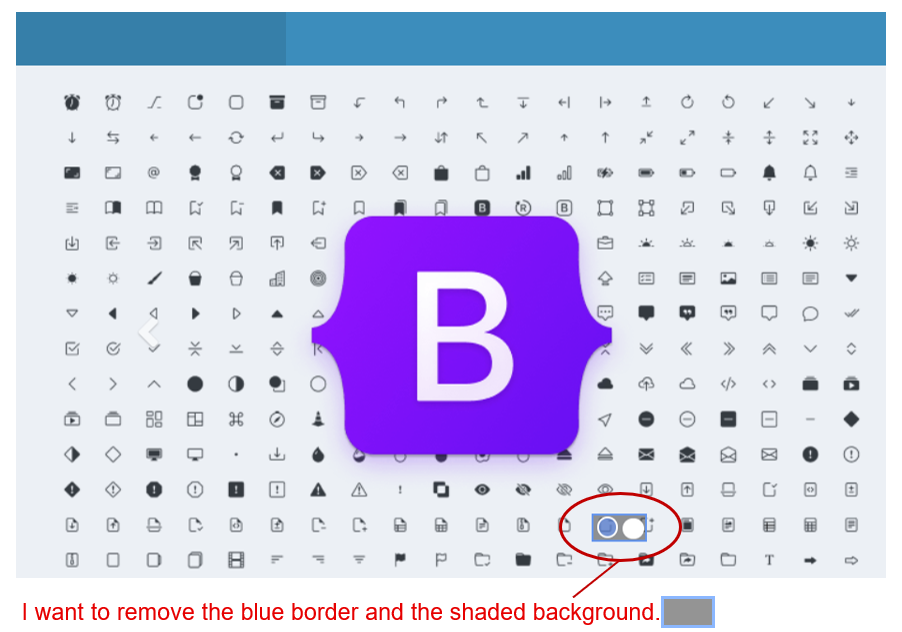
我使用{shinydashboard}和{shinydashboardPlus}来显示carousel。当我单击旋转木马指示器时,会显示背景阴影和蓝色边框(在早期版本的shinydashboardPlus::carousel中不是这样,我在下面的代码中添加了使用过的包版本)。我在火狐浏览器和边缘浏览器中查过这个。我想同时移除(方框和边框),但不知道如何处理CSS周。我已经设法隐藏了.carousel-caption,但是在玩了一段时间DOM检查器之后,我还没有对旋转木马指示器周围的小盒子做同样的事情。
我的问题是识别具有阴影背景和蓝色边框作为属性的对象的类。一旦我弄明白了,应该很容易改变它。
任何帮助都很感激。
# Windows 10 64bit, R 4.1.0
library(shiny) # 1.6
library(shinydashboard) # 0.7.1
library(shinydashboardPlus) # 2.0.3

shinyApp(ui = dashboardPage(

  title = "Test",

  header  = dashboardHeader(),

  sidebar = dashboardSidebar(disable = TRUE,
                             width = "0px",
                             collapsed = TRUE),

  body = dashboardBody(

    tags$head(
      tags$style(HTML("
      .carousel-caption {
        display: none !important;
      }
      "))
    ),

    carousel(
      id = "mycarousel",
      carouselItem(
        caption = "Item 1",
        tags$img(src = "https://getbootstrap.com/docs/5.1/assets/img/bootstrap-icons.png")
      ),
      carouselItem(
        caption = "Item 2",
        tags$img(src = "https://getbootstrap.com/docs/5.1/assets/img/bootstrap-icons.png")
      )
    )
    ) # close dashboardBody
  ), # close dashboardPage
server = function(input, output) {}
)
回答 1
Stack Overflow用户
发布于 2021-09-23 21:38:58
这是因为从1.6开始,闪亮的人们决定加入的可访问性插件。以前没什么问题。这真烦人。我试图让他们有一个选项,选择加载或不加载这个插件的启动,但他们拒绝了。您可以从本期中阅读。
为了解决您的问题,我添加了一些CSS样式:
# Windows 10 64bit, R 4.1.0
library(shiny) # 1.6
library(shinydashboard) # 0.7.1
library(shinydashboardPlus) # 2.0.3

shinyApp(ui = dashboardPage(
  title = "Test",
  header  = dashboardHeader(),
  sidebar = dashboardSidebar(disable = TRUE,
                             width = "0px",
                             collapsed = TRUE),

  body = dashboardBody(

    tags$head(
      tags$style(HTML("
      .carousel-caption {
        display: none !important;
      }
      a.carousel-control:focus {
        outline: none;
        /*change background-image to none if want to remove black bars on right*/
        background-image: linear-gradient(to right, transparent 0px, rgba(0,0,0,0.5) 100%);;
        box-shadow: none;
      }
      a.carousel-control.left:focus {
        /*change background-image to none if want to remove black bars on left*/
          background-image: linear-gradient(to right,rgba(0,0,0,.5) 0,rgba(0,0,0,.0001) 100%);
      }
      .carousel-tablist-highlight.focus {
        outline: none;
        background-color: transparent;
      }
      "))
    ),
    carousel(
      id = "mycarousel",
      carouselItem(
        caption = "Item 1",
        tags$img(src = "https://getbootstrap.com/docs/5.1/assets/img/bootstrap-icons.png")
      ),
      carouselItem(
        caption = "Item 2",
        tags$img(src = "https://getbootstrap.com/docs/5.1/assets/img/bootstrap-icons.png")
      )
    )
  ) # close dashboardBody
), # close dashboardPage
server = function(input, output) {}
)
第一条规则是你加的。第二和第三条规则是在单击左右栏时移除丑陋的框,但我没有移除周围的黑影。您可以按照我留下的注释说明删除它们。最后一条规则是你真正想要的。如果你不关心左边和右边的酒吧,那就离开最后一个吧。
https://stackoverflow.com/questions/69254476
复制相似问题
腾讯云开发者

Copyright © 2013 - 2026 Tencent Cloud. All Rights Reserved. 腾讯云 版权所有
深圳市腾讯计算机系统有限公司 ICP备案/许可证号:粤B2-20090059  粤公网安备44030502008569号
腾讯云计算(北京)有限责任公司 京ICP证150476号 | 京ICP备11018762号