
TypeError:寄存器不是一种反应钩子形式的函数。
TypeError:寄存器不是一种反应钩子形式的函数。
提问于 2021-09-20 10:17:48
我有三个表单组件:
- CreateInvoice.js (父组件表单)
- Item.js (儿童部件)
- Input.js (带有一些样式的简单输入)当我试图使用此代码访问
register方法到Item.js文件时,它将显示以下错误消息
TypeError: register is not a function
Input
src/components/Input.js:5
  2 |
  3 | const Input = ({ inputName, readOnly, register }) => {
  4 |     return (
> 5 |         <input {...(readOnly && { disabled: true, readOnly, value: 0 })} type="text" id={inputName} className="w-full bg-primaryOne p-3 rounded-md shadow-md border border-borderOne focus:outline-none focus:border-secondaryOne transition text-white font-bold text-xs" {...register(inputName, { required: true })} />
  6 |     )
  7 | }
  8 |
但是,当我在useForm中直接调用Item.js时,它不会显示错误消息,而且当我向表单中添加一个新项时,它会向发票数组添加一个空对象,如下所示。
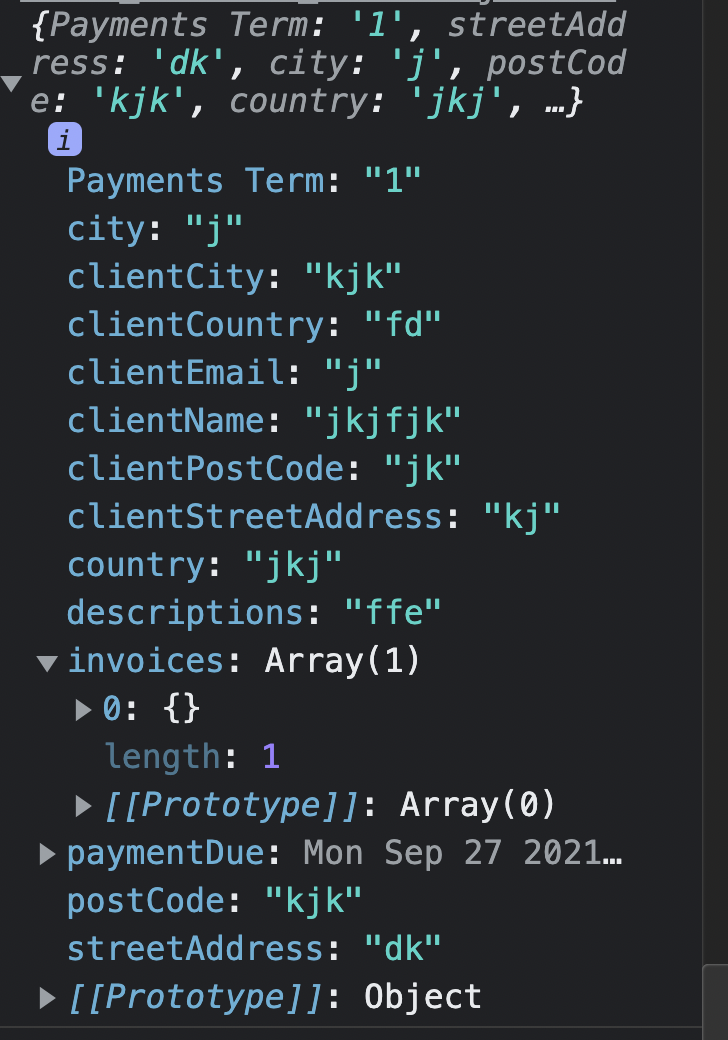
任何人,请帮我解决这个问题。
输入组件代码(Input.js):
import React from 'react'

const Input = ({ inputName, readOnly, register }) => {
    return (
        <input {...(readOnly && { disabled: true, readOnly, value: 0 })} type="text" id={inputName} className="w-full bg-primaryOne p-3 rounded-md shadow-md border border-borderOne focus:outline-none focus:border-secondaryOne transition text-white font-bold text-xs" {...register(inputName, { required: true })} />
    )
}

export default Input
完整的表单代码(CreateInvoice.js):
import React, { useState } from 'react'
import { useForm, Controller, useFieldArray, FormProvider } from "react-hook-form";
import DatePicker from 'react-datepicker'
import "react-datepicker/dist/react-datepicker.css";
import Label from './Label';
import Input from './Input';
import Item from './Item';
// import { useDispatch } from 'react-redux';
// import { createInvoice } from '../actions/invoices';

const CreateInvoice = ({ openForm, setOpenForm }) => {
    const { register, control, handleSubmit, errors } = useForm();
    const [newItems, setNewItems] = useState([]);

    const { fields, append, remove } = useFieldArray({
        control,
        name: "invoices"
    });
    // const dispatch = useDispatch();

    const onSubmit = data => {
        console.log(data);
        // dispatch(createInvoice(data));
    };
    return (
        <div className={`transition ${!openForm ? 'transform translate-x-full hidden' : '-translate-x-full'}`}>
            <div className="fixed top-0 left-0 flex items-center justify-center w-full h-screen z-10" onClick={() => setOpenForm(!openForm)}></div>
            <div className="fixed top-0 left-0 z-20 ml-24">
                <FormProvider >
                    <form onSubmit={handleSubmit(onSubmit)} className="w-screen max-w-2xl h-screen bg-primaryTwo p-14">
                        <h1 className="text-white text-2xl font-bold mb-10">Create Invoice</h1>
                        <div className="overflow-scroll w-full h-full flex flex-col pr-7 content-area pb-10">
                            <small className="text-secondaryTwo font-bold text-xs">Bill Form</small>
                            <div>
                                <Label labelName="Street Address" />
                                <Input inputName="streetAddress" register={register} />
                            </div>
                            <div className="flex justify-between flex-wrap">
                                <div>
                                    <Label labelName="City" />
                                    <Input inputName="city" register={register} />
                                </div>
                                <div>
                                    <Label labelName="Post Code" />
                                    <Input inputName="postCode" register={register} />
                                </div>
                                <div>
                                    <Label labelName="Country" />
                                    <Input inputName="country" register={register} />
                                </div>
                            </div>
                            <small className="text-secondaryTwo font-bold text-xs mt-8">Bill To</small>
                            <div>
                                <Label labelName="Client Name" />
                                <Input inputName="clientName" register={register} />
                            </div>
                            <div>
                                <Label labelName="Client Email" />
                                <Input inputName="clientEmail" register={register} />
                            </div>
                            <div>
                                <Label labelName="Street Address" />
                                <Input inputName="clientStreetAddress" register={register} />
                            </div>
                            <div className="flex flex-wrap justify-between">
                                <div>
                                    <Label labelName="City" />
                                    <Input inputName="clientCity" register={register} />
                                </div>
                                <div>
                                    <Label labelName="Post Code" />
                                    <Input inputName="clientPostCode" register={register} />
                                </div>
                                <div>
                                    <Label labelName="Country" />
                                    <Input inputName="clientCountry" register={register} />
                                </div>
                            </div>
                            <div className="flex justify-between">
                                <div className="w-1/2 mr-2">
                                    <Label labelName="Invoice Date" />
                                    <Controller
                                        control={control}
                                        name="paymentDue"
                                        render={({ field }) => (
                                            <DatePicker
                                                className="w-full bg-primaryOne p-3 rounded-md shadow-md border border-borderOne focus:outline-none focus:border-secondaryOne transition text-white font-bold text-xs"
                                                onChange={(date) => field.onChange(date)}
                                                selected={field.value}
                                            />
                                        )}
                                    />
                                </div>
                                <div className="w-1/2 ml-2">
                                    <Label labelName="Payment Terms" />
                                    <select className="w-full bg-primaryOne p-3 rounded-md shadow-md border border-borderOne focus:outline-none focus:border-secondaryOne transition text-white font-bold text-xs" name="Payments Term" id="Payments Term" {...register("Payments Term", { required: true })}>
                                        <option value="1">Next 1 Day</option>
                                        <option value="7">Next 7 Days</option>
                                        <option value="14">Next 14 Days</option>
                                        <option value="30">Next 30 Days</option>
                                    </select>
                                </div>
                            </div>
                            <div>
                                <Label labelName="Descriptions" />
                                <Input inputName="descriptions" register={register} />
                            </div>
                            <p className="text-gray-500 text-lg mt-6 mb-2 font-bold">Item List</p>
                            <div>
                                // in this code I need help
                                {fields.map((invoice, index) => <Item key={invoice.id} index={index} remove={remove} />)}
                            </div>
                            <button className="w-full bg-borderOne hover:bg-primaryOne transition text-white border-none rounded-full mt-4 p-4 text-xs font-bold flex justify-center" onClick=
                                {e => {
                                    e.preventDefault();
                                    append({});
                                }}
                            >
                                <span className="font-semibold mr-1">+</span>Add New Item
                            </button>
                        </div>
                        <div className="flex justify-between py-4">jsx

                            <button className="rounded-full text-neutral text-xs bg-primaryOne outline-none px-8 py-4 font-bold" onClick={() => setOpenForm(!openForm)}>Discard</button>
                            <div className="pr-7">
                                <button className="rounded-full text-neutral text-xs bg-primaryOne outline-none px-8 py-4 font-bold">Save as Draft</button>
                                <input className="rounded-full text-neutral text-xs bg-secondaryTwo outline-none ml-2 px-8 py-4 font-bold" type="submit" value="Save & Send" />
                            </div>
                        </div>
                    </form>
                </FormProvider>
            </div >

        </div >
    )
}

export default CreateInvoice
全子组件(Item.js)代码
import React, { useState } from 'react'
import Input from './Input'
import Label from './Label'
import { useFormContext } from "react-hook-form";

const Item = ({ index, remove }) => {
    const { register } = useFormContext();

    return (
        <div className="flex justify-center items-end">
            <div className="w-3/5">
                <Label labelName="Item Name" />
                <Input inputName="inputName" register={register} />
            </div>
            <div className="w-2/12 mx-3">
                <Label labelName="Qty." />
                <Input inputName="quantity" register={register} />
            </div>
            <div className="w-1/3">
                <Label labelName="Price" />
                <Input inputName="price" register={register} />
            </div>
            <div className="mx-3">
                <Label labelName="Total" />
                <Input inputName="total" register={register} readOnly />
            </div>
            <button className="mb-4" aria-label="delete button" onClick={
                e => {
                    e.preventDefault();
                    remove(index);
                }}
            >
                <svg className="transition fill-current text-gray-400 hover:fill-current hover:text-red-400" width="13" height="16" xmlns="http://www.w3.org/2000/svg"><path d="M11.583 3.556v10.666c0 .982-.795 1.778-1.777 1.778H2.694a1.777 1.777 0 01-1.777-1.778V3.556h10.666zM8.473 0l.888.889h3.111v1.778H.028V.889h3.11L4.029 0h4.444z" fillRule="nonzero" /></svg></button>
        </div>
    )
}

export default Item回答 1
Stack Overflow用户
回答已采纳
发布于 2021-09-20 11:01:59
您缺少将formMethods扩展到<CreateInvoice />组件中的<FormProvider />。
const CreateInvoice = ({ openForm, setOpenForm }) => {
    const formMethods = useForm();
    const { register, control, handleSubmit, formState: { errors } } = formMethods;

    return (
      <FormProvider {...formMethods} >
      ...
      </FormProvider>
    );
}
为第二期:
- 您没有正确注册字段数组项
<input />组件,并且未能设置index,因此RHF无法设置到此fields的链接。查看演示,我刚刚将fieldId作为道具传递给您的<Item />组件。 - 因为v7 RHF的
errors对象是useForm返回的formState属性的一个属性。我更新了上面的代码示例。 - 在调用
defaultValues时,应该为字段数组项设置append。来自文档
当
append、prepend、insert和update字段数组时,obj不可能是空对象,而是需要提供所有输入的defaultValues。

页面原文内容由Stack Overflow提供。腾讯云小微IT领域专用引擎提供翻译支持
原文链接:
https://stackoverflow.com/questions/69252756
复制相关文章
相似问题
腾讯云开发者

Copyright © 2013 - 2026 Tencent Cloud. All Rights Reserved. 腾讯云 版权所有
深圳市腾讯计算机系统有限公司 ICP备案/许可证号:粤B2-20090059  粤公网安备44030502008569号
腾讯云计算(北京)有限责任公司 京ICP证150476号 | 京ICP备11018762号