
如何正确计算时间
如何正确计算时间
提问于 2021-09-25 08:52:54
我做这个有问题:我有一个视频,我想读它,并在它上画圆圈实时。我有三个列,其中有x,y坐标的圆圈,第二次。
x = ['20' , '30' , '40', '50','60' , '70' , '80', '90','100' , '110' ]
y = ['20' , '30' , '40', '50','60' , '70' , '80', '90','100' , '110' ]
times = [1,2,3,4,5,6,7,8,9,10]#Seconds
我想在视频中画出每一秒的坐标,所以
One second, Draw a circle with 20(x) and 20(y)
Two second, Draw a circle with 30(x) and 30(y)
Three second, Draw a circle with 40(x) and 40(y)...
诸若此类。
我试过一些东西,但我真的很坏
import cv2
import numpy as np
import time

a = ['20' , '30' , '40', '50','60' , '70' , '80', '90','100' , '110' ]
b = ['20' , '30' , '40', '50','60' , '70' , '80', '90','100' , '110' ]
time = [1,2,3,4,5,6,7,8,9,10]#Seconds

#ceate a capture object-------------------------------------------------------------------

cap=cv2.VideoCapture(r'C:/Users/aless/Documents/GitHub/Tobii-Glasses-Thesis/video/scenevideo5.mp4')

i=0

while(cap.isOpened()):
   ret, frame = cap.read()
   time_passed = int(cap.get(cv2.CAP_PROP_POS_MSEC))
   if time_passed % (time[i]*1000) and i<=(len(time)-1):
      print(time_passed)
      # draw circles

      cv2.circle(frame, (int(a[i]),int(b[i])), 10, (255, 0, 0), -1)
      cv2.imshow('test', frame)  # draw
      i+=1
   if cv2.waitKey(1) & 0xFF == ord('q'):
      break
cap.release()
cv2.destroyAllWindows()
画完第一圈后,它就不画另一圈了。有人能帮忙吗?
编辑1:我试过这样做,但这会给我带来错误。
错误:(-215:断言失败)函数'cv::cvtColor‘中的_src.empty()
import cv2
import numpy as np
import time

a = ['20' , '30' , '40', '50','60' , '70' , '80', '90','100' , '110' ]
b = ['20' , '30' , '40', '50','60' , '70' , '80', '90','100' , '110' ]
times = [1,2,3,4,5,6,7,8,9,10]#Seconds

#ceate a capture object-------------------------------------------------------------------

cap=cv2.VideoCapture(r'C:/Users/aless/Documents/GitHub/Tobii-Glasses-Thesis/video/scenevideo5.mp4')
count = 0
success = True
fps = int(cap.get(cv2.CAP_PROP_FPS))
i=0

while(cap.isOpened()):
   ret, frame = cap.read()
   time_passed = int(cap.get(cv2.CAP_PROP_POS_MSEC))
   for x,y,t in zip(a,b,times):
      if count%(t*fps) == 0 :

         # draw circles
         cv2.circle(frame, (int(x),int(x)), 10, (255, 0, 0), -1)
         cv2.imshow('test', frame)  # draw
      count+=1

cap.release()
cv2.destroyAllWindows()回答 1
Stack Overflow用户
回答已采纳
发布于 2021-09-25 21:09:02
有两个主要问题:
count += 1应该在for循环之外。- 条件
count % (t*fps) == 0不正确。 你可能是想说是if (count - (t*fps)) == 0如果fps不是整数,我们也可以检查:if abs(count - (t*fps)) <= 0.001如果fps是一个整数,我们只需检查: 如果计数== (t*fps)
调试代码:
与处理某些任意视频文件不同,使用合成视频文件调试代码更简单。
下面的代码创建一个具有运行帧计数器的合成视频:
vid_filename = 'synthetic_video.mp4'
width, height, fps, n_frames = 320, 240, 25, 300

synthetic_out = cv2.VideoWriter(vid_filename, cv2.VideoWriter_fourcc(*'mp4v'), fps, (width, height))

for i in range(n_frames):
    img = np.full((height, width, 3), 60, np.uint8)
    cv2.putText(img, str(i+1), (width//2-40*len(str(i+1)), height//2+40), cv2.FONT_HERSHEY_DUPLEX, 4, (30, 255, 30), 8)  # Green number
    synthetic_out.write(img)

synthetic_out.release()为了进行测试,在cv2.waitKey(1000)之后添加cv2.imshow('test', frame)。
等待整整一秒,我们就可以看到圆圈是否画在正确的框架上。
放置断点,启动调试,并在“监视”窗口中放置相关变量。
示例(使用PyCharm IDE):
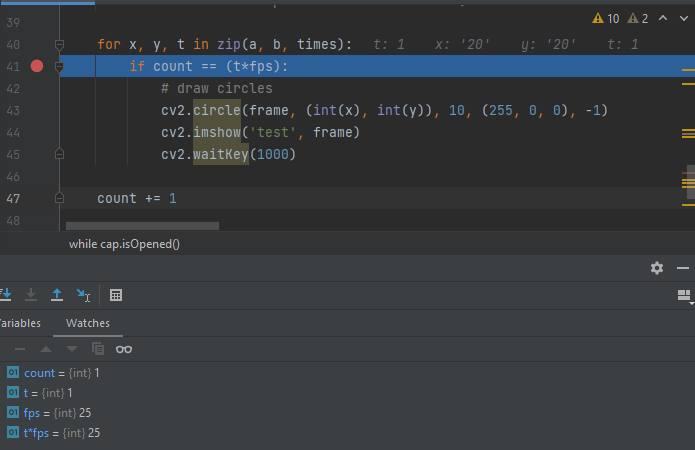
它还有助于逐步执行代码.
完整代码示例:
import numpy as np
import cv2
import os.path

# Build synthetic video for testing (320x240 at 25fps and 300 frames)
################################################################################
vid_filename = 'synthetic_video.mp4'

if not os.path.isfile(vid_filename):  # Create the file only once (if not exists).
    width, height, fps, n_frames = 320, 240, 25, 300

    synthetic_out = cv2.VideoWriter(vid_filename, cv2.VideoWriter_fourcc(*'mp4v'), fps, (width, height))

    for i in range(n_frames):
        img = np.full((height, width, 3), 60, np.uint8)
        cv2.putText(img, str(i+1), (width//2-40*len(str(i+1)), height//2+40), cv2.FONT_HERSHEY_DUPLEX, 4, (30, 255, 30), 8)  # Green number
        synthetic_out.write(img)

    synthetic_out.release()
################################################################################


a = ['20', '30', '40', '50', '60', '70', '80', '90', '100', '110']
b = ['20', '30', '40', '50', '60', '70', '80', '90', '100', '110']
times = [1, 2, 3, 4, 5, 6, 7, 8, 9, 10]  # Seconds

# create a capture object-------------------------------------------------------------------

cap = cv2.VideoCapture(vid_filename)
count = 1  # Start counting from 1 - assume first frame is 1 and not zero (draw a circle on frames 25, 50, 75 and not 26, 51, 76...)
fps = int(cap.get(cv2.CAP_PROP_FPS))
i = 0

while cap.isOpened():
    ret, frame = cap.read()

    if ret is False:
        break  # Break loop in case ret is false (should be false after the last frame)

    for x, y, t in zip(a, b, times):
        if count == (t*fps):
            # draw circles
            cv2.circle(frame, (int(x), int(y)), 10, (255, 0, 0), -1)
            cv2.imshow('test', frame)
            cv2.waitKey(1000)

    count += 1

cap.release()
cv2.destroyAllWindows()
输出样本:
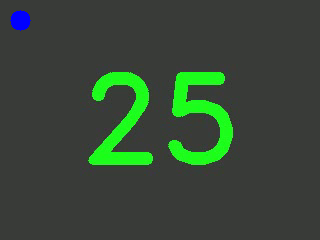
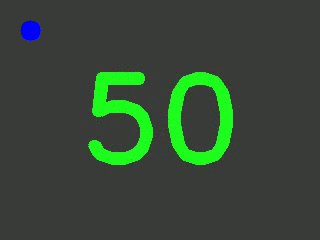
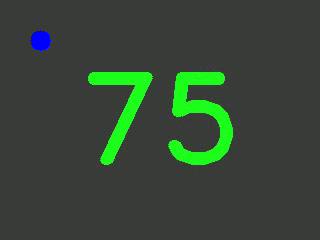
页面原文内容由Stack Overflow提供。腾讯云小微IT领域专用引擎提供翻译支持
原文链接:
https://stackoverflow.com/questions/69324588
复制相关文章
相似问题
腾讯云开发者

Copyright © 2013 - 2026 Tencent Cloud. All Rights Reserved. 腾讯云 版权所有
深圳市腾讯计算机系统有限公司 ICP备案/许可证号:粤B2-20090059  粤公网安备44030502008569号
腾讯云计算(北京)有限责任公司 京ICP证150476号 | 京ICP备11018762号