
将Firebase实时数据库json响应从_InternalLinkedHashMap<Object?、Object?>转换为Map<String、dynamic>
我的Firebase实时数据库中有一个数据库,其子数据库如下所示:
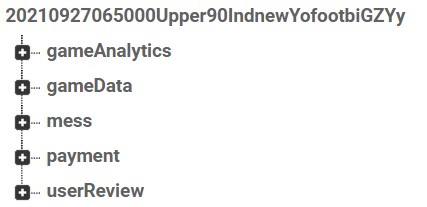
下面是我从我的firebase调用中在我的应用程序中接收到的JSON:
{
  "gameAnalytics" : {
    "log" : {
      "20210926073039AbMc4uSXywqpK9OcusSV" : {
        "cityID" : "newYork",
        "countryCode" : "USA",
        "gameID" : "20210927065000Upper90IndnewYofootbiGZYy",
        "gamePaymentMethod" : "payAtPitch",
        "players" : {
          "umZ5ezrtI6a3UoCDWFDc3hInoNA2" : {
            "pnam" : "Mario Rest",
            "url" : "https://i.ibb.co/blahblah.jpg"
          }
        },
        "sportID" : "football",
        "status" : {
          "202109261130395laHd8h77R" : "completing, send back",
          "20210926113039BcUQ8RdbHs" : "payAtPitch",
          "20210926113039Ck9JsD1uf1" : "playersAdded"
        },
        "timeAndDateString" : "20210926073039",
        "totalCost" : 999,
        "type" : "ADD",
        "userWhoAddedID" : "umZ5ezrtI6a3UoCDWFDc3hInoNA2",
        "wantsToBeOrganizer" : true
      },
      "202109261146540focIuCQRi3wNfSluvkl" : {
        "cityID" : "newYork",
        "countryCode" : "USA",
        "gameID" : "20210927065000Upper90IndnewYofootbiGZYy",
        "gamePaymentMethod" : "payByBalance",
        "players" : {
          "hOBQJtqCCNgGBVrAv2MqeaFJmdu1" : {
            "pnam" : "Seong Kang",
            "url" : "messi"
          }
        },
        "promoCodeData" : "U90qaL",
        "sportID" : "football",
        "status" : {
          "2021092615465414NXsxwW51" : "playersAdded",
          "20210926154654A60TLCmS2t" : "paidByBalance",
          "20210926154654VtYR1t4bMZ" : "completing, send back"
        },
        "timeAndDateString" : "20210926114654",
        "totalCost" : 0,
        "type" : "ADD",
        "userWhoAddedID" : "hOBQJtqCCNgGBVrAv2MqeaFJmdu1",
        "wantsToBeOrganizer" : false
      },
      "20210926204533DjF3lMCMDpvwHfsh6lQJ" : {
        "amountToRefund" : 0,
        "promoCodes" : {
          "hOBQJtqCCNgGBVrAv2MqeaFJmdu1" : "U90qaL"
        },
        "status" : {
          "20210927004533ZWGNEMX27V" : "REFUNDING: 0  null  hOBQJtqCCNgGBVrAv2MqeaFJmdu1"
        },
        "type" : "CANCEL",
        "userWhoAddedID" : "hOBQJtqCCNgGBVrAv2MqeaFJmdu1"
      }
    },
    "pitchCost" : 3500,
    "playerNumbers" : {
      "hoursBefore12" : 2,
      "hoursBefore24" : 1,
      "hoursBefore3" : 2,
      "hoursBefore36" : 1,
      "hoursBefore48" : 1,
      "hoursBefore6" : 2,
      "hoursBefore72" : 1,
      "hoursBefore96" : 1
    },
    "timings" : {
      "added" : {
        "20210917004938" : "organiserID12345",
        "20210926113040" : "umZ5ezrtI6a3UoCDWFDc3hInoNA2",
        "20210926154656" : "hOBQJtqCCNgGBVrAv2MqeaFJmdu1"
      },
      "cancelled" : {
        "20210917004939" : "playersUnCancelled",
        "20210927004522" : "playersCancelled"
      },
      "removed" : {
        "20210926113042" : "organiserID12345"
      }
    }
  },
  "gameData" : {
    "addFakePlayers" : false,
    "can" : true,
    "canAddPromoCode" : true,
    "canDes" : {
      "en" : "somedesc"
    },
    "canMes" : "blahblah.",
    "cost" : 999,
    "cur" : 2,
    "currency" : "usd",
    "dat" : "20210927065000",
    "descriptions" : {
      "en" : "blahblah"
    },
    "dur" : "60 minutes",
    "expOrg" : "",
    "gameTypes" : {
      "en" : "blahblah"
    },
    "hostConfirmed" : false,
    "hostInfo" : {
      "hostDescription" : "blahblah",
      "hostNickname" : "Mario R",
      "hostPhoto" : "https://i.ibb.co/blahblah.jpg",
      "isSuperHost" : false
    },
    "lid" : "Upper90IndoorQueensabcde739219515176663407563157034467ap0mr",
    "max" : 15,
    "mes" : "blahblah",
    "mes1" : "my disappointment",
    "mes2" : "is immessurable",
    "mes3" : "and my day",
    "payAtPitchMessage" : {
      "en" : "is ruined"
    },
    "paymentType" : "justOnline",
    "paymentsAllowed" : [ "card" ],
    "pla1" : {
      "hOBQJtqCCNgGBVrAv2MqeaFJmdu1" : {
        "pnam" : "blahblah",
        "url" : "messi"
      }
    },
    "pla2" : {
      "umZ5ezrtI6a3UoCDWFDc3hInoNA2" : {
        "organizer" : true,
        "pnam" : "Mario Rest",
        "url" : "https://i.ibb.co/blahblah.jpg"
      }
    },
    "pub" : false,
    "removalAllowed" : true,
    "showHostConfirmButton" : false,
    "spotEn" : true,
    "surl" : "https://someurl",
    "title" : {
      "en" : "ok"
    }
  },
  "mess" : {
    "-MjlDj5szZxKaDs0p3CN" : {
      "mes" : "ok",
      "tim" : "20210916204938",
      "unm" : "blahblah",
      "usi" : "XwyPhbjzeKNYVczPdCPFTG0DZbj1"
    },
    "-MjlDj6bnMvKUO76EjLE" : {
      "mes" : "ok",
      "tim" : "20210916204938",
      "unm" : "blahblah",
      "usi" : "XwyPhbjzeKNYVczPdCPFTG0DZbj1"
    },
    "-MjlDj7SeqRV0KzRzFFX" : {
      "mes" : "ok",
      "tim" : "20210916204939",
      "unm" : "bllblb",
      "usi" : "XwyPhbjzeKNYVczPdCPFTG0DZbj1"
    },
    "-MjlDj8C-p406IK8I-cb" : {
      "mes" : "msg",
      "tim" : "20210916204940",
      "unm" : "msg",
      "usi" : "XwyPhbjzeKNYVczPdCPFTG0DZbj1"
    }
  },
  "payment" : {
    "playerPaymentStatus" : {
      "hOBQJtqCCNgGBVrAv2MqeaFJmdu1" : {
        "date" : "20210927004533",
        "refundedAmount" : 0,
        "stripePaymentNotConfirmed" : true,
        "type" : "notPaidForGame",
        "userWhoAddedID" : "hOBQJtqCCNgGBVrAv2MqeaFJmdu1"
      }
    }
  },
  "userReview" : {
    "showReview" : true
  }
}我试图通过使用Map<String, dynamic>,Map.from(),如下所示:
class PickUpGameItem extends StatefulWidget {
  final String gameId;

  const PickUpGameItem(this.gameId, [Key? key]) : super(key: key);

  @override
  _PickUpGameItemState createState() => _PickUpGameItemState();
}

class _PickUpGameItemState extends State<PickUpGameItem> {
  late StreamSubscription _pickUpGameDetailsStreamSub;
  PickUpGameDetails? gameDetails;

  @override
  void initState() {
    super.initState();
    _setListeners();
  }

  @override
  void deactivate() {
    _pickUpGameDetailsStreamSub.cancel();
    super.deactivate();
  }

  void _setListeners() {
    _pickUpGameDetailsStreamSub = FirebaseDatabase()
        .reference()
        .child(
            '.../gamesDetailed/${widget.gameId}/')
        .onValue
        .listen((event) {
      final detailsJson = Map<String, dynamic>.from(event.snapshot.value);
      setState(() {
        gameDetails = PickUpGameDetails.fromJson(detailsJson);
        print(gameDetails.toString());
      });
    });
  }

  @override
  Widget build(BuildContext context) {
    return Container(
      padding: const EdgeInsets.symmetric(horizontal: 20, vertical: 20),
      child: Row(
        children: [
          ClipRRect(
            borderRadius: BorderRadius.circular(8.0),
            child: const Image(
              fit: BoxFit.fill,
              width: 80.0,
              height: 80.0,
              image: AssetImage('assets/images/temp_city_img.jpg'),
            ),
          ),
          const SizedBox(
            width: 10,
          ),
          Expanded(
            child: Column(
              crossAxisAlignment: CrossAxisAlignment.start,
              children: const [
                Text(
                  'Lorem ipsum dolor sit amet this is a test ......................................',
                  style: TextStyle(
                      color: Colors.black,
                      fontWeight: FontWeight.bold,
                      fontSize: 16),
                  maxLines: 1,
                  overflow: TextOverflow.ellipsis,
                ),
                SizedBox(
                  height: 10,
                ),
                Text(
                  'Lorem ipsum dolor sit amet this is a test ......................................',
                  style: TextStyle(
                      color: Colors.grey,
                      fontWeight: FontWeight.normal,
                      fontSize: 14),
                  maxLines: 1,
                  overflow: TextOverflow.ellipsis,
                ),
              ],
            ),
          ),
          const SizedBox(
            width: 10,
          ),
          Flexible(
            flex: 0,
            child: Column(
              crossAxisAlignment: CrossAxisAlignment.start,
              children: [
                const Text(
                  'Football',
                  style: TextStyle(
                      color: Colors.black,
                      fontWeight: FontWeight.bold,
                      fontSize: 16),
                ),
                const SizedBox(
                  height: 10,
                ),
                Row(
                  children: const [
                    Text(
                      '14/16',
                      style: TextStyle(
                          color: Colors.grey,
                          fontWeight: FontWeight.normal,
                          fontSize: 14),
                    ),
                    SizedBox(
                      width: 5,
                    ),
                    Icon(Icons.ac_unit)
                  ],
                ),
              ],
            ),
          ),
        ],
      ),
    );
  }
}当我运行这个应用程序时,我会看到一个错误,它说内部链接的哈希映射不是映射的一个子类型,并且在调用GameAnalytics.fromJson()时会发生错误。我见过多个类似的帖子,但是他们的错误提到了一个_InternalLinkedHashMap映射。为什么在我的响应中使用Object?作为键和值的链接哈希映射?
[ERROR:flutter/lib/ui/ui_dart_state.cc(209)] Unhandled Exception: type '_InternalLinkedHashMap<Object?, Object?>' is not a subtype of type 'Map<String, dynamic>'下面是我的省道模型类:
PickUpGameDetails.dart:
class PickUpGameDetails {
  GameAnalytics? gameAnalytics;
  GameData? gameData;
  UserReview? userReview;

  PickUpGameDetails(
      {required this.gameAnalytics,
      required this.gameData,
      required this.userReview});

  PickUpGameDetails.fromJson(Map<String, dynamic> json) {
    gameAnalytics = json['gameAnalytics'] != null
        ? GameAnalytics.fromJson(json['gameAnalytics'])
        : null;
    gameData =
        json['gameData'] != null ? GameData.fromJson(json['gameData']) : null;
    userReview = json['userReview'] != null
        ? UserReview.fromJson(json['userReview'])
        : null;
  }

  Map<String, dynamic> toJson() {
    final Map<String, dynamic> data = new Map<String, dynamic>();
    if (gameAnalytics != null) {
      data['gameAnalytics'] = gameAnalytics!.toJson();
    }
    if (gameData != null) {
      data['gameData'] = gameData!.toJson();
    }
    if (userReview != null) {
      data['userReview'] = userReview!.toJson();
    }
    return data;
  }
}
GameAnalytics.dart:
class GameAnalytics {
  late int pitchCost;
  PlayerNumbers? playerNumbers;
  Timings? timings;

  GameAnalytics(
      {required this.pitchCost,
      required this.playerNumbers,
      required this.timings});

  GameAnalytics.fromJson(Map<String, dynamic> json) {
    pitchCost = json['pitchCost'];
    playerNumbers = json['playerNumbers'] != null
        ? PlayerNumbers.fromJson(json['playerNumbers'])
        : null;
    timings =
        json['timings'] != null ? Timings.fromJson(json['timings']) : null;
  }

  Map<String, dynamic> toJson() {
    final Map<String, dynamic> data = <String, dynamic>{};
    data['pitchCost'] = pitchCost;
    if (playerNumbers != null) {
      data['playerNumbers'] = playerNumbers!.toJson();
    }
    if (timings != null) {
      data['timings'] = timings!.toJson();
    }
    return data;
  }
}
PlayerNumbers.dart:
class PlayerNumbers {
  late int hoursBefore12;
  late int hoursBefore24;
  late int hoursBefore3;
  late int hoursBefore36;
  late int hoursBefore48;
  late int hoursBefore6;
  late int hoursBefore72;
  late int hoursBefore96;

  PlayerNumbers(
      {required this.hoursBefore12,
      required this.hoursBefore24,
      required this.hoursBefore3,
      required this.hoursBefore36,
      required this.hoursBefore48,
      required this.hoursBefore6,
      required this.hoursBefore72,
      required this.hoursBefore96});

  PlayerNumbers.fromJson(Map<String, dynamic> json) {
    hoursBefore12 = json['hoursBefore12'];
    hoursBefore24 = json['hoursBefore24'];
    hoursBefore3 = json['hoursBefore3'];
    hoursBefore36 = json['hoursBefore36'];
    hoursBefore48 = json['hoursBefore48'];
    hoursBefore6 = json['hoursBefore6'];
    hoursBefore72 = json['hoursBefore72'];
    hoursBefore96 = json['hoursBefore96'];
  }

  Map<String, dynamic> toJson() {
    final Map<String, dynamic> data = <String, dynamic>{};
    data['hoursBefore12'] = hoursBefore12;
    data['hoursBefore24'] = hoursBefore24;
    data['hoursBefore3'] = hoursBefore3;
    data['hoursBefore36'] = hoursBefore36;
    data['hoursBefore48'] = hoursBefore48;
    data['hoursBefore6'] = hoursBefore6;
    data['hoursBefore72'] = hoursBefore72;
    data['hoursBefore96'] = hoursBefore96;
    return data;
  }
}
Timings.dart:
class Timings {
  Map<String, dynamic>? added;
  Map<String, dynamic>? cancelled;
  Map<String, dynamic>? removed;

  Timings(
      {required this.added, required this.cancelled, required this.removed});

  Timings.fromJson(Map<String, dynamic> json) {
    added = json['added'];
    cancelled = json['cancelled'];
  }

  Map<String, dynamic> toJson() {
    final Map<String, dynamic> data = <String, dynamic>{};
    if (added != null) {
      data['added'] = added;
    }
    if (cancelled != null) {
      data['cancelled'] = cancelled;
    }
    if (removed != null) {
      data['removed'] = removed;
    }
    return data;
  }
}
UserReview.dart:
class UserReview {
  bool? showReview;

  UserReview({required this.showReview});

  UserReview.fromJson(Map<String, dynamic> json) {
    showReview = json['showReview'];
  }

  Map<String, dynamic> toJson() {
    final Map<String, dynamic> data = <String, dynamic>{};
    data['showReview'] = showReview;
    return data;
  }
}
GameData.dart:
class GameData {
  late bool addFakePlayers;
  late bool hasBeenCancelled;
  late bool canAddPromoCode;
  late String cancellationDescription;
  late String cancellationMsg;
  late int cost;
  late int cur;
  late String currency;
  late String dateTime;
  late String description;
  late String durationMsg;
  late String expOrg;
  late String gameTypeMsg;
  late bool hostConfirmed;
  late String lid;
  late int maxPlayers;
  late List<String> messages;
  late String payAtPitchMessage;
  late String paymentType;
  late List<String> paymentsAllowed;
  Team? team1;
  Team? team2;
  late bool pub;
  late bool removalAllowed;
  late bool showHostConfirmButton;
  late bool spotEn;
  late String surl;
  late String title;

  GameData(
      {required this.addFakePlayers,
      required this.hasBeenCancelled,
      required this.canAddPromoCode,
      required this.cancellationDescription,
      required this.cancellationMsg,
      required this.cost,
      required this.cur,
      required this.currency,
      required this.dateTime,
      required this.description,
      required this.durationMsg,
      required this.expOrg,
      required this.gameTypeMsg,
      required this.hostConfirmed,
      required this.lid,
      required this.maxPlayers,
      required this.messages,
      required this.payAtPitchMessage,
      required this.paymentType,
      required this.paymentsAllowed,
      required this.team1,
      required this.team2,
      required this.pub,
      required this.removalAllowed,
      required this.showHostConfirmButton,
      required this.spotEn,
      required this.surl,
      required this.title});

  GameData.fromJson(Map<String, dynamic> json) {
    addFakePlayers = json['addFakePlayers'];
    hasBeenCancelled = json['can'];
    canAddPromoCode = json['canAddPromoCode'];
    cancellationDescription = json['canDes']['en'];
    cancellationMsg = json['canMes'];
    cost = json['cost'];
    cur = json['cur'];
    currency = json['currency'];
    dateTime = json['dat'];
    description = json['descriptions']['en'];
    durationMsg = json['dur'];
    expOrg = json['expOrg'];
    gameTypeMsg = json['gameTypes']['en'];
    hostConfirmed = json['hostConfirmed'];
    lid = json['lid'];
    maxPlayers = json['max'];
    messages.add(json['mes']);
    messages.add(json['mes1']);
    messages.add(json['mes2']);
    messages.add(json['mes3']);
    payAtPitchMessage = json['payAtPitchMessage']['en'];
    paymentType = json['paymentType'];
    paymentsAllowed = json['paymentsAllowed'].cast<String>();
    team1 = json['pla1'] != null ? Team.fromJson(json['pla1']) : null;
    team2 = json['pla2'] != null ? Team.fromJson(json['pla2']) : null;
    pub = json['pub'];
    removalAllowed = json['removalAllowed'];
    showHostConfirmButton = json['showHostConfirmButton'];
    spotEn = json['spotEn'];
    surl = json['surl'];
    title = json['title']['en'];
  }

  Map<String, dynamic> toJson() {
    final Map<String, dynamic> data = <String, dynamic>{};
    data['addFakePlayers'] = addFakePlayers;
    data['can'] = hasBeenCancelled;
    data['canAddPromoCode'] = canAddPromoCode;
    data['canDes'] = cancellationDescription;
    data['canMes'] = cancellationMsg;
    data['cost'] = cost;
    data['cur'] = cur;
    data['currency'] = currency;
    data['dat'] = dateTime;
    data['descriptions'] = description;
    data['dur'] = durationMsg;
    data['expOrg'] = expOrg;
    data['gameTypes'] = gameTypeMsg;
    data['hostConfirmed'] = hostConfirmed;
    data['lid'] = lid;
    data['max'] = maxPlayers;
    data['mes'] = messages.elementAt(0);
    data['mes1'] = messages.elementAt(1);
    data['mes2'] = messages.elementAt(2);
    data['mes3'] = messages.elementAt(3);
    data['payAtPitchMessage'] = payAtPitchMessage;
    data['paymentType'] = paymentType;
    data['paymentsAllowed'] = paymentsAllowed;
    data['pla1'] = team1?.toJson();
    data['pla2'] = team2?.toJson();
    data['pub'] = pub;
    data['removalAllowed'] = removalAllowed;
    data['showHostConfirmButton'] = showHostConfirmButton;
    data['spotEn'] = spotEn;
    data['surl'] = surl;
    data['title'] = title;
    return data;
  }
}
Team.dart:
class Team {
  Map<String, Player> players;

  Team({required this.players});

  factory Team.fromJson(Map<String, dynamic> json) {
    Map<String, Player> _players = {};
    for (String key in json.keys) {
      _players[key] = Player.fromJson(json[key]);
    }
    return Team(players: _players);
  }

  Map<String, dynamic> toJson() {
    Map<String, dynamic> json = <String, dynamic>{};
    for (String key in players.keys) {
      json[key] = players[key];
    }
    return json;
  }
}
Player.dart:
class Player {
  String name;
  String url;

  Player({required this.name, required this.url});

  factory Player.fromJson(Map<String, dynamic> json) {
    return Player(name: json['pname'], url: json['url']);
  }

  Map<String, dynamic> toJson() {
    final json = <String, dynamic>{};
    json['pname'] = name;
    json['url'] = url;
    return json;
  }
}回答 4
Stack Overflow用户
发布于 2021-10-03 09:14:49
在搜索了Flutter的存储库中的多个Stack帖子和GitHub问题之后,我遇到了一条神奇的界线,这是从现在开始让事情开始工作的唯一方法。在flutter的存储库上提出这个建议的人也提到了这是多么奇怪,但我猜想Firebase的响应不是以有效的JSON格式(?)。就目前而言,如果你想要一些有用的东西,很可能是这样的:
jsonDecode(jsonEncode(event.snapshot.value)));请注意,这可能不利于性能。
Stack Overflow用户
发布于 2022-03-12 18:49:42
在研究了Firebase实时数据库返回的json值是如何实际出现在颤振中之后,我才得以解决这个问题。
出现这种未处理的类型转换错误是因为RTDB不返回jsonDecode()可以解析的json对象。jsonDecode可以解析以下json字符串:
final source = '{"lastUpdatedID": "R7FIlRodwblI4w", "lastUpdateOn": "1647094887285"}';但RTDB返回以下json字符串:
final source = '{lastUpdatedID: R7FIlRodwblI4w, lastUpdateOn: 1647094887285}';注意双引号丢失了。这就是为什么jsonDecode抛出一个错误。所以,首先我们需要加双引号。
final jsonString = origin
      .replaceAll(RegExp(r'\s+'), '')   // To remove all white spaces
      .replaceAll(RegExp(r':'), '":"')  // To add double-quotes on both sides of colon
      .replaceAll(RegExp(r','), '","')  // To add double-quotes on both sides of comma
      .replaceAll(RegExp(r'{'), '{"')   // To add double-quotes after every open curly bracket
      .replaceAll(RegExp(r'}'), '"}');  // To add double-quotes before every closing curly bracket
现在我们解码字符串:-
final decoded = jsonDecode(jsonString);我们还创建了一个数据模型类:-
class Model {
  const Model({required this.lastUpdatedID, required this.lastUpdateOn});

  /// This factory constructor parses the [lastUpdateOn] as int (if possible)
  factory Model.fromJson(Map<String, dynamic> json) => Model(
        lastUpdatedID: json['lastUpdatedID'] as String,
        lastUpdateOn: int.tryParse(json['lastUpdateOn']) ?? 0,
      );

  Map<String, dynamic> toJson() => {
        'lastUpdatedID': lastUpdatedID,
        'lastUpdateOn': lastUpdateOn,
      };

  final String lastUpdatedID;
  final int lastUpdateOn;

  @override
  String toString() =>
      'Model(lastUpdatedID: $lastUpdatedID, lastUpdateOn: $lastUpdateOn)';
}
最后,使用fromJson工厂构造函数创建一个模型实例:-
final model = Model.fromJson(value);这是完整的代码:-
import 'dart:convert';

void main() {
  final origin = '{lastUpdatedID: R7FIlRodwblI4w, lastUpdateOn: 1647094887285}';

  final jsonString = origin
      .replaceAll(RegExp(r'\s+'), '')
      .replaceAll(RegExp(r':'), '":"')
      .replaceAll(RegExp(r','), '","')
      .replaceAll(RegExp(r'{'), '{"')
      .replaceAll(RegExp(r'}'), '"}');
  print(jsonString);

  final value = jsonDecode(jsonString);
  print('value.runtimeType : ' + value.runtimeType.toString());
  print('value : ' + value.toString());

  final model = Model.fromJson(value);
  print('model : $model');
}

class Model {
  const Model({required this.lastUpdatedID, required this.lastUpdateOn});

  factory Model.fromJson(Map<String, dynamic> json) => Model(
        lastUpdatedID: json['lastUpdatedID'] as String,
        lastUpdateOn: int.tryParse(json['lastUpdateOn']) ?? 0,
      );

  Map<String, dynamic> toJson() => {
        'lastUpdatedID': lastUpdatedID,
        'lastUpdateOn': lastUpdateOn,
      };

  final String lastUpdatedID;
  final int lastUpdateOn;

  @override
  String toString() =>
      'Model(lastUpdatedID: $lastUpdatedID, lastUpdateOn: $lastUpdateOn)';
}Stack Overflow用户
发布于 2021-09-30 03:21:56
我看到问题在您的fromJson方法中:
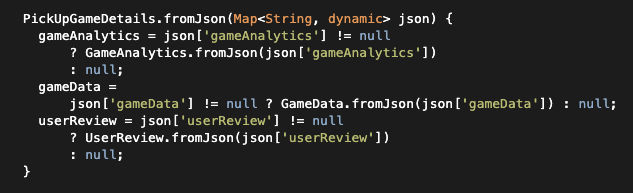
在创建命名构造函数时,有两个可能的语法:
1.使用初始化器快速定义一些参数,而不访问this
在这种情况下,假设您有一个名为PickUpGameDetails.noReview的子类,您将在其中创建一个固定的userReview对象。在这种情况下,您不会处理任何额外的params,只会简化一些params的构造函数。要使此工作正常,您可以在{之前添加初始化器,使用:,类似于这样(在本例中,您甚至不需要使用{ }创建上下文,除非您希望在初始化程序之外执行额外的操作):
PickUpGameDetails.noReview({
  required this.gameAnalytics,
  required this.gameData
}): userReview = {}
2.使用不同的参数并将其转换为对象构造函数。
在这里,我们感兴趣的不仅是从标准对象创建一些变体,而且还要定义一些将输入转换为类参数的方法。
因此,您在{之后处理这个问题,因为我们将能够根据params进行更详细的计算。这部分最大的错误是在处理json之后没有设置类params,这意味着您的对象没有被正确初始化,因为您只为构造函数创建了一些局部变量。但是,由于this是可访问的,并且等待接收params,所以您的代码的快速修复方法是使用this将计算出来的值分配给类参数。
PickUpGameDetails.mock(Map<String, dynamic> json) {
  this.gameAnalytics = json['gameAnalytics'] != null
      ? GameAnalytics.fromJson(json['gameAnalytics'])
      : null;
  this.gameData =
      json['gameData'] != null ? GameData.fromJson(json['gameData']) : null;
  this.userReview = json['userReview'] != null
      ? UserReview.fromJson(json['userReview'])
      : null;
}3.额外费用:factory
还有一个选项,在使用命名构造函数返回不同对象时很常见,这就是Dart的factory的用法,因此您的工厂应该返回一个新构造的对象,它可以为您提供灵活性,甚至可以根据一些额外的参数更改返回对象的类型/子类型。首先,对于您的实现,它将类似于
factory PickUpGameDetails.fromJson(Map<String, dynamic> json) {
  gameAnalytics = json['gameAnalytics'] != null
      ? GameAnalytics.fromJson(json['gameAnalytics'])
      : null;
  gameData =
      json['gameData'] != null ? GameData.fromJson(json['gameData']) : null;
  userReview = json['userReview'] != null
      ? UserReview.fromJson(json['userReview'])
      : null;

  return PickUpGameDetails(
      gameAnalytics: gameAnalytics,
      gameData: gameData,
      userReview: userReview,
    )
}但是,如果您有不同的factory,并且希望在不同的类中进行处理,那么,假设我们有一个基类Game,那么您可以这样做:
factory Game.fromJson(Map<String, dynamic> json) {
  String gameType = json['gameType']
  if (gameType == 'football') {
    return FootballGame.fromJson(json)
  }

  return OtherSportsGame.fromJson(json)
}
通过这种方式,您可以将这个基类设置为负责定义要初始化的类/子类。
https://stackoverflow.com/questions/69345005
复制相似问题
腾讯云开发者

Copyright © 2013 - 2026 Tencent Cloud. All Rights Reserved. 腾讯云 版权所有
深圳市腾讯计算机系统有限公司 ICP备案/许可证号:粤B2-20090059  粤公网安备44030502008569号
腾讯云计算(北京)有限责任公司 京ICP证150476号 | 京ICP备11018762号