
在Heroku部署时,Craco无法构建react
已经做了两天了,很困惑..。尝试了我能在堆栈溢出上找到的所有解决方案。尝试在Heroku上部署带有顺风的MERN堆栈应用程序。看来Craco/顺风给我带来了麻烦。
有什么帮助吗?
“(节点:2326) UnhandledPromiseRejectionWarning:错误:找不到模块‘尾风’
要求堆栈:
- /tmp/build_1f05e363/frontend/craco.config.js
- /tmp/build_1f05e363/frontend/node_modules/@craco/craco/lib/config.js
- /tmp/build_1f05e363/frontend/node_modules/@craco/craco/scripts/build.js "
“
下面发布的错误生成日志
`

-----> Building on the Heroku-20 stack

-----> Using buildpack: mars/create-react-app

-----> React.js (create-react-app) multi app detected

=====> Downloading Buildpack: https://github.com/heroku/heroku-buildpack-multi.git

=====> Detected Framework: Multipack

=====> Downloading Buildpack: https://github.com/heroku/heroku-buildpack-nodejs.git

=====> Detected Framework: Node.js


-----> Creating runtime environment


       NPM_CONFIG_LOGLEVEL=error

       NODE_VERBOSE=false

       NODE_ENV=production

       NODE_MODULES_CACHE=true


-----> Installing binaries

       engines.node (package.json):  14.17.5

       engines.npm (package.json):   unspecified (use default)


       Resolving node version 14.17.5...

       Downloading and installing node 14.17.5...

       Using default npm version: 6.14.14


-----> Restoring cache

       Cached directories were not restored due to a change in version of node, npm, yarn or stack

       Module installation may take longer for this build


-----> Installing dependencies

       Installing node modules


       > nodemon@2.0.12 postinstall /tmp/build_1f05e363/node_modules/nodemon

       > node bin/postinstall || exit 0


       Love nodemon? You can now support the project via the open collective:

        > https://opencollective.com/nodemon/donate


       added 269 packages in 8.641s


-----> Build

       Running heroku-postbuild


       > react-ecommerce@1.0.0 heroku-postbuild /tmp/build_1f05e363

       > NPM_CONFIG_PRODUCTION=false npm install --prefix frontend && npm run build --prefix frontend


       > core-js@2.6.12 postinstall /tmp/build_1f05e363/frontend/node_modules/babel-runtime/node_modules/core-js

       > node -e "try{require('./postinstall')}catch(e){}"


       > core-js@3.16.3 postinstall /tmp/build_1f05e363/frontend/node_modules/core-js

       > node -e "try{require('./postinstall')}catch(e){}"


       > core-js-pure@3.16.3 postinstall /tmp/build_1f05e363/frontend/node_modules/core-js-pure

       > node -e "try{require('./postinstall')}catch(e){}"


       > ejs@2.7.4 postinstall /tmp/build_1f05e363/frontend/node_modules/ejs

       > node ./postinstall.js


       added 1991 packages from 811 contributors in 51.631s


       150 packages are looking for funding

         run `npm fund` for details


       > frontend@0.1.0 build /tmp/build_1f05e363/frontend

       > craco build


`
(node:2326) UnhandledPromiseRejectionWarning: Error: Cannot find module 'tailwindcss'

Require stack:

- /tmp/build_1f05e363/frontend/craco.config.js

- /tmp/build_1f05e363/frontend/node_modules/@craco/craco/lib/config.js

- /tmp/build_1f05e363/frontend/node_modules/@craco/craco/scripts/build.js

    at Function.Module._resolveFilename (internal/modules/cjs/loader.js:889:15)

    at Function.Module._load (internal/modules/cjs/loader.js:745:27)

    at Module.require (internal/modules/cjs/loader.js:961:19)

    at require (internal/modules/cjs/helpers.js:92:18)

    at Object.<anonymous> (/tmp/build_1f05e363/frontend/craco.config.js:6:11)

    at Module._compile (internal/modules/cjs/loader.js:1072:14)

    at Object.Module._extensions..js (internal/modules/cjs/loader.js:1101:10)

    at Module.load (internal/modules/cjs/loader.js:937:32)

    at Function.Module._load (internal/modules/cjs/loader.js:778:12)

    at Module.require (internal/modules/cjs/loader.js:961:19)

(Use `node --trace-warnings ...` to show where the warning was created)

(node:2326) UnhandledPromiseRejectionWarning: Unhandled promise rejection. This error originated either by throwing inside of an async function without a catch block, or by rejecting a promise which was not handled with .catch(). To terminate the node process on unhandled promise rejection, use the CLI flag `--unhandled-rejections=strict` (see https://nodejs.org/api/cli.html#cli_unhandled_rejections_mode). (rejection id: 2)

(node:2326) [DEP0018] DeprecationWarning: Unhandled promise rejections are deprecated. In the future, promise rejections that are not handled will terminate the Node.js process with a non-zero exit code.
`


-----> Caching build

       - node_modules


-----> Pruning devDependencies

       audited 269 packages in 2.577s


       22 packages are looking for funding

         run `npm fund` for details


       found 0 vulnerabilities


-----> Build succeeded!

=====> Downloading Buildpack: https://github.com/mars/create-react-app-inner-buildpack.git#v9.0.0

=====> Detected Framework: React.js (create-react-app)

       Writing `static.json` to support create-react-app

       Enabling runtime environment variables

=====> Downloading Buildpack: https://github.com/heroku/heroku-buildpack-static.git

=====> Detected Framework: Static HTML

-----> Installed nginx 1.19.0 to /app/bin

Using release configuration from last framework (Static HTML).

-----> Discovering process types

       Procfile declares types -> web

-----> Compressing...

       Done: 103.2M

-----> Launching...

       Released v20


`{
"name": "frontend",
"proxy": "http://127.0.0.1:5000",
"version": "0.1.0",
"private": true,
"dependencies": {
"@craco/craco": "^6.2.0",
"@testing-library/jest-dom": "^5.14.1",
"@testing-library/react": "^11.2.7",
"@testing-library/user-event": "^12.8.3",
"axios": "^0.21.1",
"react": "^17.0.2",
"react-bootstrap": "^1.6.1",
"react-dom": "^17.0.2",
"react-paypal-button-v2": "^2.6.3",
"react-redux": "^7.2.5",
"react-router-dom": "^5.2.1",
"react-scripts": "4.0.3",
"redux": "^4.1.1",
"redux-devtools-extension": "^2.13.9",
"redux-thunk": "^2.3.0",
"web-vitals": "^1.1.2"
},
"scripts": {
"start": "craco start",
"build": "craco build",
"test": "craco test",
"eject": "react-scripts eject"
},
"eslintConfig": {
"extends": [
"react-app",
"react-app/jest"
]
},
"browserslist": {
"production": [
">0.2%",
"not dead",
"not op_mini all"
],
"development": [
"last 1 chrome version",
"last 1 firefox version",
"last 1 safari version"
]
},
"devDependencies": {
"autoprefixer": "^9.8.7",
"postcss": "^7.0.38",
"tailwindcss": "npm:@tailwindcss/postcss7-compat@^2.2.16"
}
}我已经尝试过卸载顺风/postcss/自动重定位器,并将其重新安装到依赖项中,在这种情况下,构建仍然不会完成一个Craco构建错误。
我费解了8个小时来一直想解决这个问题.
如果我猛击我的heroku应用程序:
`    Running bash on ⬢ appName123... up, run.4756 (Free)
    ~ $ dir
    Procfile  README.md  backend  frontend  node_modules  package-lock.json  package.json
    ~ $ cd backend
    ~/backend $ dir
    config  controller  data  middleware  models  routes  seeder.js  server.js  utils
    ~/backend $ cd ..
    ~ $ cd frontend
    ~/frontend $ dir
    craco.config.js  node_modules  package-lock.json  package.json  public  src  tailwind.config.js
    ~/frontend $ exit
    exit
`
没有生成文件夹。
我尝试手动安装:
`~/frontend $ npm run build

> frontend@0.1.0 build /app/frontend
> craco build

(node:81) UnhandledPromiseRejectionWarning: Error: Cannot find module 'tailwindcss'
Require stack:
- /app/frontend/craco.config.js
- /app/frontend/node_modules/@craco/craco/lib/config.js
- /app/frontend/node_modules/@craco/craco/scripts/build.js
    at Function.Module._resolveFilename (internal/modules/cjs/loader.js:889:15)
    at Function.Module._load (internal/modules/cjs/loader.js:745:27)
    at Module.require (internal/modules/cjs/loader.js:961:19)
    at require (internal/modules/cjs/helpers.js:92:18)
    at Object.<anonymous> (/app/frontend/craco.config.js:6:11)
    at Module._compile (internal/modules/cjs/loader.js:1072:14)
    at Object.Module._extensions..js (internal/modules/cjs/loader.js:1101:10)
    at Module.load (internal/modules/cjs/loader.js:937:32)
    at Function.Module._load (internal/modules/cjs/loader.js:778:12)
    at Module.require (internal/modules/cjs/loader.js:961:19)
(Use `node --trace-warnings ...` to show where the warning was created)
(node:81) UnhandledPromiseRejectionWarning: Unhandled promise rejection. This error originated either by throwing inside of an async function without a catch block, or by rejecting a promise which was not handled with .catch(). To terminate the node process on unhandled promise rejection, use the CLI flag `--unhandled-rejections=strict` (see https://nodejs.org/api/cli.html#cli_unhandled_rejections_mode). (rejection id: 2)
(node:81) [DEP0018] DeprecationWarning: Unhandled promise rejections are deprecated. In the future, promise rejections that are not handled will terminate the Node.js process with a non-zero exit code.`
同样的错误..。无法建造。
不过,无论它是常规依赖还是依赖开发,craco构建每次运行都很好,顺风也会在本地工作。只需在Heroku部署就会产生问题。
我指定了Node版本,将我的构建包更新为mars创建-react app.没有什么可以尝试的了
后端服务器根文件夹中的package.json
{
  "name": "react-ecommerce",
  "engines": {
    "node": "14.17.5"
  },
  "version": "1.0.0",
  "description": "MERN ecommerce shop",
  "main": "server.js",
  "dependencies": {
    "bcryptjs": "^2.4.3",
    "concurrently": "^6.2.1",
    "dotenv": "^10.0.0",
    "express": "^4.17.1",
    "express-async-handler": "^1.1.4",
    "jsonwebtoken": "^8.5.1",
    "mongoose": "^6.0.4",
    "nodemon": "^2.0.12"
  },
  "devDependencies": {},
  "scripts": {
    "server": "nodemon backend/server",
    "client": "npm start --prefix frontend",
    "start": "node backend/server",
    "dev": "concurrently \"npm run server \" \"npm run client \"",
    "data:import": "node backend/seeder",
    "data:delete": "node backend/seeder -d",
    "heroku-postbuild": "NPM_CONFIG_PRODUCTION=false npm install --prefix frontend && npm run build --prefix frontend"
  }
}
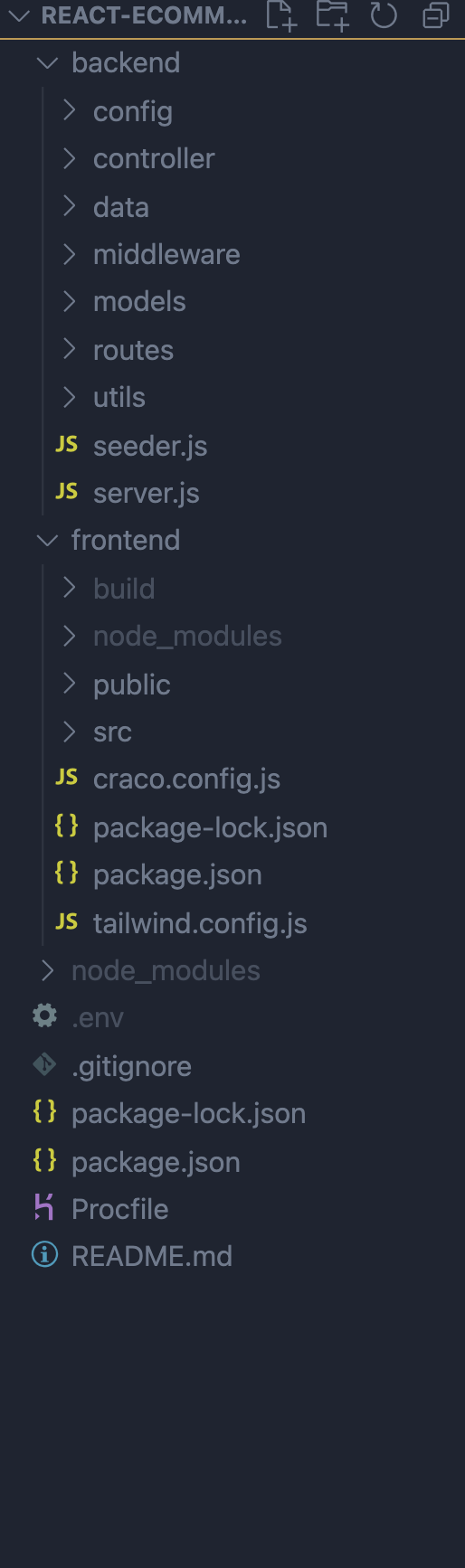
再一次,一切都在本地运作。即使在没有craco运行的生产模式下启动。所以路径似乎很好。这是Heroku的建筑会失败
有什么帮助吗?
回答 2
Stack Overflow用户
发布于 2021-11-16 01:26:26
试着将“tailwindcss”模块移动到依赖项,而不是dev依赖项。
Stack Overflow用户
发布于 2022-01-01 15:39:39
是的,在我的VPS上也有同样的问题,通过删除它们并重新安装来解决这个问题:
npm uninstall tailwindcss postcss autoprefixer
npm install tailwindcss@npm:@tailwindcss/postcss7-compat postcss@^7 autoprefixer@^9https://stackoverflow.com/questions/69409151
复制相似问题
腾讯云开发者

Copyright © 2013 - 2026 Tencent Cloud. All Rights Reserved. 腾讯云 版权所有
深圳市腾讯计算机系统有限公司 ICP备案/许可证号:粤B2-20090059  粤公网安备44030502008569号
腾讯云计算(北京)有限责任公司 京ICP证150476号 | 京ICP备11018762号