
C# LibVLCSharp玩YouTube的问题
在WPF应用程序中,我试图在多个实例上使用LibVLC来播放LibVLC。这可能会在75%的时间内正常工作,但是流会冻结一秒钟或2秒钟,然后将其他25%的流像素化。这似乎是随机的。
这是我的代码:
public async void PlayUri(string path, bool isMuted, bool repeat)
{
    await Dispatcher.InvokeAsync(new Action(async () =>
    {
        Core.Initialize();

        using (LibVLC libVLC = new LibVLC(MediaOptions(repeat)))
        {
            using (var media = new Media(libVLC, path, FromType.FromLocation))
            {
                await media.Parse(MediaParseOptions.ParseNetwork);
                vlcPlayer = new MediaPlayer(media.SubItems.FirstOrDefault());
                if (!repeat)
                    vlcPlayer.EndReached += (sender, args) => ThreadPool.QueueUserWorkItem(_ => waitHandle.Set());
                VideoView.MediaPlayer = vlcPlayer;
                VideoView.MediaPlayer.Play();
            }

            // Set the sound and audio output device
            SetAudioToDirectsound(isMuted);
        }
    }));
}
MediaOptions只是在传递一个string[]
mediaOptions = new[]
{
    "--input-repeat=5",
    "--sout-mux-caching=12000"
};
和(为了完整性) SetAudioToDirectSount(bool)
var directsound = VideoView.MediaPlayer.SetAudioOutput("directsound");
IsMuted = isMuted;
这个“--=12000”选项应该是缓存视频的下一个12秒。
这是正确的吗?我还需要其他的选择吗?我查看了所有cmd行选项,似乎找不到任何明显的选项。
阅读最佳实践这里,它提到
VLC核心开发人员建议在应用程序生命周期内只创建一个LibVLC类型的实例。您可以从单个LibVLC对象创建任意数量的LibVLC对象。
在我的例子中,它是嵌套在using语句中的,因此我似乎没有遵循最佳实践。因此,我应声明:
Core.Initialize();
public LibVLC libVLC {get; set; } = new LibVLC();
只有一次,并且只在卸载时释放MediaPlayer?
最小测试解决方案
名为VLCStream的新WPF项目
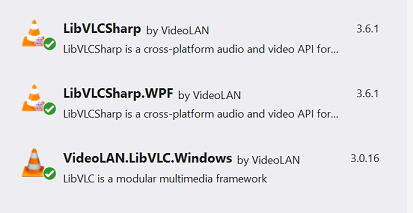
NuGet安装:
- VideoLAN.LibVLC.Windows
- LibVLCSharp.WPF
- LibVLCSharp
MainWindow.xaml
<Window x:Class="VLCStream.MainWindow"
        xmlns="http://schemas.microsoft.com/winfx/2006/xaml/presentation"
        xmlns:x="http://schemas.microsoft.com/winfx/2006/xaml"
        xmlns:d="http://schemas.microsoft.com/expression/blend/2008"
        xmlns:mc="http://schemas.openxmlformats.org/markup-compatibility/2006"
        xmlns:vlc="clr-namespace:LibVLCSharp.WPF;assembly=LibVLCSharp.WPF"
        xmlns:local="clr-namespace:VLCStream"
        mc:Ignorable="d"
        Title="MainWindow" Height="450" Width="800"
        Loaded="Window_Loaded">

    <Grid>
        <Grid.RowDefinitions>
            <RowDefinition Height="40" />
            <RowDefinition Height="*" />
        </Grid.RowDefinitions>

        <Button Content="Play" Click="Button_Click" />

        <vlc:VideoView x:Name="VideoView" Grid.Row="1" />
    </Grid>
</Window>
MainWindow.xaml.cs
using LibVLCSharp.Shared;
using LibVLCSharp.WPF;
using System;
using System.Linq;
using System.Windows;

namespace VLCStream
{
    public partial class MainWindow : Window
    {
        public MainWindow()
        {
            InitializeComponent();
        }

        private void Button_Click(object sender, RoutedEventArgs e)
        {
            Dispatcher.InvokeAsync(new Action(async () =>
            {
                using (LibVLC libVLC = new LibVLC("--sout-mux-caching=12000"))
                {
                    using (var media = new Media(libVLC, "https://youtu.be/pW-iVG0_D34", FromType.FromLocation))
                    {
                        await media.Parse(MediaParseOptions.ParseNetwork);
                        MediaPlayer vlcPlayer = new MediaPlayer(media.SubItems.FirstOrDefault());
                        VideoView.MediaPlayer = vlcPlayer;
                        VideoView.MediaPlayer.Play();
                    }
                }
            }));
        }

        private void Window_Loaded(object sender, RoutedEventArgs e)
        {
            Core.Initialize();
        }
    }
}
问题似乎是随机的,需要超过一个运行。
回答 2
Stack Overflow用户
发布于 2021-10-30 06:53:40
Stack Overflow用户
发布于 2021-10-08 07:21:21
对您的代码的一般反馈。
- 只要您正在使用mediaplayer,就跟踪它,并在完成时将其释放。
- 当你使用LibVLC时,不要处理它。
- 将每个mediaplayer与一个视图集成在一起,现在您只需要调用没有绘图目标的媒体播放器。LibVLC将创建随机窗口以供绘制。可能不是你想要的。
现在,在打开日志的VLC桌面应用程序中播放您的流将提供一些见解:
main error: ES_OUT_SET_(GROUP_)PCR is called too late (pts_delay increased to 2926 ms)
main debug: Received first picture
main error: Timestamp conversion failed for 9480001: no reference clock
main error: Could not convert timestamp 0 for FFmpeg
main debug: Buffering 0%
main debug: Buffering 8%
main debug: Buffering 17%
main debug: Buffering 25%
main debug: Buffering 34%
main debug: Buffering 42%
main debug: Buffering 51%
main debug: Buffering 59%
main debug: Buffering 68%
main debug: Buffering 76%
main debug: Buffering 85%
main debug: Buffering 93%
main debug: Stream buffering done (3000 ms in 7056 ms)
main debug: Decoder wait done in 0 ms
main debug: inserting 307 zeroes
mmdevice debug: state changed: 1
main warning: buffer too late (-217851 us): dropped
main warning: buffer too late (-194631 us): dropped
main error: ES_OUT_SET_(GROUP_)PCR is called too late (pts_delay increased to 3774 ms)
main debug: ES_OUT_RESET_PCR called
main warning: buffer too late (-171411 us): dropped
main debug: Received first picture
main error: Timestamp conversion failed for 15800001: no reference clock
main error: Could not convert timestamp 0 for FFmpeg
mmdevice debug: state changed: 0
这看起来不太好。也许YouTube对视频的编码很差?或者更有可能是LibVLC的问题?我没有把握。
https://stackoverflow.com/questions/69445725
复制相似问题
腾讯云开发者

Copyright © 2013 - 2026 Tencent Cloud. All Rights Reserved. 腾讯云 版权所有
深圳市腾讯计算机系统有限公司 ICP备案/许可证号:粤B2-20090059  粤公网安备44030502008569号
腾讯云计算(北京)有限责任公司 京ICP证150476号 | 京ICP备11018762号