
NG2-图在角11中的标注问题
NG2-图在角11中的标注问题
提问于 2021-10-05 16:14:28
我需要在我的图表中显示一条固定的线(如图像中的“测试标签”):

因此,我将chartjs注释添加到了我的角11项目中,所以我有了这些版本:
"chart.js": "^2.9.3",
"chartjs-plugin-annotation": "^1.0.2",
"ng2-charts": "^2.3.0",
然后我在我的选项中添加了:
    this.chartOptions = {
      responsive: true,
      scales: {
        xAxes: [{}],
        yAxes: [
          {
            id: 'y-axis-0',
            position: 'left',
          }
        ]
      },
      annotation: {
        annotations: [{
          type: 'line',
          drawTime: 'afterDatasetsDraw',
          id: 'strip-line-1',
          mode: 'horizontal',
          scaleID: 'y-axis-0',
          value: tagvalue,
          borderColor: 'red', // '#feaf00',
          borderWidth: 3
        }]
      }
    };
  }
但没有线条显示..。所以我发现我必须注册这个,但它不起作用
import * as ChartAnnotation from 'chartjs-plugin-annotation';

Chart.pluginService.register(ChartAnnotation);
我得到了:
TS2559: Type 'typeof import("C:/.../node_modules/chartjs-plugin-annotation/types/index")' has no properties in common with type 'Plugin'.这是因为:
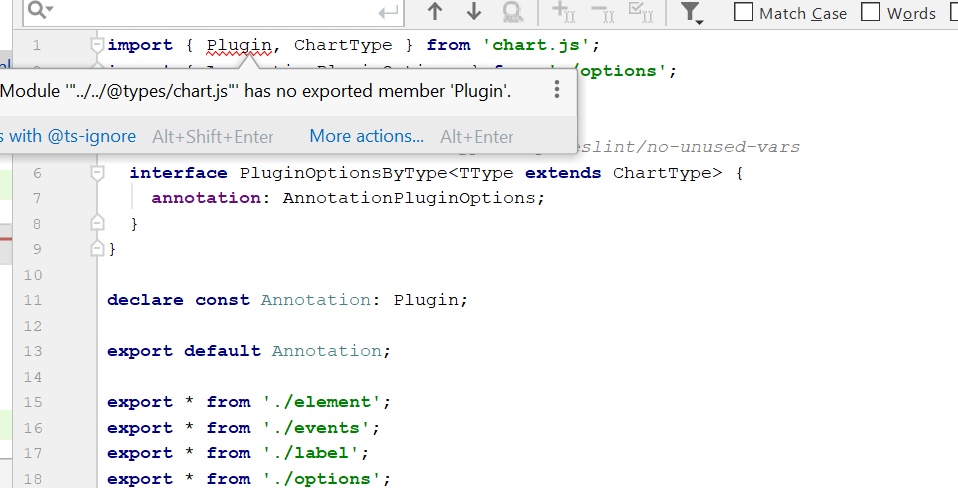
这是一个图表插件注释错误吗?我需要换几个家属吗?
回答 2
Stack Overflow用户
回答已采纳
发布于 2021-10-06 13:13:22
解决办法:
npm安装chartjs-plugin-注释@0.5.7作为@LeeLenalee建议,之后:
import * as ChartAnnotation from 'chartjs-plugin-annotation';
import Chart from 'chart.js';


  ngOnInit(): void {
    Chart.pluginService.register(ChartAnnotation);
  }

  // ...
  this.myChartOptions = {
    responsive: true,
    scales: {
      xAxes: [{}],
      yAxes: [
        {
          id: 'y-axis-0',
          position: 'left'
        }
      ]
    },
    annotation: {
      annotations: [
        {
          drawTime: 'afterDatasetsDraw',
          id: 'hline',
          type: 'line',
          mode: 'horizontal',
          scaleID: 'y-axis-0',
          value: 50, // My value
          borderColor: 'red',
          borderWidth: 3,
          label: {
             backgroundColor: 'red',
             enabled: true
          }
        }
      ]
    }
  };
如果没有显示线条,则可以更新图表:
  import { BaseChartDirective } from 'ng2-charts';
  // ...

  @ViewChild(BaseChartDirective) chart: BaseChartDirective;

  // ...
this.chart.update();Stack Overflow用户
发布于 2021-10-05 18:38:30
正如注释插件的文档中所述,如果使用的是chart.js版本2,则需要使用0.5.7版本
对于Chart.js 2.4.0到2.9.x的支持,请注意,在GitHub上可以找到这个插件文档的0.5.7版本( v0.5.7 )。
因此,您需要删除注释插件,并安装较低版本或更新到chart.js版本3。
npm uninstall chartjs-plugin-annotation

npm install chartjs-plugin-annotation@0.5.7页面原文内容由Stack Overflow提供。腾讯云小微IT领域专用引擎提供翻译支持
原文链接:
https://stackoverflow.com/questions/69453974
复制相关文章
相似问题
腾讯云开发者

Copyright © 2013 - 2026 Tencent Cloud. All Rights Reserved. 腾讯云 版权所有
深圳市腾讯计算机系统有限公司 ICP备案/许可证号:粤B2-20090059  粤公网安备44030502008569号
腾讯云计算(北京)有限责任公司 京ICP证150476号 | 京ICP备11018762号