
如何找到两个轴对齐立方体之间相交的体积和顶点?
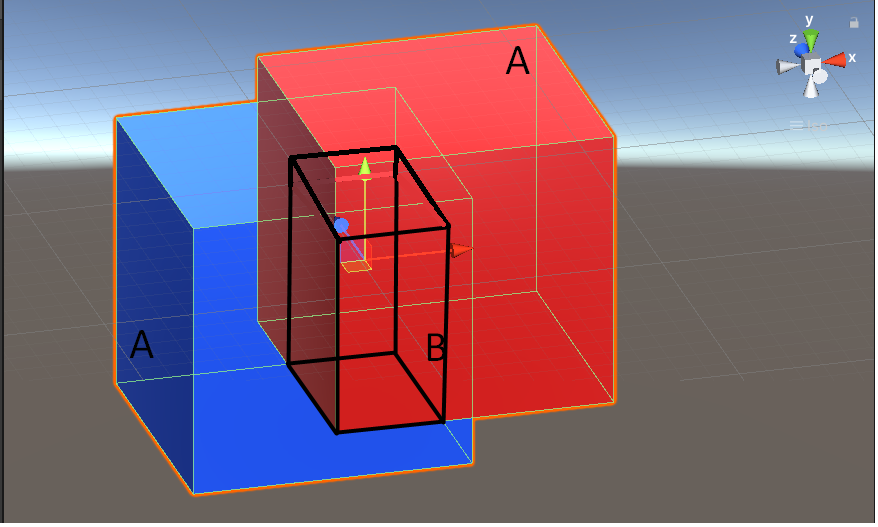
如何才能找到两个立方体与轴线相交的体积?立方体可以有不同的大小和位置。(我添加了一张图片来显示两个立方体的简单示例)
经过深入的研究,我敢肯定,在统一中并没有一个特定的功能可以用来解决这个问题,解决这个问题的唯一途径就是数学逻辑。例如,我的第一个想法是:
- 查找立方体“相交”的8个顶点(图像中的B)。
- 尝试用这个顶点构建一个新的多维数据集.
"intersection".
- 查找多维数据集
- 的大小和体积
统一许可可发现:
每个主立方体(图像中的A)的中心与每个主立方体(图像中的A)从立方体中心(边界大小的一半)到"Bounds.centre";
- the的"Bounds.extents".
的范围
这里提供的文档:https://docs.unity3d.com/ScriptReference/Bounds.html
但是,我找不到有每个立方体顶点的方法。其次,一个逻辑函数,它可以找到16个顶点中的8个是用来构建立方体“交集”的正确顶点。
你有什么帮助或建议吗?
图片:
回答 1
Stack Overflow用户
发布于 2021-10-11 04:47:38
如果正如您所说的,多维数据集将始终与统一世界(=>界=对撞机/渲染器卷)保持轴线对齐,那么您很可能只需做一些类似的事情
F 210的最小值
你从这里得到的是重叠框的一个新的最小和最大点。
这是足够的信息
- 通过将这些min和max.
之间向量的各个分量相乘来计算体积。
- 通过获取每个轴的最小和最大之间的所有排列来得到所有顶点。
就像这样
public class OverlapArea
{
    public readonly Vector3 min;
    public readonly Vector3 max;

    public readonly float volume;
    public Vector3 frontBottomLeft => min;
    public readonly Vector3 frontBottomRight;
    public readonly Vector3 frontTopLeft;
    public readonly Vector3 frontTopRight;
    public readonly Vector3 backBottomLeft;
    public readonly Vector3 backBottomRight;
    public readonly Vector3 backTopLeft;
    public Vector3 backTopRight => max;

    public readonly Bounds bounds;

    public OverlapArea(Bounds a, Bounds b)
    {
        // The min and max points
        var minA = a.min;
        var maxA = a.max;
        var minB = b.min;
        var maxB = b.max;

        min.x = Mathf.Max(minA.x, minB.x);
        min.y = Mathf.Max(minA.y, minB.y);
        min.z = Mathf.Max(minA.z, minB.z);

        max.x = Mathf.Min(maxA.x, maxB.x);
        max.y = Mathf.Min(maxA.y, maxB.y);
        max.z = Mathf.Min(maxA.z, maxB.z);

        frontBottomRight = new Vector3(max.x, min.y, min.z);
        frontTopLeft = new Vector3(min.x, max.y, min.z);
        frontTopRight = new Vector3(max.x, max.y, min.z);
        backBottomLeft = new Vector3(min.x, min.y, max.z);
        backBottomRight = new Vector3(max.x, min.y, max.z);
        backTopLeft = new Vector3(min.x, max.y, max.z);

        // The diagonal of this overlap box itself
        var diagonal = max - min;
        volume = diagonal.x * diagonal.y * diagonal.z;

        bounds.SetMinMax(min, max);
    }

    public static bool GetOverlapArea(Bounds a, Bounds b, out OverlapArea overlapArea)
    {
        overlapArea = default;

        // If they are not intersecting we can stop right away ;)
        if (!a.Intersects(b)) return false;

        overlapArea = new OverlapArea(a, b);

        return true;
    }
}
因此,为了获得重叠信息,您可以这样做。
// I intentionally used the Bounds as parameters for the method because you can
// either use the Renderer bounds
var boundsA = cubeA.GetComponent<Renderer>().bounds;
// or use Collider bounds in your case they should be equal
var boundsB = cubeB.GetComponent<Collider>().bounds;

if(GetOverlapArea(boundsA, boundsB, out var overlap))
{
    // Now in overlap you have all the information you wanted
}
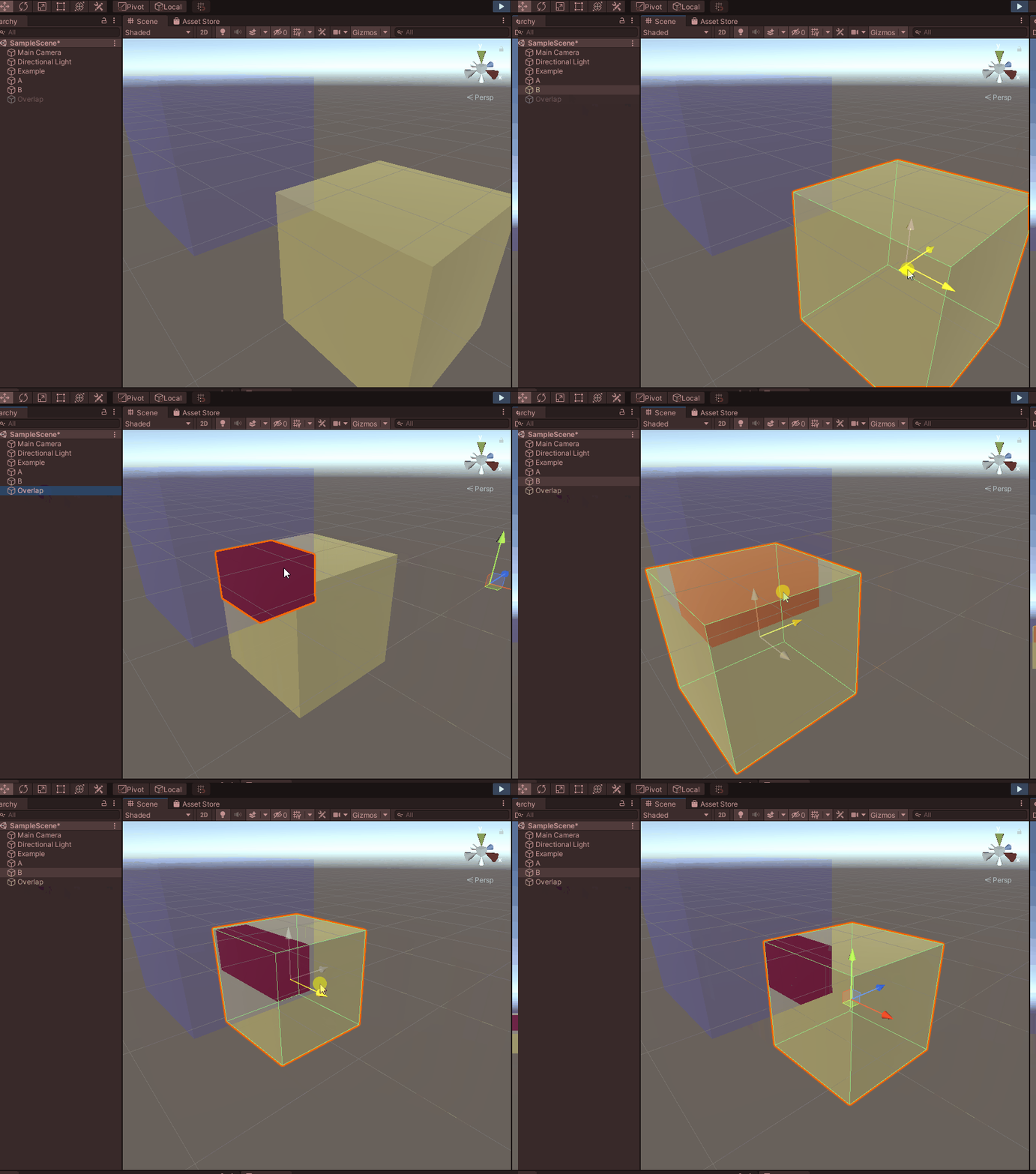
现在,为了真正得到重叠网格(如果这是您要去的位置),您有两个选项
要么使用给定的边缘点,然后自己创建一个网格(请注意,顶点位于世界空间中,因此对象本身和任何父对象都不应该缩放)
...

var mesh = new Mesh
{
    vertices = new[]
    {
        overlapArea.frontBottomLeft,
        overlapArea.frontBottomRight,
        overlapArea.frontTopLeft,
        overlapArea.frontTopRight,

        overlapArea.backBottomLeft,
        overlapArea.backBottomRight,
        overlapArea.backTopLeft,
        overlapArea.backTopRight
    },
    triangles = new[]
    {
        // Front
        0, 2, 1,
        1, 2, 3,
        // Back
        5, 7, 4,
        4, 7, 6,
        // Left
        4, 6, 2,
        4, 2, 0,
        // Right
        1, 7, 5,
        1, 3, 7,
        // Top
        2, 7, 3,
        2, 6, 7,
        // Bottom
        0, 4, 1,
        1, 4, 5
    }
}
作为一个小小的演示
public class Example : MonoBehaviour
{
    public Renderer CubeA;
    public Renderer CubeB;

    public Material overlapMaterial;

    private MeshFilter overlap;
    private readonly Vector3[] overlapVertices = new Vector3[8];

    public void Awake()
    {
        overlap = new GameObject("Overlap", typeof(MeshRenderer)).AddComponent<MeshFilter>();

        var overlapMesh = new Mesh
        {
            vertices = overlapVertices,
            triangles = new[]
            {
                // Front
                0, 2, 1,
                1, 2, 3,

                // Back
                5, 7, 4,
                4, 7, 6,

                // Left
                4, 6, 2,
                4, 2, 0,

                // Right
                1, 7, 5,
                1, 3, 7,

                // Top
                2, 7, 3,
                2, 6, 7,

                // Bottom
                0, 4, 1,
                1, 4, 5
            }
        };

        overlap.mesh = overlapMesh;
        overlap.GetComponent<Renderer>().material = overlapMaterial;
    }

    public void Update()
    {
        if (OverlapArea.GetOverlapArea(CubeA.bounds, CubeB.bounds, out var overlapArea))
        {
            overlap.gameObject.SetActive(true);

            overlap.mesh.vertices = new[]
            {
                overlapArea.frontBottomLeft,
                overlapArea.frontBottomRight,
                overlapArea.frontTopLeft,
                overlapArea.frontTopRight,

                overlapArea.backBottomLeft,
                overlapArea.backBottomRight,
                overlapArea.backTopLeft,
                overlapArea.backTopRight
            };

            overlap.mesh.RecalculateBounds();
        }
        else
        {
            overlap.gameObject.SetActive(false);
        }
    }
}
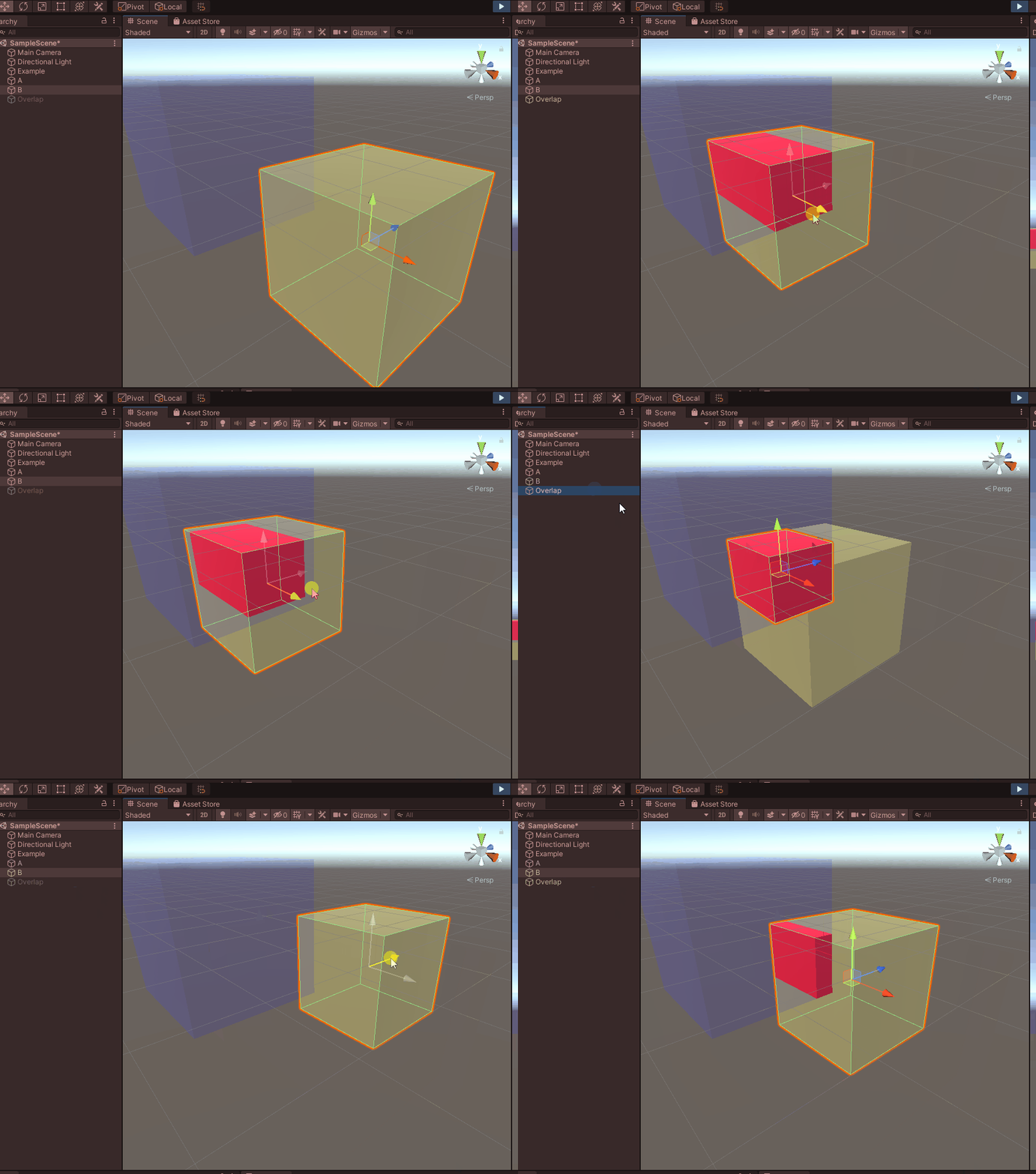
或者您可以使用已经存在的基元多维数据集(默认的统一多维数据集),只需将其设置为正确的坐标,并按如下所示进行缩放
overlapVisualizer.transform.position = overlap.bounds.center;
// note we set the local scale so there should be no parent scaling
overlapVisualizer.transform.localScale = overlap.bounds.size;
再一次演示一下
public class Example : MonoBehaviour
{
    public Renderer CubeA;
    public Renderer CubeB;

    public Transform overlap;

    public void Update()
    {
        if (OverlapArea.GetOverlapArea(CubeA.bounds, CubeB.bounds, out var overlapArea))
        {
            overlap.gameObject.SetActive(true);

            overlap.position = overlapArea.bounds.center;
            overlap.localScale = overlapArea.bounds.size;
        }
        else
        {
            overlap.gameObject.SetActive(false);
        }
    }
}
https://stackoverflow.com/questions/69516211
复制相似问题
腾讯云开发者

Copyright © 2013 - 2026 Tencent Cloud. All Rights Reserved. 腾讯云 版权所有
深圳市腾讯计算机系统有限公司 ICP备案/许可证号:粤B2-20090059  粤公网安备44030502008569号
腾讯云计算(北京)有限责任公司 京ICP证150476号 | 京ICP备11018762号