
电子设置主进程与渲染进程之间的IPC通信
我正在使用https://github.com/maxogden/menubar创建一个带有电子的菜单桌面应用程序。然而,我正在努力建立基本的IPC通信。知道为什么下面的代码不起作用吗?为了澄清这一点,我希望当应用程序启动时,test将被注销到控制台,但它不是。
app.js
const { app } = require('electron');
const Menubar = require('menubar');

const menubar = Menubar.menubar({
  index: `file://${__dirname}/index.html`,
  preloadWindow: true,
  icon: './assets/img/icon.png',
});

try {
  require('electron-reloader')(module)
} catch (_) { }

app.on('ready', () => {
  menubar.window.webContents.send('test');
});
renderer.js
const { ipcRenderer } = require('electron');

ipcRenderer.on('test', () => {
  console.log('test');
});
index.html
<html>
<head>
  <title>Test</title>
  <script>
    require('./renderer')
  </script>
</head>
<body>
</body>
</html>回答 2
Stack Overflow用户
发布于 2021-10-17 19:19:57
这可能是个假阴性。
我希望当应用程序启动时,测试将被注销到控制台,但它不是。
console.log调用的输出位置取决于调用的位置:
主线程中的
- :参见启动该应用程序的终端.
渲染器线程中的
- :参见Chrome DevTools控制台.
因此,请确保您正在寻找预期的输出在正确的地方。
如果这不起作用,那么这里有一个关于如何在主进程和呈现程序进程之间设置IPC通信的演示。
main.js
您会注意到,我确实将nodeIntegration和contextIsolation设置为它们的默认值。这样做是为了明确指出,--您不需要降低应用程序的安全性来允许您的主进程和呈现程序进程之间的消息。
这里发生了什么事?
主进程在发送其"ping“消息之前等待呈现程序完成加载。IPC通信将由预加载脚本处理。
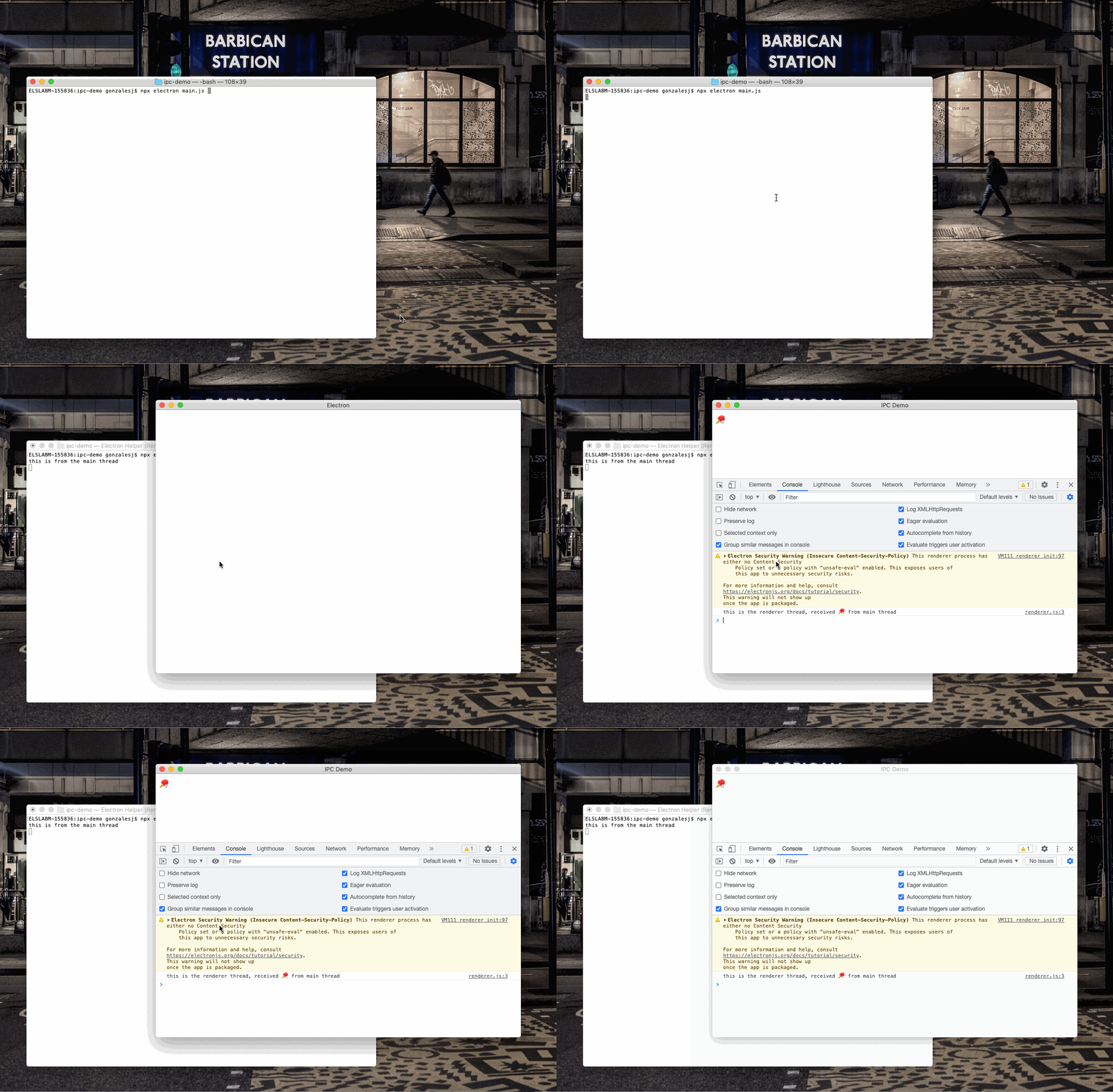
请注意console.log调用,并查看它在下面屏幕显示的位置。
const {app, BrowserWindow} = require('electron'); // <-- v15
const path = require('path');

app.whenReady().then(() => {
  const win = new BrowserWindow({
    webPreferences: {
      devTools: true,
      preload: path.resolve(__dirname, 'preload.js'),
      nodeIntegration: false, // <-- This is the default value
      contextIsolation: true  // <-- This is the default value
    }
  });
  win.loadFile('index.html');
  win.webContents.openDevTools();
  win.webContents.on('did-finish-load', () => {
    win.webContents.send('ping', '');
  });
  // This will not show up in the Chrome DevTools Console
  // This will show up in the terminal that launched the app
  console.log('this is from the main thread');
});
preload.js
我们使用的是contextBridge API。这允许在不启用nodeIntegration或破坏上下文隔离的情况下将特权API公开给呈现程序进程。
API将在一个非常愚蠢的名称空间(BURRITO)下提供,以清楚地表明您可以更改这个名称空间。
const { contextBridge, ipcRenderer } = require('electron');

contextBridge.exposeInMainWorld('BURRITO', {
  whenPing: () => new Promise((res) => {
    ipcRenderer.on('ping', (ev, data) => {
      res(data);
    });
  })
});
renderer.js
使用预加载脚本提供的API,我们开始侦听ping消息。当我们得到它时,我们将主进程所传递的数据放在呈现器页面中。我们还记录了一条信息,您可以在下面的屏幕上看到。
BURRITO.whenPing().then(data => {
  document.querySelector('div').textContent = data;
  // This will show up in the Chrome DevTools Console
  console.log(`this is the renderer thread, received ${data} from main thread`);
});
index.html
<!DOCTYPE html>
<html>
  <head>
    <meta charset="UTF-8">
    <title>IPC Demo</title>
  </head>
  <body>
    <div></div>
    <script src="./renderer.js"></script>
  </body>
</html>
运行该应用程序时:
npx electron main.js您可以看到,两个console.log调用在两个不同的地方产生了输出。
Stack Overflow用户
发布于 2021-10-17 16:22:39
要使用IPC通信,必须启用nodeIntegration。我会尝试这样的方法
const menubar = Menubar.menubar({
  index: `file://${__dirname}/index.html`,
  preloadWindow: true,
  icon: './assets/img/icon.png',
  browserWindow:{
    webPreferences: {nodeIntegration: true},
  },
});https://stackoverflow.com/questions/69605882
复制相似问题
腾讯云开发者

Copyright © 2013 - 2026 Tencent Cloud. All Rights Reserved. 腾讯云 版权所有
深圳市腾讯计算机系统有限公司 ICP备案/许可证号:粤B2-20090059  粤公网安备44030502008569号
腾讯云计算(北京)有限责任公司 京ICP证150476号 | 京ICP备11018762号