
类型记录框生成的联合类型太复杂,无法表示。
呈现Box会产生以下错误:
表达式产生的联合类型对represent.ts(2590)来说太复杂了。
正如我所看到的这里,这是由于同时安装了@mui/material和@react-three/drei & @react-three/fiber。
这个错误背后的原因是什么?我只从Box导入mui组件。有类型混淆什么的吗?解决方案/解决办法是什么?
复制步骤:
- 设置一个cra应用程序:
npx create-react-app my-app --template typescript - 将下列软件包添加到
package.json中
  "dependencies": {
    "@azure/msal-browser": "^2.18.0",
    "@azure/msal-react": "^1.1.0",
    "@emotion/react": "^11.5.0",
    "@emotion/styled": "^11.3.0",
    "@mui/icons-material": "^5.0.4",
    "@mui/lab": "^5.0.0-alpha.51",
    "@mui/material": "^5.0.4",
    "@mui/system": "^5.0.4",
    "@react-three/drei": "^7.16.8",
    "@react-three/fiber": "^7.0.17",
    "axios": "^0.23.0",
    "dotenv": "^10.0.0",
    "localforage": "^1.10.0",
    "react": "^17.0.2",
    "react-dom": "^17.0.2",
    "react-router": "^5.2.1",
    "react-router-dom": "^5.3.0",
    "react-scripts": "4.0.3",
    "three": "^0.133.1",
    "three-stdlib": "^2.5.4",
    "web-vitals": "^1.1.2",
    "zustand": "^3.5.14"
  },
  "devDependencies": {
    "@testing-library/jest-dom": "^5.14.1",
    "@testing-library/react": "^11.2.7",
    "@testing-library/user-event": "^12.8.3",
    "@types/jest": "^26.0.24",
    "@types/node": "^12.20.33",
    "@types/react": "^17.0.30",
    "@types/react-dom": "^17.0.9",
    "@types/react-router-dom": "^5.3.1",
    "@types/three": "^0.133.1",
    "@typescript-eslint/eslint-plugin": "^4.29.3",
    "@typescript-eslint/parser": "^4.29.3",
    "cross-env": "^7.0.3",
    "eslint-config-airbnb": "^18.2.1",
    "eslint-config-airbnb-typescript": "^14.0.1",
    "eslint-config-prettier": "^8.3.0",
    "eslint-plugin-import": "^2.25.2",
    "eslint-plugin-jsx-a11y": "^6.4.1",
    "eslint-plugin-react": "^7.26.1",
    "eslint-plugin-react-hooks": "^4.2.0",
    "jest-when": "^3.4.1",
    "rimraf": "^3.0.2",
    "typescript": "^4.4.4"
},- 运行
npm install - 确保你在
Typescript v4.4.4上运行 - 将以下组件添加到
src中。我叫它ThreeRenderer.tsx
import { Html, OrbitControls, PerspectiveCamera, useGLTF, useProgress } from '@react-three/drei';
import { Canvas, useFrame } from '@react-three/fiber';
import { FC, Suspense, useEffect, useRef, useState } from 'react';
import { AnimationAction, AnimationMixer } from 'three';
import { GLTF, GLTFLoader } from 'three-stdlib';
import create from 'zustand';
import { devtools } from 'zustand/middleware';

export const useGLTFModel = create<{ readonly model: () => GLTF | undefined }>(
  // eslint-disable-next-line @typescript-eslint/no-unused-vars
  devtools((set) => ({
    model: () => undefined
  }))
);

export const useGLTFAnimationAction = create<{ readonly animationAction: () => AnimationAction[] | undefined }>(
  // eslint-disable-next-line @typescript-eslint/no-unused-vars
  devtools((set) => ({
    animationAction: () => undefined
  }))
);

interface ModelProps {
  readonly gltfPath: string;
  readonly onLoad: () => void;
}

const Model: FC<ModelProps> = ({ gltfPath, onLoad }) => {
  const model = useGLTF(gltfPath, undefined, undefined, (loader: GLTFLoader) => {
    loader.manager.onLoad = onLoad;
  });

  // Refs
  const rootRef = useRef();
  const animationActionsRef = useRef<AnimationAction[]>();

  // Mixer
  const [mixer] = useState(() => new AnimationMixer(model.scene));
  useFrame((_state, delta) => mixer.update(delta));

  // Effects
  useEffect(() => {
    useGLTFModel.setState({ model: () => model });

    animationActionsRef.current = model.animations.map((animation) => mixer.clipAction(animation, rootRef.current));
    useGLTFAnimationAction.setState({ animationAction: () => animationActionsRef.current });

    return () => {
      model.animations.map((animation) => mixer.uncacheClip(animation));
    };
  }, [model, mixer]);

  return <primitive ref={rootRef.current} object={model.scene} />;
};

const Progress = () => {
  const { progress } = useProgress();
  return (
    <Html center>
      <span style={{ color: 'white' }}>{progress}% loaded</span>
    </Html>
  );
};

const ThreeRenderer: FC<ModelProps> = ({ gltfPath, onLoad }): JSX.Element => {
  const cameraRef = useRef();

  return (
    <Canvas>
      <PerspectiveCamera ref={cameraRef} position={[0, 5, 5]} />
      <OrbitControls camera={cameraRef.current} />
      <ambientLight intensity={0.5} />
      <Suspense fallback={<Progress />}>
        {/* <Environment preset="city" /> */}
        <Model gltfPath={gltfPath} onLoad={onLoad} />
      </Suspense>
    </Canvas>
  );
};

export default ThreeRenderer;- 转到
App.tsx并从@mui/material添加一个Box组件。
import React from 'react';
import logo from './logo.svg';
import './App.css';
import {Box} from '@mui/material';

function App() {
  return (
    <div className="App">
      <header className="App-header">
        <img src={logo} className="App-logo" alt="logo" />
        <p>
          Edit <code>src/App.tsx</code> and save to reload.
        </p>
        <a
          className="App-link"
          href="https://reactjs.org"
          target="_blank"
          rel="noopener noreferrer"
        >
          Learn React
        </a>
        <Box>

        </Box>
      </header>
    </div>
  );
}

export default App;- 您应该看到出现了错误。我看到的是:
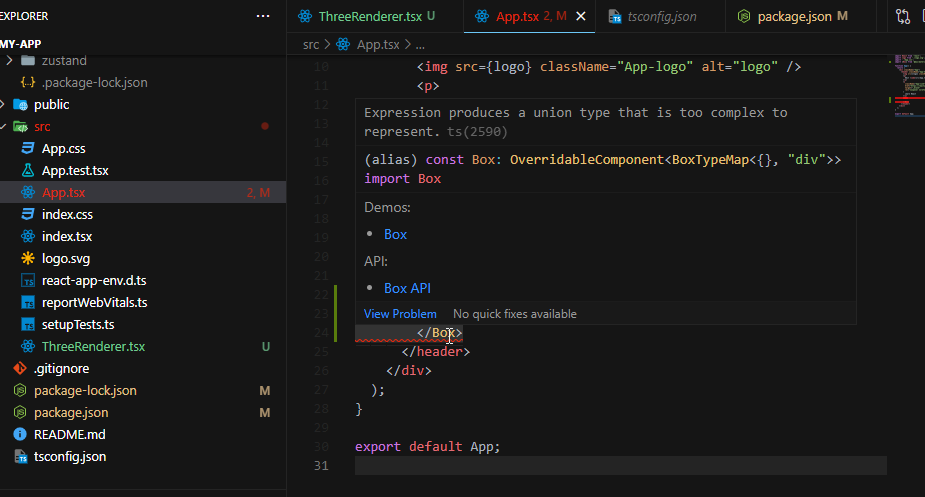
备注请尝试在VSCode或首选编辑器中本地复制此错误。例如,我没有设法在codesandbox上复制这个结果。我不知道为什么这个问题没有出现。我怀疑那是因为他们使用的是不同的打字本版本。
更新
我已经公开了MUI和Reactive-3的问题:
回答 1
Stack Overflow用户
发布于 2022-01-18 00:58:45
虽然我确信有几种情况可能会发生这个问题,但我现在遇到这种情况的原因是,npm安装了一个@chakra-ui/system的复制版本,该版本定义了forwardRef()的类型声明。
当我运行npm ls @chakra-ui/system时,我可以看到我同时拥有@chakra-ui/system@1.9.1和@chakra-ui/system@1.9.0。
这很可能是因为某些依赖项(如@chakra-ui/skeleton@1.2.4 )定义了精确的@chakra-ui/system版本1.9.0,而大多数包(如@chakra-ui/menu@1.8.3 )将非常开放的>=1.0.0定义为peerDependencies。由于npm v7,npm默认安装peerDependencies。
看起来,这可能会导致npm为开放的>=1.0.0安装最新版本,然后单独安装特定的1.9.0,并且没有足够的智能来销毁它。
我可以用任何一种方法来解决这个问题
rm package-lock.json && npm install --legacy-peer-deps。然而,这对npm软件包的安装有很大的影响。- 或者,将一个
overrides(需要npm >=8.3)添加到package.json中,以指定要安装的特定版本。 “重写”:{ "@chakra-ui/system":"1.9.1“} 您可能必须重新生成package-lock.json,在再次运行install之前删除它,以实际强制执行这个新的解析。 这只会确保删除特定的包,而不会更改其他不相关的包,比如“--遗留--对等--部门”。
https://stackoverflow.com/questions/69625898
复制相似问题
腾讯云开发者

Copyright © 2013 - 2026 Tencent Cloud. All Rights Reserved. 腾讯云 版权所有
深圳市腾讯计算机系统有限公司 ICP备案/许可证号:粤B2-20090059  粤公网安备44030502008569号
腾讯云计算(北京)有限责任公司 京ICP证150476号 | 京ICP备11018762号