
vue -如何在字符串变量中存储换行符
vue -如何在字符串变量中存储换行符
提问于 2021-10-21 09:07:00
我希望将换行器存储在字符串变量中,并显示如下(请忽略图像):
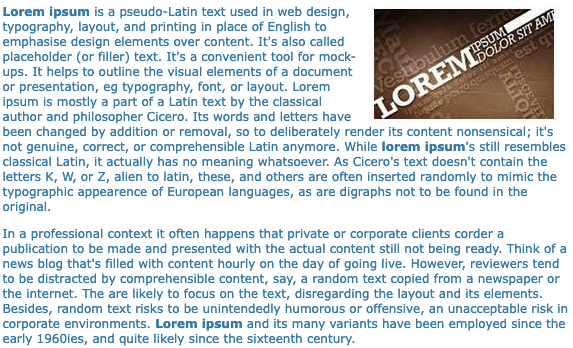
我试图在<br/>中添加text,但没有工作。
App.vue
<template>
  <div id="app">{{ text }}</div>
</template>

<script>
export default {
  name: "App",
  data() {
    return {
      text:
        "Lorem ipsum is a pseudo-Latin text used in web design, typography, layout, and printing in place of English to emphasise design elements over content. It's also called placeholder (or filler) text. It's a convenient tool for mock-ups. It helps to outline the visual elements of a document or presentation, eg typography, font, or layout. Lorem ipsum is mostly a part of a Latin text by the classical author and philosopher Cicero. Its words and letters have been changed by addition or removal, so to deliberately render its content nonsensical; it's not genuine, correct, or comprehensible Latin anymore. While lorem ipsum's still resembles classical Latin, it actually has no meaning whatsoever. As Cicero's text doesn't contain the letters K, W, or Z, alien to latin, these, and others are often inserted randomly to mimic the typographic appearence of European languages, as are digraphs not to be found in the original.In a professional context it often happens that private or corporate clients corder a publication to be made and presented with the actual content still not being ready. Think of a news blog that's filled with content hourly on the day of going live. However, reviewers tend to be distracted by comprehensible content, say, a random text copied from a newspaper or the internet. The are likely to focus on the text, disregarding the layout and its elements. Besides, random text risks to be unintendedly humorous or offensive, an unacceptable risk in corporate environments. Lorem ipsum and its many variants have been employed since the early 1960ies, and quite likely since the sixteenth century.",
    };
  },
};
</script>
码箱
回答 2
Stack Overflow用户
回答已采纳
发布于 2021-10-21 09:16:48
如果要包含html,则需要使用html指令:
<template>
  <div v-html="text"></div>
</template>

<script>
export default {
  name: "App",
  data() {
    return {
      text:
        "Lorem ipsum is a pseudo-Latin text used in web design, typography, layout, and printing in place of English to emphasise design elements over content. It's also called placeholder (or filler) text. It's a convenient tool for mock-ups. It helps to outline the visual elements of a document or presentation, eg typography, font, or layout. Lorem ipsum is mostly a part of a Latin text by the classical author and philosopher Cicero. Its words and letters have been changed by addition or removal, so to deliberately render its content nonsensical; it's not genuine, correct, or comprehensible Latin anymore. While lorem ipsum's still resembles classical Latin, it actually has no meaning whatsoever. As Cicero's text doesn't contain the letters K, W, or Z, alien to latin, these, and others are often inserted randomly to mimic the typographic appearence of European languages, as are digraphs not to be found in the original.<br>In a professional context it often happens that private or corporate clients corder a publication to be made and presented with the actual content still not being ready. Think of a news blog that's filled with content hourly on the day of going live. However, reviewers tend to be distracted by comprehensible content, say, a random text copied from a newspaper or the internet. The are likely to focus on the text, disregarding the layout and its elements. Besides, random text risks to be unintendedly humorous or offensive, an unacceptable risk in corporate environments. Lorem ipsum and its many variants have been employed since the early 1960ies, and quite likely since the sixteenth century.",
    };
  },
};
</script>Stack Overflow用户
发布于 2021-10-21 09:12:01
这也适用于常规javascript:
const myString = "First line \nSecond line"

document.querySelector("#my-div").innerText = myString<div id="my-div" style="white-space: pre-wrap;"></div>
这里的关键词是:
- 使用css-属性
white-space: pre-line(或相似) - 将
\n添加到字符串中,作为换行符。
页面原文内容由Stack Overflow提供。腾讯云小微IT领域专用引擎提供翻译支持
原文链接:
https://stackoverflow.com/questions/69659040
复制相关文章
相似问题
腾讯云开发者

Copyright © 2013 - 2026 Tencent Cloud. All Rights Reserved. 腾讯云 版权所有
深圳市腾讯计算机系统有限公司 ICP备案/许可证号:粤B2-20090059  粤公网安备44030502008569号
腾讯云计算(北京)有限责任公司 京ICP证150476号 | 京ICP备11018762号