
如何使用自动完成任务并在ZWcad中绘制?
如何使用自动完成任务并在ZWcad中绘制?
提问于 2021-10-21 18:16:44
我在做一个帮助工程师自动化绘图任务的项目。由于我的公司使用ZWcad而不是Autocad,我发现自己不得不使用pyzwcad,但是我在一个地方找不到足够的信息,或者我没有在正确的地方搜索,因为我是一个初学者,我需要在一个地方收集我收集的所有数据。
回答 2
Stack Overflow用户
回答已采纳
发布于 2021-10-21 18:16:44
首先,您需要导入pyzwacad。
from pyzwcad import *或者直接导入使用过的方法
from pyzwcad import ZwCAD, ZCAD, APoint, aDouble使用API实现任务自动化的首选方法是让用户在使用该工具之前启动程序。
因此,我们现在需要定义cad对象。
acad = ZwCAD()在接下来的段落中,我将总结一下在我的项目中使用的一些pyzwacad方法。
- 在当前绘图文件中添加行类型。 def G_add_line_typ(ltyp_name,acad):line_type_found = False for ltyp in acad.doc.Linetypes: if ltyp.name == ltyp_name: line_type_found = True if line_type_found: acad.doc.Linetypes.Load(ltyp_name,ZWCADiso.lin)
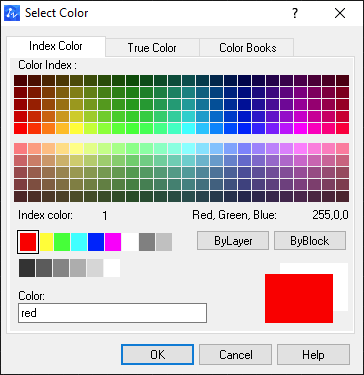
- 画正方形: X_coo:是正方形中心点的X坐标。 y_coo:是正方形中心点的Y坐标。 我们需要为正方形点坐标做一个数组/列表,例如,第一点将取列表中的前两个位置,所以 列表是第一个点X坐标和 list1是第一个点Y坐标。 def draw_sqr(acad,X_coo,y_coo,d,w,n_color):sqr_pts = X_coo - (d / 2),y_coo +w/ 2,X_coo - (d / 2),y_coo -w/ 2,X_coo + (d / 2),y_coo -w/ 2,X_coo + (d / 2),y_coo +w/ 2,X_coo - (d / 2),y_coo +w/2 sqr =y_coo sqr.color = n_color # shape颜色是来自红色索引1的整数。

Stack Overflow用户
发布于 2021-10-22 12:44:21
3-加圈:
# add insertion point
x_coo = 50
y_coo = 50
c1 = APoint(x_coo, y_co)
radius = 500
circle= acad.model.AddCircle(c1, radius)
4-旋转物体:
# add base point
x_coo = 50
y_coo = 50
base_point= APoint(x_coo, y_co)
r_ang = (45 * np.pi) / 180
object.Rotate(base_point, r_ang)
# object is refering to the object name it could be difrent based on your code
5-增加案文:
# add insertion point
x_coo = 50
y_coo = 50
pttxt = APoint(x_coo, y_coo)
txt_height = 200 # text height
text = acad.model.AddText("text string", pttxt, txt_height)
6-更改文本对齐方式:
# first we need to sort the current insertion point for the exist text object as it will be reset after changing the alignment.

old_insertion_point = APoint(text.InsertionPoint)
# text is refering to text object name it could be difrent based on your code


text.Alignment = ZCAD.zcAlignmentBottomCenter

# modify the text insertion point as the above step automaticaly reset it to (0, 0)
text.TextAlignmentPoint = old_insertion_point
7-增加旋转尺寸线:
我们需要定义3点
起始点,终点和维度文本点,也应该使用数学库来使用弧度法。
import math
acad = ZwCAD()
st_dim = APoint(0, 0)

end_dim = APoint(100, 30)

text_dim = APoint(50, 15)

dim_line = acad.model.AddDimRotated(st_dim, end_dim, text_dim, math.radians(30))

acad.Application.ZoomAll()
上述程序可用于增加线性尺寸线的角度位置为水平尺寸0或math.radians(90)的垂直尺寸。
8-增加对齐尺寸线:
与上述相同,但不使用旋转角度。
acad = ZwCAD()
st_dim = APoint(0, 0)

end_dim = APoint(100, 30)

text_dim = APoint(50, 15)

dim_line = acad.model.AddDIMALIGNED(st_dim, end_dim, text_dim)
9-覆盖现有维度行文本:
dim_line.TextOverride = "new text""dim_line“指的是想要的维度行对象名。
页面原文内容由Stack Overflow提供。腾讯云小微IT领域专用引擎提供翻译支持
原文链接:
https://stackoverflow.com/questions/69666916
复制相关文章
相似问题
腾讯云开发者

Copyright © 2013 - 2026 Tencent Cloud. All Rights Reserved. 腾讯云 版权所有
深圳市腾讯计算机系统有限公司 ICP备案/许可证号:粤B2-20090059  粤公网安备44030502008569号
腾讯云计算(北京)有限责任公司 京ICP证150476号 | 京ICP备11018762号