
Java GUI编程中的奇怪问题
我用Java制作了一个简单的GUI。问题是,当我在按钮和复选按钮之前添加标签时,当我在按钮上悬停时会感到奇怪的闪烁,而GUI看起来不太对劲。但是,当我添加标签后按钮和复选按钮,一切都很好。为什么会发生这种情况?
这是我的代码:
package javaapplication13;

import java.awt.*;
import javax.swing.*;

public class JavaApplication13 {
    public static void main(String[] args) {
        ButtonFrame bf = new ButtonFrame();
    }
}

class ButtonFrame extends JFrame {
    public ButtonFrame() {
        JButton b1 = new JButton("1. Dugme");
        JButton b2 = new JButton("2. Dugme");
        JLabel l1 = new JLabel();
        JCheckBox c1 = new JCheckBox("Prvo dugme");
        JCheckBox c2 = new JCheckBox("Drugo dugme");
        Container cp = getContentPane();
        setTitle("Dugme");
        setSize(400,400);
        setDefaultCloseOperation(JFrame.EXIT_ON_CLOSE);
        setVisible(true);
        this.add(b1);
        this.add(b2);
        this.add(c1);
        this.add(c2);
        this.add(l1);
        b1.setBounds(20, 30, 90, 20);
        b2.setBounds(20,70,90,20);
        l1.setBounds(70,120,90,20);
        c1.setBounds(120,30,120,20);
        c2.setBounds(120,70,120,20);

        l1.setText("");
    }
}回答 2
Stack Overflow用户
发布于 2021-10-23 09:20:30
当我用JDK 17在我的Windows 10计算机上复制并运行您的代码时,我没有看到您声称的闪烁。然而,当我在添加按钮和复选框之前更改您的代码并将标签添加到框架中时(正如您在问题中所述),我确实看到了“闪烁”。
虽然您已经接受了@Antoniossss 回答,但not推荐not使用布局管理器。请参阅没有布局管理器的下列摘录
虽然没有布局管理器是可能的,但如果可能的话,您应该使用布局管理器。
如果容器所包含的组件的大小不受容器大小或字体、外观或语言更改的影响,那么绝对定位可能是有意义的。
GUI提供给自己的布局管理器之一是GridBagLayout,尽管这并不是唯一合适的。下面的代码显示了如何。(请注意,在下面的代码中,我设置了JLabel文本,以便您可以看到它。)
import java.awt.Container;
import java.awt.EventQueue;
import java.awt.GridBagConstraints;
import java.awt.GridBagLayout;

import javax.swing.BorderFactory;
import javax.swing.JButton;
import javax.swing.JCheckBox;
import javax.swing.JComponent;
import javax.swing.JFrame;

public class BtnFrame {
    private void createAndDisplayGui() {
        JFrame frame = new JFrame("Dugme");
        frame.setDefaultCloseOperation(JFrame.EXIT_ON_CLOSE);
        frame.setLayout(new GridBagLayout());
        createForm(frame.getContentPane());
        frame.pack();
        frame.setLocationByPlatform(true);
        frame.setVisible(true);
    }

    private void createForm(Container contentPane) {
        if (contentPane instanceof JComponent) {
            JComponent jCmpt = (JComponent) contentPane;
            jCmpt.setBorder(BorderFactory.createEmptyBorder(20, 20, 20, 20));
        }
        GridBagConstraints gbc = new GridBagConstraints();
        gbc.anchor = GridBagConstraints.LINE_START;
        gbc.gridx = 0;
        gbc.gridy = 0;
        gbc.insets.bottom = 5;
        gbc.insets.left = 5;
        gbc.insets.right = 5;
        gbc.insets.top = 5;
        JButton b1 = new JButton("1. Dugme");
        contentPane.add(b1, gbc);
        gbc.gridx = 1;
        JCheckBox c1 = new JCheckBox("Prvo dugme");
        contentPane.add(c1, gbc);
        gbc.gridx = 0;
        gbc.gridy = 1;
        JButton b2 = new JButton("2. Dugme");
        contentPane.add(b2, gbc);
        gbc.gridx = 1;
        JCheckBox c2 = new JCheckBox("Drugo dugme");
        contentPane.add(c2, gbc);
        gbc.gridx = 0;
        gbc.gridy = 2;
        gbc.anchor = GridBagConstraints.CENTER;
        JLabel l1 = new JLabel("label");
        contentPane.add(l1, gbc);
    }

    public static void main(String[] args) {
        final BtnFrame gui = new BtnFrame();
        EventQueue.invokeLater(() -> gui.createAndDisplayGui());
    }
}
下面是应用程序的屏幕截图。
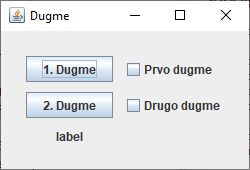
当在代码中将布局管理器设置为null时(正如@Antoniossss在回答中所说的那样),GUI看起来像下面的屏幕截图。(同样,我还设置了JLabel的文本,以便您能够看到它。)
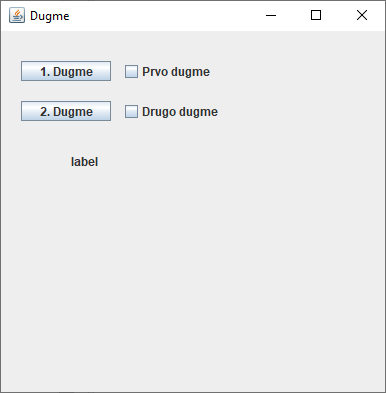
正如您所看到的,这两个屏幕截图实际上是相同的。
为了完整起见,下面是您的代码,以及我的更改,这些代码生成了上面的屏幕截图。如您所见,我移动了行this.add(l1),并添加了行cp.setLayout(null)。
import java.awt.Container;

import javax.swing.JButton;
import javax.swing.JCheckBox;
import javax.swing.JFrame;
import javax.swing.JLabel;

public class ButtonFrame extends JFrame {
    public ButtonFrame(){

        JButton b1 = new JButton("1. Dugme");
        JButton b2 = new JButton("2. Dugme");
        JLabel l1 = new JLabel();
        JCheckBox c1 = new JCheckBox("Prvo dugme");
        JCheckBox c2 = new JCheckBox("Drugo dugme");
        Container cp = getContentPane();
        cp.setLayout(null); // Added this line.
        setTitle("Dugme");
        setSize(400,400);
        setDefaultCloseOperation(JFrame.EXIT_ON_CLOSE);
        setVisible(true);
        this.add(l1);
        this.add(b1);
        this.add(b2);
        this.add(c1);
        this.add(c2);
//        this.add(l1);
        b1.setBounds(20, 30, 90, 20);
        b2.setBounds(20,70,90,20);
        l1.setBounds(70,120,90,20);
        c1.setBounds(120,30,120,20);
        c2.setBounds(120,70,120,20);

        l1.setText("label");
    }

    public static void main(String[] args) {
        ButtonFrame bf = new ButtonFrame();
    }
}Stack Overflow用户
发布于 2021-10-23 08:23:19
这是因为默认的LayoutManager,您无论如何都不想使用它,因为您对组件使用了严格的界限。删除布局管理器
setLayout(null);它将按预期工作。
public ButtonFrame(){

    setLayout(null); //this will do the trick

    JButton b1 = new JButton("1. Dugme");
    ...rest of your code

}https://stackoverflow.com/questions/69686242
复制相似问题
腾讯云开发者

Copyright © 2013 - 2026 Tencent Cloud. All Rights Reserved. 腾讯云 版权所有
深圳市腾讯计算机系统有限公司 ICP备案/许可证号:粤B2-20090059  粤公网安备44030502008569号
腾讯云计算(北京)有限责任公司 京ICP证150476号 | 京ICP备11018762号