
无法运行剧作家测试
无法运行剧作家测试
提问于 2021-10-25 00:40:37
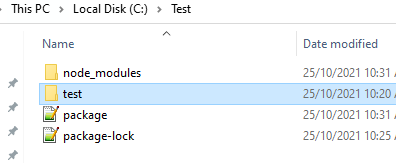
我试图从下面的位置运行playwright测试,但它显示了消息npm install -D @playwright/test,无法运行测试。我已经将playwright安装为dev依赖项。有人能告诉我这里有什么问题吗?
我试过以下几种方法:
1)
Test User@TestUser MINGW64 /c/Test
    $ npx playwright test --headed
    Please install @playwright/test package to use Playwright Test.
npm install -D @playwright/test- 测试用户@TestUser MINGW64 /c/Test $ npx剧作家测试请安装@ playwright /test包以使用剧作家测试。安装-D @剧作家/测试
// test/test1.spec.js
const { test, expect } = require('@playwright/test');

test('basic test', async ({ page }) => {
  await page.goto('https://playwright.dev/');
  const title = page.locator('.navbar__inner .navbar__title');
  await expect(title).toHaveText('Playwright');
});
//package.json
{
  "name": "play",
  "version": "1.0.0",
  "description": "Playwright test",
  "main": "index.js",
  "directories": {
    "test": "test"
  },
  "dependencies": {},
  "devDependencies": {
    "@playwright/test": "^1.16.1"
  },
  "scripts": {
    "test": "npx playwright test"
  },
  "author": "Test",
  "license": "ISC"
}
回答 1
Stack Overflow用户
发布于 2022-09-26 15:03:22
我看到一些人在推荐一些建议,这里
- 删除剧作家模块。
npm rm playwrightnpm install @playwright/test -D - 使用纱线
npx playwright test->yarn playwright test - 通过将这个添加到我的
.gitlab-ci.yml中,我解决了Gitlab管道中的问题。
cache:
  key: ${CI_COMMIT_REF_SLUG}
  paths:
    - node_modules/
页面原文内容由Stack Overflow提供。腾讯云小微IT领域专用引擎提供翻译支持
原文链接:
https://stackoverflow.com/questions/69701816
复制相关文章
相似问题
腾讯云开发者

Copyright © 2013 - 2026 Tencent Cloud. All Rights Reserved. 腾讯云 版权所有
深圳市腾讯计算机系统有限公司 ICP备案/许可证号:粤B2-20090059  粤公网安备44030502008569号
腾讯云计算(北京)有限责任公司 京ICP证150476号 | 京ICP备11018762号