
Xarray合并两个维度长度不同的hdf5文件
我有一些仪器数据,以hdf-5格式保存为多个二维阵列,随着测量时间的推移。如下图所示,d1和d2是两个独立的文件,仪器记录在不同的时间。它们有相同的数据变量,唯一的区别是phony_dim_0的长度,它表示总数据点随测量时间的变化。
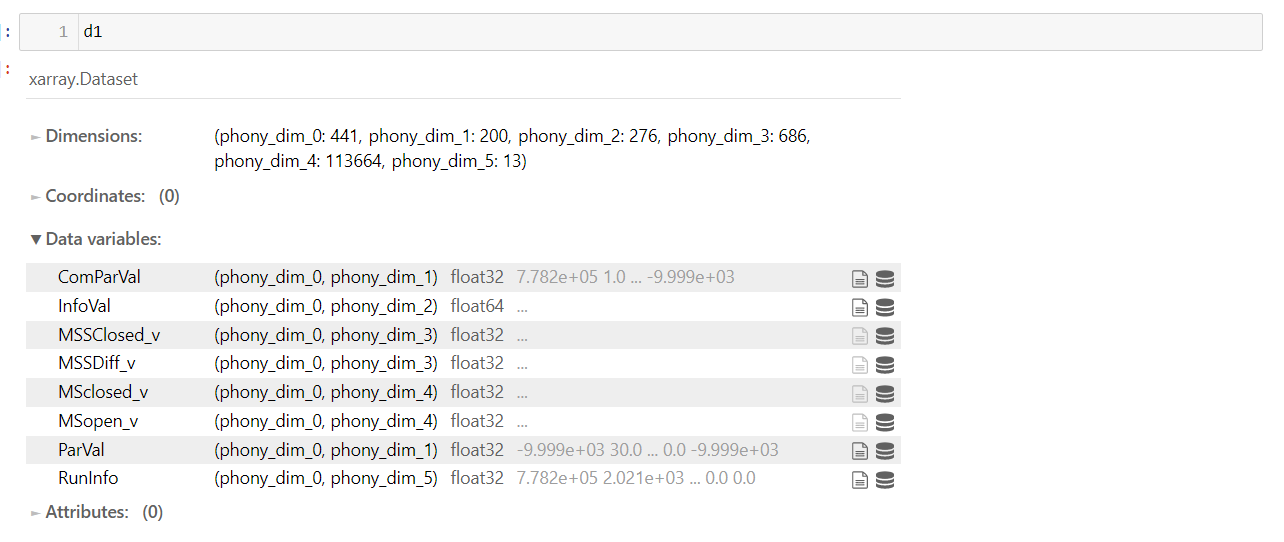

这些文件需要加载到仪器公司提供的特定软件中,以获得有意义的结果。我希望将多个文件与Python合并,同时保持它们的原始格式,然后将一个合并的文件合并到软件中。
以下是我的尝试:
files = os.listdir("DATA_PATH")
d1 = xarray.open_dataset(files[0])
d2 = xarray.open_dataset(files[1])

## copy a new one to save the merged data array.
d0 = d1

vars_ = [c for c in d1]
for var in vars_:
d0[var].values = np.vstack([d1[var],d2[var]])错误显示如下:replacement data must match the Variable's shape. replacement data has shape (761, 200); Variable has shape (441, 200)
我想出了两种解决这个问题的方法:
- 将维度长度展开为所有合并文件的总长度。
- 以相同的d1和d2格式创建一个新的空数据。
但是,我仍然想不出实现这一目标的功能。如有任何意见或建议,将不胜感激。
补充信息
回答 1
Stack Overflow用户
发布于 2021-10-27 19:58:44
我不熟悉xarray,所以无法帮助您编写代码。但是,您不需要xarray来复制HDF5数据;h5py的设计目的是将HDF5数据很好地作为NumPy数组处理,这是您需要进行合并的全部数据。
关于Xarray的笔记。它使用与HDF5和h5py不同的名称。Xarray将文件称为“数据集”,并调用HDF5数据集“数据变量”。HDF5 5/h5py命名更常用,所以我将在我的文章的其余部分使用它。
在跨2个或更多HDF5文件合并数据集时,需要考虑一些问题。它们是:
- 数据架构的一致性(您已经检查过)。
- 属性的一致性。如果数据集有不同的属性名或值,合并过程就会变得更加复杂!(你的似乎是一致的。)
- 最好在合并的文件中创建resizabe数据集。这简化了过程,因为您在最初创建数据集时不需要知道总大小。更好的是,以后可以添加更多的数据(如果/当您有更多的文件时)。
我看了你的档案。每个文件中有8个HDF5数据集。有一点是好的:数据集是可调整大小的。这简化了合并过程。此外,尽管您的数据集有许多属性,但它们在两个文件中似乎都很常见。这也简化了这个过程。
下面的代码经过以下步骤来合并数据。
- 打开新的合并文件以便写入
- 打开第一个数据文件(只读)
- 通过所有数据集循环
使用组复制函数复制数据集(数据加上
maxshape参数以及属性名称和值)。 - 打开第二个数据文件(只读)
- 循环遍历所有数据集并执行以下操作:
a.获取两个数据集的大小(现有的和待添加的)
b.使用HDF5方法增加
.resize()数据集的大小 c.将值从数据集写入到现有数据集的末尾 - 最后,它遍历所有3个文件并打印所有数据集的
shape和maxshape(用于视觉比较)。
代码如下:
import h5py

files = [ '211008_778183_m.h5', '211008_778624_m.h5', 'merged_.h5' ]

# Create the merge file:
with h5py.File('merged_.h5','w') as h5fw:

    # Open first HDF5 file and copy each dataset.
    # Will use maxhape and attributes from existing dataset.
    with h5py.File(files[0],'r') as h5fr:
        for ds in h5fr.keys():
            h5fw.copy(h5fr[ds], h5fw, name=ds)

    # Open second HDF5 file and copy data from each dataset.
    # Resizes existing dataset as needed to hold new data.
    with h5py.File(files[1],'r') as h5fr:
        for ds in h5fr.keys():
            ds_a0 = h5fw[ds].shape[0]
            add_a0 = h5fr[ds].shape[0]
            h5fw[ds].resize(ds_a0+add_a0,axis=0)
            h5fw[ds][ds_a0:] = h5fr[ds][:]

for fname in files:
    print(f'Working on file:{fname}')
    with h5py.File(fname,'r') as h5f:
        for ds, h5obj in h5f.items():
print (f'for: {ds}; axshape={h5obj.shape}, maxshape={h5obj.maxshape}')https://stackoverflow.com/questions/69739198
复制相似问题
腾讯云开发者

Copyright © 2013 - 2026 Tencent Cloud. All Rights Reserved. 腾讯云 版权所有
深圳市腾讯计算机系统有限公司 ICP备案/许可证号:粤B2-20090059  粤公网安备44030502008569号
腾讯云计算(北京)有限责任公司 京ICP证150476号 | 京ICP备11018762号