
颜色按钮背景永久点击时,没有压力的影响?
颜色按钮背景永久点击时,没有压力的影响?
提问于 2021-11-02 01:22:31
我构建了一个按钮图像(第一个图像),但是我手动将相邻的文本添加为纯文本。我想确保点击按钮(图像或文本),按钮的背景色变成永久的(第二个图像)。
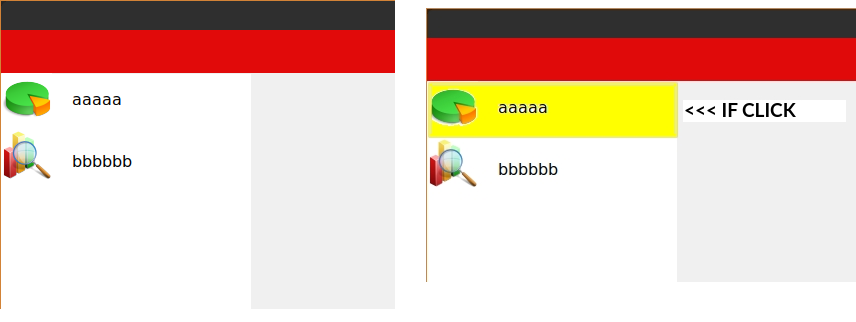
我不喜欢按按钮的效果,我只想要按钮的背景色。我可以通过将图像+文本合并到一个选择中来修改我创建的按钮吗?还是必须以另一种方式创建按钮?如果是的话,你能告诉我怎么做吗?我在网上找到了一些按钮,但它们不是我想要的:我不喜欢它看起来像一个按钮(我不想要矩形的轮廓,我不想要按压的效果)。我该怎么做?
代码:
from tkinter import *
from tkinter import ttk
from tkinter import messagebox
import tkinter as tk
from tkinter import ttk
from PIL import ImageTk, Image

root = Tk()
root.title("xxxx")
root.geometry("1920x1080+0+0")
root.config(bg="#f0f0f0")
root.state("normal")

topbar=Frame(root, width=2200, height=43, background="#e10a0a")
topbar.place(x=0, y=0)
leftbar=Frame(root, width=250, height=1400, background="white")
leftbar.place(x=1, y=44)


button1= tk.PhotoImage(file="/image.png")
btn1 = tk.Button(root, image=button1, borderwidth=0, highlightthickness=0,  bg="white", text="sdsdsd", foreground='green')
btn1.place(x=2, y=43)
text1 = Label(root, text="aaaaa", bg="white", foreground='black',  font='Verdana 12')
text1.place(x=70, y=58)


button2= tk.PhotoImage(file="/image.png")
btn2 = tk.Button(root, image=button2, borderwidth=0, highlightthickness=0,  bg="white", text="sdsdsd", foreground='green')
btn2.place(x=2, y=100)
text2 = Label(root, text="bbbbbb", bg="white", foreground='black',  font='Verdana 12')
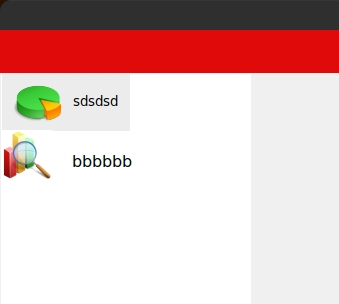
text2.place(x=70, y=120)更新1在使用复合之后,我得到了这个。我不知道这是不是最好的解决办法。我越来越近了,但我仍然没有我需要的东西。我想将选择的颜色拉伸到白色矩形的末尾,然后我想永久地为按钮的背景着色。
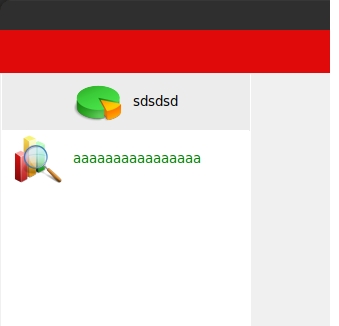
更新2通过应用宽度= 224,我修正了按钮的背景色长度问题,但按钮是居中的。现在在他的左边有空间,在它还没有出现之前。我想把它放在左边的起始位置
回答 1
Stack Overflow用户
回答已采纳
发布于 2021-11-02 02:43:12
通过设置image选项,可以将text和compound组合在按钮中。
还建议使用pack()而不是place()来为您的情况布局框架和按钮。
我认为这些按钮的parent应该是leftbar而不是root。
以下是修改后的代码:
from tkinter import messagebox
import tkinter as tk
from tkinter import ttk
from PIL import ImageTk, Image

root = tk.Tk()
root.title("xxxx")
root.geometry("1920x1080+0+0")
root.config(bg="#f0f0f0")
root.state("normal")

topbar = tk.Frame(root, background="#e10a0a", height=43)
topbar.pack(fill='x') # use pack() instead of place()

leftbar = tk.Frame(root, width=250, background="white")
leftbar.pack(side='left', fill='y') # use pack() instead of place()
leftbar.pack_propagate(0) # disable size auto-adjustment

def clicked(btn):
    for w in leftbar.winfo_children():
        w['bg'] = 'white' if w is not btn else 'yellow'

button1 = tk.PhotoImage(file="/image.png")
btn1 = tk.Button(leftbar, image=button1, borderwidth=0, highlightthickness=0,
                 bg="white", text="aaaaa", foreground='green', compound='left', anchor='w')
btn1.pack(fill='x') # use pack() instead of place()
btn1['command'] = lambda: clicked(btn1)

button2 = tk.PhotoImage(file="/image.png")
btn2 = tk.Button(leftbar, image=button2, borderwidth=0, highlightthickness=0,
                 bg="white", text="bbbbb", foreground='green', compound='left', anchor='w')
btn2.pack(fill='x') # use pack() instead of place()
btn2['command'] = lambda: clicked(btn2)

root.mainloop()
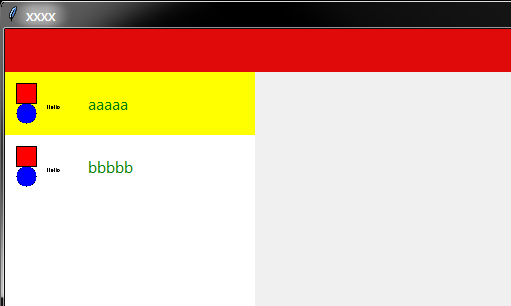
产出:
页面原文内容由Stack Overflow提供。腾讯云小微IT领域专用引擎提供翻译支持
原文链接:
https://stackoverflow.com/questions/69804421
复制相关文章
相似问题
腾讯云开发者

Copyright © 2013 - 2026 Tencent Cloud. All Rights Reserved. 腾讯云 版权所有
深圳市腾讯计算机系统有限公司 ICP备案/许可证号:粤B2-20090059  粤公网安备44030502008569号
腾讯云计算(北京)有限责任公司 京ICP证150476号 | 京ICP备11018762号