
使用attachFile()使用Cypress、拖放图像或视频
使用attachFile()使用Cypress、拖放图像或视频
提问于 2021-11-02 16:49:55
我尝试过各种方法让Cypress使用attachFile()来拖放或附加图像或视频文件。正如您在附加的Cypress故障图像上可能看到的那样,它不会将图像加载到Modal框中,add按钮仍然是禁用的,测试失败。
#1
Cypress.Commands.add('uploadMedia', (mediaType) => {
cy.wait(2000)
const fileName = 'Cover.jpg'
cy.fixture('Cover.jpg').then(Cypress.Blob.base64StringToBlob)
.then((fileContent) =>
{
    cy.get(newStoryPage.getDragAndDropFiles()).attachFile(
    {
        fileContent, fileName, mimeType: 'image/jpg'},
        {subjectType: 'drag-n-drop'

    })
})
#2我也尝试过这样做:
cy.fixture('Cover.jpg').then(jpg => {
    const files = [
        { fileName: 'Cover.jpg', fileContent: jpg, mimeType: 'image/jpg' }
      ]

      newStoryPage.getDragAndDropFiles().attachFile(files, {subjectType: 'drag-n-drop', events: ['dragenter', 'drop'] })
    })
#3并尝试了如下:
Cypress.Commands.add('dropFile', {prevSubject: false}, (fileName) =>
{
            Cypress.log({name: 'dropFile'})

        return cy.fixture(fileName, 'base64').then(Cypress.Blob.base64StringToBlob).then((blob) =>
        {
            return cy.window().then((win) =>
            {
                const file = new win.File([blob], fileName)
                const dataTransfer = new win.DataTransfer()
                dataTransfer.items.add(file)
                return cy.document().trigger('drop', {dataTransfer})

            })
        })
    }
)
返回
返回ui拖放区的get函数:
    class NewStoryPage
getDragAndDropFiles() {
        return cy.get("div[class*='upload-file-ui']")}
这个类使用函数#3运行它:
import NewStoryPage from '../../support/pageobjects/NewStoryPage'
const newStoryPage = new NewStoryPage()

class Create
{
uploadImage()
    {
        newStoryPage.getDragAndDropFiles().trigger('dragenter')
        cy.dropFile('Cover.jpg')
        newStoryPage.getAddButton().click()
    }
}
export default Create
html部件:
<div class="jsx-3861824103 upload-file-ui">
<span class="jsx-3993537252 icon">
<svg viewBox="0 0 32 32" class="jsx-3993537252">
<path d="M31.8 16.704c0 3.489-2.765 6.296-5.238 6.296H24v-1h2.562c1.92 0 4.238-2.362 4.238-5.296a5.359 5.359 0 0 0-3.607-5.097l-.407-.138-.581-.198-.087-.608-.06-.425A7.953 7.953 0 0 0 18.462 3.2a7.647 7.647 0 0 0-6.683 4.187l-.259.488-.37.696-.763-.197-.535-.138a3.474 3.474 0 0 0-.874-.13 2.943 2.943 0 0 0-3.024 2.766l-.022.404-.031.573-.51.262-.357.183A5.173 5.173 0 0 0 2.2 16.897c0 2.653 2.166 5.085 4.545 5.103H11v1H6.737C3.733 22.978 1.2 19.988 1.2 16.897a6.169 6.169 0 0 1 3.378-5.493l.357-.183.022-.402a3.93 3.93 0 0 1 4.022-3.713 4.432 4.432 0 0 1 1.125.162l.534.138.26-.488A8.645 8.645 0 0 1 18.462 2.2a8.956 8.956 0 0 1 8.584 7.897l.06.425.408.138a6.358 6.358 0 0 1 4.285 6.044zM18 14.707l2.646 2.646.707-.707-3.853-3.853-3.854 3.854.707.707L17 14.707V30h1z" class="jsx-3993537252">
</path>
</svg>
</span>
<div class="jsx-3861824103 upload-section">
<p class="jsx-3861824103 upload-title">Drag and drop a file here</p>
<div class="jsx-3861824103 upload-description">Only include media in your story that you have permission to use and will not violate copyright laws if published.<span class="jsx-3861824103"> </span>
<a rel="noopener noreferrer" target="_blank" class="jsx-181317841" href="https://doc.arcgis.com/en/arcgis-online/reference/terms-of-use.htm">
<span class="jsx-181317841">Learn more</span>
</a>
</div>
</div>
<button type="button" class="jsx-4157471165 button default primary">Browse your files</button>
<p class="jsx-3861824103 upload-types">Supported file types: .jpg, .png, .gif, .svg</p>
</div>
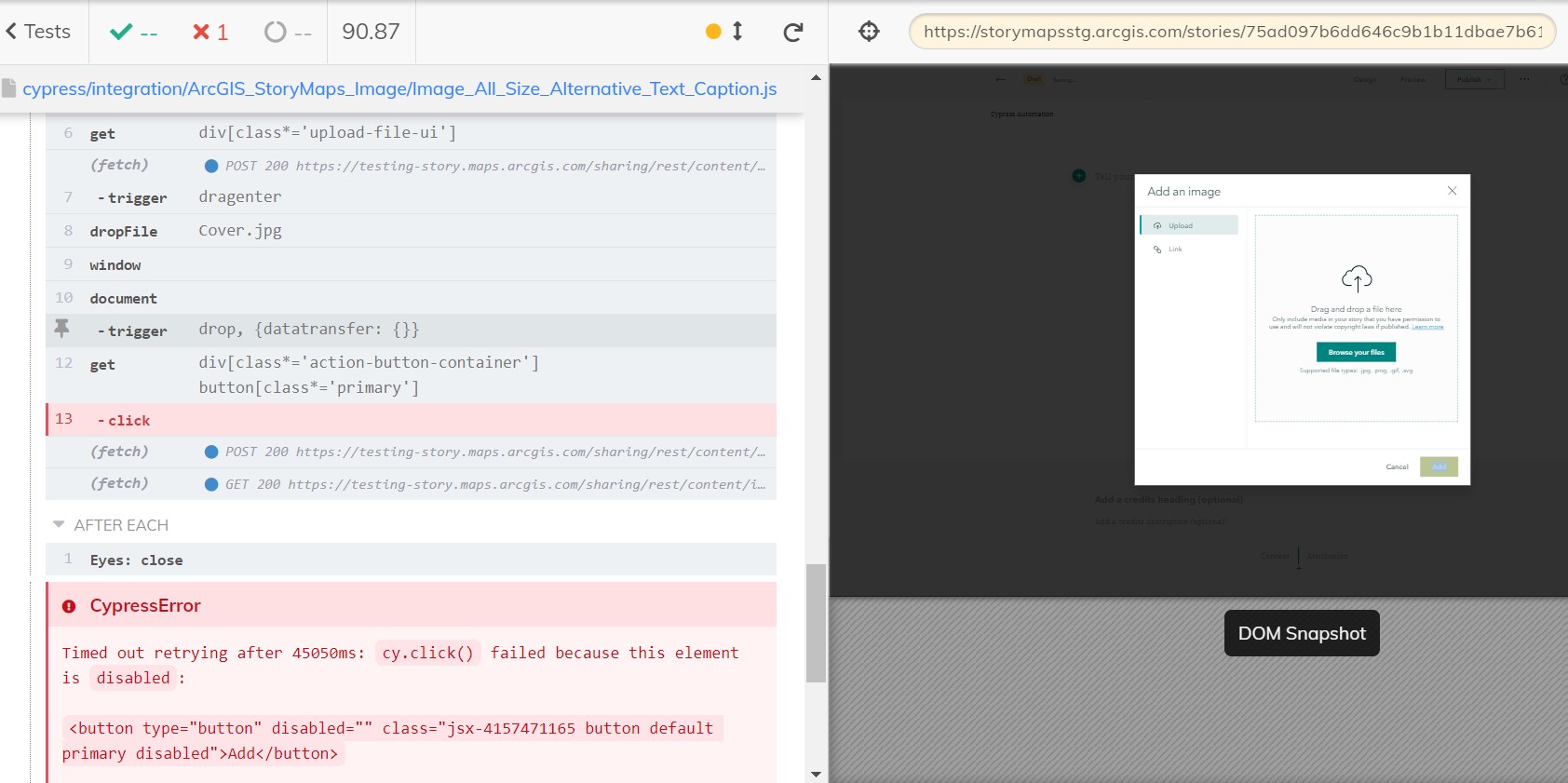
正如您所看到的,我使用了各种方法试图添加一个图像;但遗憾的是,我无法加载它。任何想法都是非常感激的。谢谢
回答 1
Stack Overflow用户
发布于 2021-11-03 02:19:53
好吧,所以我解决了。我的功能比要求的要复杂得多。我只需要以下几点:
            newStoryPage.getDragAndDropFiles().attachFile('image.jpg',
            {
                subjectType: 'drag-n-drop', events: ['dragenter', 'drop']
            })
就这样了!吸取教训,不要把事情复杂化!我希望这能帮助其他被"attachFile()“困住的人。
页面原文内容由Stack Overflow提供。腾讯云小微IT领域专用引擎提供翻译支持
原文链接:
https://stackoverflow.com/questions/69814170
复制相关文章
相似问题
腾讯云开发者

Copyright © 2013 - 2026 Tencent Cloud. All Rights Reserved. 腾讯云 版权所有
深圳市腾讯计算机系统有限公司 ICP备案/许可证号:粤B2-20090059  粤公网安备44030502008569号
腾讯云计算(北京)有限责任公司 京ICP证150476号 | 京ICP备11018762号