
尝试用std::bad_alloc打开图像时获取exiv2
尝试用std::bad_alloc打开图像时获取exiv2
提问于 2021-11-03 10:45:20
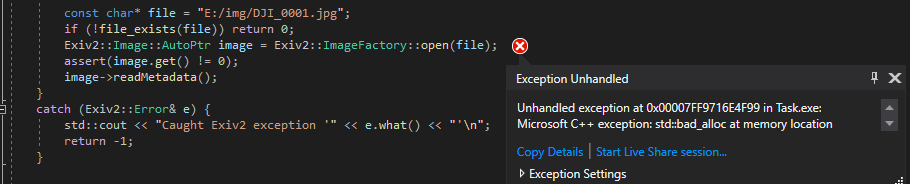
你好,我正在尝试使用exiv2从图像中读取元数据,但是当打开文件时,我得到以下错误: Microsoft C++异常: std::bad_alloc
我使用默认的c++ VisualStudio2019编译器。
#include <iostream>
#include "exiv2/exiv2.hpp"

inline bool file_exists(const std::string& name) {
    struct stat buffer;
    return (stat(name.c_str(), &buffer) == 0);
}

int main(void)
{
    try
    {
        Exiv2::XmpParser::initialize();
        ::atexit(Exiv2::XmpParser::terminate);
#ifdef EXV_ENABLE_BMFF
        Exiv2::enableBMFF();
#endif

        const char* file = "E:/img/DJI_0001.jpg";
        if (!file_exists(file)) return 0;
        Exiv2::Image::AutoPtr image = Exiv2::ImageFactory::open(file);
        assert(image.get() != 0);
        image->readMetadata();
    }
    catch (Exiv2::Error& e) {
        std::cout << "Caught Exiv2 exception '" << e.what() << "'\n";
        return -1;
}回答 2
Stack Overflow用户
发布于 2022-07-20 22:57:41
这可能是因为您的C++标准库版本与exiv2编译版本之间的ABI不兼容。我想您是在使用预构建的exiv2库吧?
您可以通过调用Exiv2::versionNumber() vs Exiv2::versionString()来检查这一点。前者可以工作,但后者可能会因为涉及std::string而崩溃。
解决方案:不使用预编译的exiv2版本,而是在主项目的同一个dev环境中自己编译。
Stack Overflow用户
发布于 2022-08-31 14:48:03
开放的方法我也有同样的问题。我听从了马提亚斯的指示,自己建立了自由。首先,错误仍然存在。然后,我为调试和发布创建了特定的版本,并为我的程序使用了适当的版本。这解决了我这边的问题。
编辑:我也尝试了预编译版本与我的发行版构建。这也很有效。
页面原文内容由Stack Overflow提供。腾讯云小微IT领域专用引擎提供翻译支持
原文链接:
https://stackoverflow.com/questions/69823490
复制相关文章
相似问题
腾讯云开发者

Copyright © 2013 - 2026 Tencent Cloud. All Rights Reserved. 腾讯云 版权所有
深圳市腾讯计算机系统有限公司 ICP备案/许可证号:粤B2-20090059  粤公网安备44030502008569号
腾讯云计算(北京)有限责任公司 京ICP证150476号 | 京ICP备11018762号