
使用jquery或javascript的List / Grid / Tile视图转换
使用jquery或javascript的List / Grid / Tile视图转换
提问于 2021-11-08 05:29:34
我希望使用Jquery实现列表/网格/平铺视图。
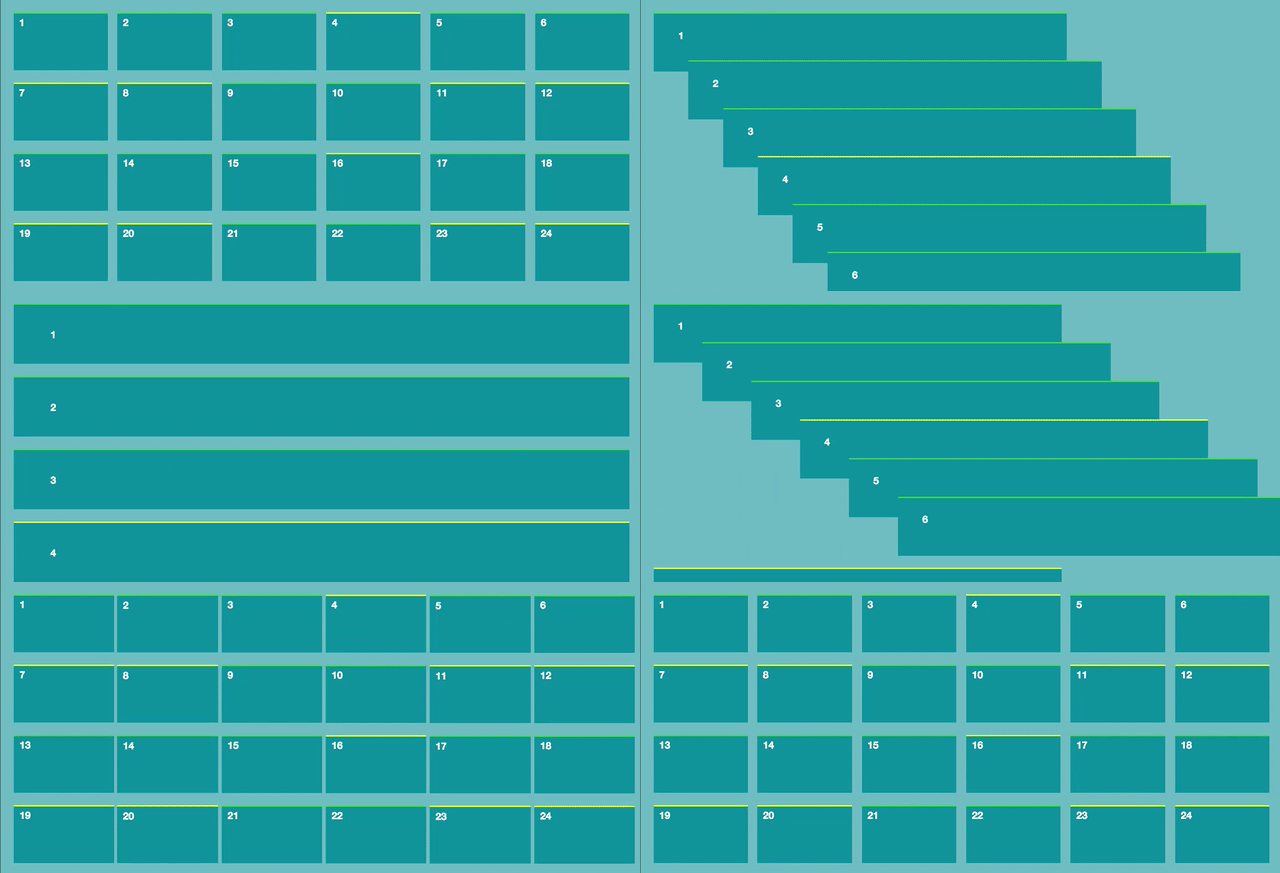
我已经用动画浏览了很多关于网格/列表视图的内容,但是只有网格/列表视图解决方案。,但我需要网格/列表视图以及动画(即,转换效果)。我附上了视频样品的过渡效应。
回答 2
Stack Overflow用户
回答已采纳
发布于 2021-11-16 16:49:26
这是我的基本实现。我试着像视频一样创建输出。
这样做的目的是在包装器中包装列表项。包装器是静态放置的,列表项是绝对放置的。当视图更改时,包装器将按照样式表或容器规则自动排列。但使用动画后移动列表项。
var pos = [];
var offs = null;

function init() {
  offs = $(".container").first().offset();
  $(".wrapper").each(function (i) {
    updatePositions();
    $(this).children(0).css({
      top: pos[i].top,
      left: pos[i].left
    });
  });
}

$(document).ready(function () {
  init();
});

$(window).resize(function () {
  init();
})

function updatePositions() {
  $(".wrapper").each(function(index) {
    var tp = $(this).offset().top - offs.top;
    var lf = $(this).offset().left - offs.left;
    pos[index] = {
      top: tp,
      left: lf
    };
  });
}

function grid() {
  if ($(".wrapper").first().hasClass("gv-wrapper")) return;
  updatePositions();
  $(".wrapper").each(function(index) {
    $(this).removeClass("dv-wrapper cv-wrapper");
    $(this).addClass("gv-wrapper");

    $(this).children(0).css({
      opacity: 0.8,
      top: pos[index].top,
      left: pos[index].left
    });
  });

  updatePositions();
  $(".wrapper").each(function(index) {
    $(this).children(0).children(0).removeClass("dv-video cv-video");
    $(this).children(0).children(1).removeClass("dv-details cv-details");
    $(this).children(0).children(0).first().addClass("gv-video");
    $(this).children(0).children(1).last().addClass("gv-details");
    $(this).children(0).animate({
      height: "100px",
      width: "200px",
      opacity: 1,
      top: pos[index].top,
      left: pos[index].left
    }, 1000, "swing");
  });
}


function detailed() {
  if ($(".wrapper").first().hasClass("dv-wrapper")) return;

  updatePositions();

  $(".wrapper").each(function(index) {
    $(this).removeClass("gv-wrapper cv-wrapper");
    $(this).addClass("dv-wrapper");

    $(this).children(0).css({
      opacity: 0.8,
      top: pos[index].top,
      left: pos[index].left
    });
  });

  updatePositions();
  $(".wrapper").each(function(index) {
    $(this).children(0).children(0).removeClass("gv-video cv-video");
    $(this).children(0).children(1).removeClass("gv-details cv-details");
    $(this).children(0).children(0).first().addClass("dv-video");
    $(this).children(0).children(1).last().addClass("dv-details");

    $(this).children(0).animate({
      height: "100px",
      width: "95%",
      opacity: 1,
      top: pos[index].top,
      left: pos[index].left
    }, 1000, "swing");
  });
}


function collapsed() {
  if ($(".wrapper").first().hasClass("cv-wrapper")) return;

  updatePositions();
  $(".wrapper").each(function(index) {
    $(this).removeClass("dv-wrapper gv-wrapper");
    $(this).addClass("cv-wrapper");

    $(this).children(0).css({
      opacity: 0.8,
      top: pos[index].top,
      left: pos[index].left
    });
  });

  updatePositions();
  $(".wrapper").each(function(index) {
    $(this).children(0).children(0).removeClass("dv-video gv-video");
    $(this).children(0).children(1).removeClass("dv-details gv-details");
    $(this).children(0).children(0).first().addClass("cv-video");
    $(this).children(0).children(1).last().addClass("cv-details");

    $(this).children(0).animate({
      height: "50px",
      width: "94%",
      opacity: 1,
      top: pos[index].top,
      left: pos[index].left
    }, 1000, "swing");
  });

}* {
margin: 0;
padding: 0;
box-sizing: border-box;
}
body {
counter-reset: number;
background-color: #ffffff;
padding: 24px;
}
i.fas {
margin: 5px;
}
i.fas:hover {
background-color: white;
}
.container {
width: 500px;
min-height: 90vh;
margin: 0 auto;
background-color: #ADC2A9;
border: 1px dotted gray;
font-size: 0.7em;
position: relative;
}
.wrapper {
margin: 10px 10px;
/* to debug enable the color */
/*background-color: darkcyan;*/
}
.record {
position: absolute;
width: 95%;
top: 0px;
left: 0px;
background-color: #D3E4CD;
}
.record:first-child:before {
counter-increment: number;
content: counter(number);
position: absolute;
top: 10%;
left: 10%;
font-size: 23px;
color: blue
}
.video {
width: 200px;
height: 100px;
background: linear-gradient(white 40%, #5e819ef8);
}
/* list view */
.dv-wrapper {
height: 100px;
width: 95%;
float: left;
}
.dv-video {}
.dv-details {
position: absolute;
width: calc(100% - 200px);
top: 0px;
right: 0px;
float: right;
padding-left: 10px;
overflow: hidden;
}
/* grid view */
.gv-wrapper {
height: 100px;
width: 200px;
float: left;
}
.gv-video {
float: left;
}
.gv-details {
position: absolute;
left: 0px;
bottom: 0px;
padding-left: 10px;
overflow: hidden;
}
/* collapsed view */
.cv-wrapper {
height: 50px;
width: 80%;
}
.cv-video {
float: left;
display: none;
}
.cv-details {
padding-left: 10px;
overflow: hidden;
}
.details p {
width: 100%;
text-overflow: ellipsis;
}<script src="https://cdnjs.cloudflare.com/ajax/libs/jquery/3.6.0/jquery.min.js"></script>
<link href="https://cdnjs.cloudflare.com/ajax/libs/font-awesome/5.15.4/css/all.min.css" rel="stylesheet" />
<div style="margin: 0 50%; width: 100px; transform: translate(-50%);">
<i class="fas fa-list" onclick="detailed()"></i>
<i class="fa fa-th" onclick="grid()"></i>
<i class="fas fa-bars" onclick="collapsed()"></i>
</div>
<div class="container">
<div class="dv-wrapper wrapper">
<div class="record">
<div class="video dv-video"></div>
<div class="details dv-details">
<p>1 Lorem ipsum dolor sit amet consectetur adipiorem ipsum dolor sit amet consectetur adipisicing elit. Deserunt, dolor.</p>
</div>
</div>
</div>
<div class="dv-wrapper wrapper">
<div class="record">
<div class="video dv-video"></div>
<div class="details dv-details">
<p>2 Lorem ipsum dolor sit amet consectetur adipisicing elit. Deserunt, dolor.</p>
</div>
</div>
</div>
<div class="dv-wrapper wrapper">
<div class="record">
<div class="video dv-video"></div>
<div class="details dv-details">
<p>3 Lorem ipsum dolor sit amet consectetur adipisicing elit. Deserunt, dolor.</p>
</div>
</div>
</div>
<div class="dv-wrapper wrapper">
<div class="record">
<div class="video dv-video"></div>
<div class="details dv-details">
<p>4 Lorem ipsum dolor sit amet consectetur adipisicing elit. Deserunt, dolor.</p>
</div>
</div>
</div>
<div class="dv-wrapper wrapper">
<div class="record">
<div class="video dv-video"></div>
<div class="details dv-details">
<p>5 Lorem ipsum dolor sit amet consectetur adipisicing elit. Deserunt, dolor.</p>
</div>
</div>
</div>
</div>
这只是一个演示代码。它可以在许多方面得到改进。我们可以在现有的网格或flex容器中放置包装器,以及上面所示的动画内容项目。
让我知道,如果任何现成的第三方可用,将减少或改进上述代码。
Stack Overflow用户
发布于 2021-11-14 11:11:10
我知道这看起来并不完全像你想要的结果,但也许它适合你,或者你可以在它的基础上建立起来。我只是在宽度和间隔上使用了一个转换,在转换中有一个小的延迟。
function toggle(){
  var k= 0;
  var i = setInterval(function(){
t = $('.test').length;
if(k>t){
 clearInterval(t)
}
$('.test').eq(k).toggleClass("test2");
k++;

  },120)
}

setTimeout(function(){
  toggle()
},1000).wrap {
width:500px;
min-height:100vh;
position:relative;
margin: 0 auto;
}
.test {
color:white;
margin:10px;
background:black;
width:100px;
height:100px;
float:left;
-webkit-transition: width 1s ease-in-out;
-moz-transition: width 1s ease-in-out;
-o-transition: width 1s ease-in-out;
transition: width 1s ease-in-out;
}
.test2 {
width:100%;
}<script src="https://cdnjs.cloudflare.com/ajax/libs/jquery/3.3.1/jquery.min.js"></script>
<div class="wrap">
<div class="test"></div>
<div class="test"></div>
<div class="test"></div>
<div class="test"></div>
<div class="test"></div>
<div class="test"></div>
<div class="test"></div>
</div>
如果你想让它和视频完全一样的话,你很可能需要和翻译-x翻译-y一起工作。
页面原文内容由Stack Overflow提供。腾讯云小微IT领域专用引擎提供翻译支持
原文链接:
https://stackoverflow.com/questions/69878990
复制相关文章
相似问题
腾讯云开发者

Copyright © 2013 - 2026 Tencent Cloud. All Rights Reserved. 腾讯云 版权所有
深圳市腾讯计算机系统有限公司 ICP备案/许可证号:粤B2-20090059  粤公网安备44030502008569号
腾讯云计算(北京)有限责任公司 京ICP证150476号 | 京ICP备11018762号