
PreferredSize和GetX的使用
我的AppBar具有git底部属性和执行BottomOfAppBar类,但是在这个类中忽略了preferredSize。
如果禁用TabBar,我的目标是使AppBar的高度设置为0px。(tabbarenable2值是自己的主要目标,但我无法找到一种动态设置AppBar高度的方法)
以下是代码:
class BottomOfAppBar extends StatelessWidget with PreferredSizeWidget {
  final TabBarController controller;

  BottomOfAppBar({Key? key, required this.tabs, required this.controller})
      : super(key: key);
  final List<Widget> tabs;
  final tabbarenable2 = Get.find<RxBool>(tag: 'tabbarenable');

  @override
  Widget build(BuildContext context) {
    return Obx(
      () => PreferredSize(
        preferredSize: tabbarenable2.value
            ? const Size.fromHeight(28.0)
            : const Size.fromHeight(0.0),
        child: ColoredBox(
          color: Colors.white,
          child: Column(
            children: [
              tabbarenable2.value
                  ? TabBar(
                      labelColor: Colors.purple[100],
                      indicatorColor: Colors.purple,
                      isScrollable: true,
                      labelPadding: const EdgeInsets.only(left: 8.0),
                      tabs: tabs)
                  : const Text('noTabBar')
            ],
          ),
        ),
      ),
    );
  }

  @override
  Size get preferredSize =>
      tabbarenable2.value ? Size.fromHeight(28.0) : Size.fromHeight(0.0);
}
有什么帮助吗?
第一次发射似乎一切正常:
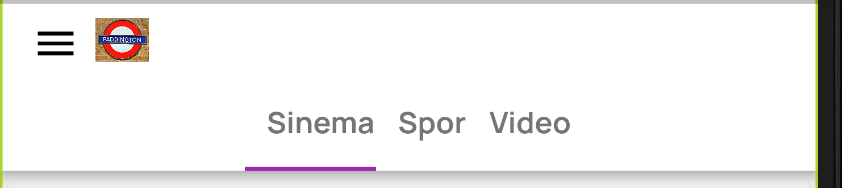
导航到视频(tabbarenable = false)
它只是纠正自己的第一个刷新页面(正确的tabBar高度)。

回答 2
Stack Overflow用户
发布于 2021-11-14 09:04:24
好的,只需尝试下面的片段,如果它不起作用,请让我看看用法
- 在这里所做的尝试是在显示小部件之前进行检查,也许正确的位置将出现在"bottomAppBar: check here“中,
- 注意不要检查构建方法中的布尔值,因为这是一种反复重新构建小部件的糟糕方法。
类BottomOfAppBar用PreferredSizeWidget (最终的TabBarController控制器;BottomOfAppBar({Key?键,必需的this.tabs,this.controller}:super( key : key);final List选项卡;tabbarenable2 =Get.find(标记:'tabbarenable');@override (BuildContext上下文){返回Obx( () => !tabbarenable2.value )?SizedBox():PreferredSize( preferredSize: const Size.fromHeight(28.0) ),ColoredBox(颜色: Colors.white,child: Column:[ TabBar( labelColor: Colors.purple100,indicatorColor: Colors.purple,isScrollable: true ),labelPadding: const EdgeInsets.only(左: 8.0),标签:标签) ],);@覆盖大小获取preferredSize => tabbarenable2.value?Size.fromHeight(28.0):Size.fromHeight(0.0);}
Stack Overflow用户
发布于 2021-11-15 15:45:33
我删除了BottomOfAppBar类,并将代码移到Scaffold。用0bx()包装,用controller.tabbarenable.value更改检查机制,非常感谢@muhamed
https://stackoverflow.com/questions/69961336
复制相似问题
腾讯云开发者

Copyright © 2013 - 2026 Tencent Cloud. All Rights Reserved. 腾讯云 版权所有
深圳市腾讯计算机系统有限公司 ICP备案/许可证号:粤B2-20090059  粤公网安备44030502008569号
腾讯云计算(北京)有限责任公司 京ICP证150476号 | 京ICP备11018762号