
如何从python的MariaDB中连接语法NAS上的SQLalchemy数据库?
我希望使用python连接到语法NAS中的MariaDB10数据库。我安装了PhpMyAdmin,并创建了一个名为"test“的数据库和一个名为"company”的随机表。我已经通过接口在表中插入了几行虚拟数据。这是它的快照。
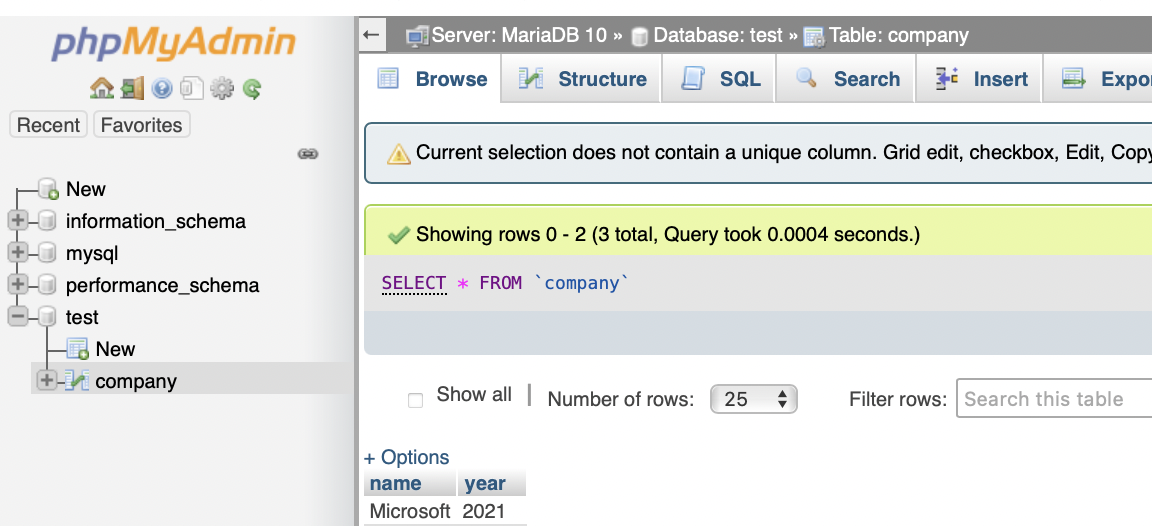
我的代码是这样的:
# Module Imports
import sqlalchemy
import pymysql
from sqlalchemy.ext.declarative import declarative_base
import config_maria_us

# Define the MariaDB engine using MariaDB Connector/Python
user = "username"
passwd = "password"
host = "192.168.1.111"
db = "test"
port= "3307"

engine = sqlalchemy.create_engine(f'mysql+pymysql://{user}:{passwd}@{host}:{port}/{db}')

sql_df = engine.execute("SELECT * FROM company" ).fetchall()
但这会返回一个错误:
OperationalError: (2003, "Can't connect to MySQL server on '192.168.1.111' ([Errno 61] Connection refused)")因为这个页面,所以我一直在使用create_engine("mysql+pymysql:。它说,要连接到MariaDB数据库,不需要更改数据库URL。
我遵循这个页面,并试图通过brew install mariadb SQLAlchemy安装mariadb SQLAlchemy。但它显示了一个警告Warning: No available formula with the name "sqlalchemy". Did you mean sqlancer?
然后,我当然安装了MariaDB连接器/C(遵循这个页面),用brew install mariadb-connector-c安装了PyMySQL,用pip install PyMySQL安装了PyMySQL。实际上,首先,我尝试用brew install mariadb安装mariadb,但是在加载了一堆东西之后,它显示出故障,
Error: Cannot install mariadb because conflicting formulae are installed.
  mysql: because mariadb, mysql, and percona install the same binaries

Please `brew unlink mysql` before continuing.

Unlinking removes a formula's symlinks from /opt/homebrew. You can
link the formula again after the install finishes. You can --force this
install, but the build may fail or cause obscure side effects in the
resulting software.
我没有继续安装它,因为我不知道如何在取消链接后“重新链接”MySQL。
差不多了,有人能告诉我怎么做吗?通过运行"engine = ...“语法,我看起来至少到达了我的服务器,但它仍然无法以'(pymysql.err.OperationalError) (2003, "Can't connect to MySQL server'的形式连接。
回答 1
Stack Overflow用户
发布于 2022-10-02 09:31:02
OP可能是自己解决的,但如果其他人还面临类似的问题的话。在我的例子中,经过以下步骤,我可以从python脚本访问NAS中托管的mariadb。
- 确保MariaDB打开TCP/IP连接
- 确保您的用户名从工作机器IP拥有对数据库的权限。你可以把它设置成 将database_name.*上的所有特权授予'username'@'localhost';
https://stackoverflow.com/questions/70010480
复制相似问题
腾讯云开发者

Copyright © 2013 - 2026 Tencent Cloud. All Rights Reserved. 腾讯云 版权所有
深圳市腾讯计算机系统有限公司 ICP备案/许可证号:粤B2-20090059  粤公网安备44030502008569号
腾讯云计算(北京)有限责任公司 京ICP证150476号 | 京ICP备11018762号