
返回代码71的USMT脚本失败
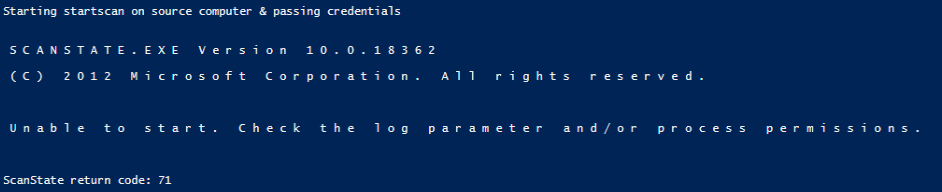
我正在处理一个用于配置文件迁移的USMT脚本,并遇到一个问题,当我尝试使用scanstate.exe时,它将以代码71退出--“无法启动。请确保您正在以更高的权限运行USMT。”
https://learn.microsoft.com/en-us/windows/deployment/usmt/usmt-return-codes#bkmk-returncodes
根据上面的站点,修复是退出USMT并以提升的权限运行。嗯,我在一个管理服务器上运行它,我用我的域管理帐户登录,并以管理员的身份运行powershell,并且仍然收到这条错误消息。我真的不明白我为什么要得到它。
下面是我使用的脚本:
#Import-Module -Name 'P:\Information Technology\WindowsPowerShell\Scripts\Modules\Write-Log' -Verbose

$PSDefaultParameterValues = @{
     'Write-Log:Label' = 'USMT'
}

function Invoke-USMT {
    [CmdletBinding()]
    param(
        [Parameter(Mandatory=$true)]
        [string]$SourceComputer,
        [Parameter(Mandatory=$true)]
        [string]$DestinationComputer,
        [Parameter(Mandatory=$true)]
        [string]$UserName,
        [Parameter(Mandatory=$true)]
        [string]$SharePath,
        [Parameter(Mandatory=$true)]
        [string]$USMTFilesPath,
        [Parameter(Mandatory=$true)]
        [string]$Domain,
        [Parameter(Mandatory=$true, HelpMessage='Enter USMT key')]
        [Security.SecureString]$SecureKey,
        [pscredential]$Credential
    )

    begin
    {
        #Test source and destination computers are online
        Write-Host 'Begin function'
        Write-Host 'Attempting to ping source computer'
        if (!(Test-Connection -ComputerName $SourceComputer -Count 2 -ErrorAction Continue))
        {
            Write-Host 'Ping to source computer failed'
            #Write-Log -Message "Count not ping $SourceComputer" -Level "Warning" -File
            Break
        } else {
            Write-Host 'Success'
        }
        Write-Host 'Attempting to ping destination computer'
         if (!(Test-Connection -ComputerName $DestinationComputer -Count 2 -ErrorAction Continue))
        {
            Write-Host 'Ping to destination computer failed'
            #Write-Log -Message "Count not ping $DestinationComputer" -Level "Warning" -File
            Break
        } else {
            Write-Host 'Success'
        }
    }

    process
    {
        #Copy USMT files to remote computers
        Try
        {
            Write-Host 'Attempting to copy USMT files to source computer'
            #Write-Log -Message "Attempting to copy USMT files to source computer" -File
            Copy-Item -Path $USMTFilesPath -Destination "\\$SourceComputer\C$\USMTFiles" -ErrorAction Stop -Recurse -force -con
            Write-Host 'Attempting to copy USMT files to destination computer'
            #Write-Log -Message "Attempting to copy USMT files to destination computer" -File
            Copy-Item -Path $USMTFilesPath -Destination "\\$DestinationComputer\C$\USMTFiles" -ErrorAction Stop -Recurse -force
        }
        Catch
        {
            Write-Host $_ + ' - Error'
            #Write-Log -Message '$_' -Level "Error" -File
            Break
        }
        #Enable CredSSP
        Write-Host 'Invoking CredSSP on source computer & passing credentials'
        #Write-Log -Message "Enabling CredSSP on source computer" -File
        Invoke-Command -ComputerName $SourceComputer -Credential $Credential -ScriptBlock {Enable-WSManCredSSP -Role server -Force}
        Write-Host 'Invoking CredSSP on destination computer & passing credentials'
        #Write-Log -Message "Enabling CredSSP on destination computer" -File
        Invoke-Command -ComputerName $DestinationComputer -Credential $Credential -ScriptBlock {Enable-WSManCredSSP -Role server -Force}
        Write-Host 'Enabling CredSSP on source computer'
        Enable-WSManCredSSP -Role client -DelegateComputer $SourceComputer -Force
        Write-Host 'Enabling CredSSP on destination computer'
        Enable-WSManCredSSP -Role client -DelegateComputer $DestinationComputer -Force

        #Start startscan on source
        Write-Host 'Starting startscan on source computer & passing credentials'
        #Write-Log -Message "Starting startscan on source computer" -File
        Invoke-Command -ComputerName $SourceComputer -Authentication Credssp -Credential $Credential -Scriptblock {
            $BSTR = [System.Runtime.InteropServices.Marshal]::SecureStringToBSTR($Using:SecureKey)
            $Key = [System.Runtime.InteropServices.Marshal]::PtrToStringAuto($BSTR)
            c:\USMTFiles\scanstate.exe "$Using:SharePath\$Using:Username" /i:c:\usmtfiles\printers.xml /i:c:\usmtfiles\custom.xml /i:c:\usmtfiles\migdocs.xml /i:c:\usmtfiles\migapp.xml /v:13 /ui:$Using:Domain\$Using:UserName /c /localonly /encrypt /key:$Key /listfiles:c:\usmtfiles\listfiles.txt /ue:pcadmin /ue:$Using:Domain\*
        } -ArgumentList {$UserName,$SharePath,$SecureKey,$SourceComputer,$Domain}
#
        #Start loadscan on destination
        Write-Host 'Starting loanscan on destination computer  passing credentials'
        #Write-Log -Message "Starting loadscan on destination computer" -File
        Invoke-Command -ComputerName $DestinationComputer -Authentication Credssp -Credential $Credential -Scriptblock {
            $BSTR = [System.Runtime.InteropServices.Marshal]::SecureStringToBSTR($Using:SecureKey)
            $Key = [System.Runtime.InteropServices.Marshal]::PtrToStringAuto($BSTR)
            c:\USMTFiles\loadstate.exe "$Using:SharePath\$Using:Username" /i:c:\usmtfiles\printers.xml /i:c:\usmtfiles\custom.xml /i:c:\usmtfiles\migdocs.xml /i:c:\usmtfiles\migapp.xml /v:13 /ui:$Using:Domain\$Using:username /c /decrypt /key:$Key
        } -ArgumentList {$UserName,$SharePath,$SecureKey,$DestinationComputer,$Domain}

        #Remove USMT files on remote computers
        Write-Host 'Removing USMT files from source computer'
        #Write-Log -Message "Removing USMT files from source computer" -File
        Remove-Item \\$SourceComputer\C$\USMTFiles -Force -Recurse
        Write-Host 'Removing USMT files from destination computer'
        #Write-Log -Message "Removing USMT files from destination computer" -File
        Remove-Item \\$DestinationComputer\C$\USMTFiles -Force -Recurse

        #Disable CredSSP on remote computers
        Write-Host 'Disabling CredSSP on source computer'
        #Write-Log -Message "Disabling CredSSP on source computer" -File
        Invoke-Command -ComputerName $SourceComputer -Credential $Credential -ScriptBlock {Disable-WSManCredSSP -Role server }
        Write-Host 'Disabling CredSSP on destination computer'
        #Write-Log -Message "Disabling CredSSP on destination computer" -File
        Invoke-Command -ComputerName $DestinationComputer -Credential $Credential -ScriptBlock {Disable-WSManCredSSP -Role server }
        Write-Host 'Disabling CredSSP on client'
        Disable-WSManCredSSP -Role client
     }
}
这是我得到错误的部分
 #Start startscan on source
        Write-Host 'Starting startscan on source computer & passing credentials'
        #Write-Log -Message "Starting startscan on source computer" -File
        Invoke-Command -ComputerName $SourceComputer -Authentication Credssp -Credential $Credential -Scriptblock {
            $BSTR = [System.Runtime.InteropServices.Marshal]::SecureStringToBSTR($Using:SecureKey)
            $Key = [System.Runtime.InteropServices.Marshal]::PtrToStringAuto($BSTR)
            c:\USMTFiles\scanstate.exe "$Using:SharePath\$Using:Username" /i:c:\usmtfiles\printers.xml /i:c:\usmtfiles\custom.xml /i:c:\usmtfiles\migdocs.xml /i:c:\usmtfiles\migapp.xml /v:13 /ui:$Using:Domain\$Using:UserName /c /localonly /encrypt /key:$Key /listfiles:c:\usmtfiles\listfiles.txt /ue:pcadmin /ue:$Using:Domain\*
        } -ArgumentList {$UserName,$SharePath,$SecureKey,$SourceComputer,$Domain}
我确保Enable-PSRemoting -Force已经在源计算机和目标计算机上完成,我还确保在管理服务器、源计算机和目标计算机的组策略中启用“允许委派新凭据”,同时在服务器列表中添加"WSMAN/*.domain.com“。
我已经做了相当多的在线搜索和与团队成员的交叉检查,但我们在这个问题上没有想法。希望你们有洞察力。
powershell中的错误:
回答 1
Stack Overflow用户
发布于 2021-11-19 15:56:42
因为在scriptblock中,您使用来自外部的变量和$using:,所以不需要使用-ArgumentList参数发送它们。
如果确实要这样做,请在scriptblock中添加一个param()块,并删除变量的using:作用域修饰符。
顺便说一句,-ArgumentList接受的是一个值数组,而不是scriptblock,我在第二个示例中忽略了$SourceComputer变量,因为scriptblock没有使用它。
尝试以下两种方法:
Invoke-Command -ComputerName $SourceComputer -Authentication Credssp -Credential $Credential -Scriptblock {
    $BSTR = [System.Runtime.InteropServices.Marshal]::SecureStringToBSTR($Using:SecureKey)
    $Key = [System.Runtime.InteropServices.Marshal]::PtrToStringAuto($BSTR)
    c:\USMTFiles\scanstate.exe "$Using:SharePath\$Using:Username" /i:c:\usmtfiles\printers.xml /i:c:\usmtfiles\custom.xml /i:c:\usmtfiles\migdocs.xml /i:c:\usmtfiles\migapp.xml /v:13 /ui:$Using:Domain\$Using:UserName /c /localonly /encrypt /key:$Key /listfiles:c:\usmtfiles\listfiles.txt /ue:pcadmin /ue:$Using:Domain\*
}
或者:
Invoke-Command -ComputerName $SourceComputer -Authentication Credssp -Credential $Credential -Scriptblock {
    param(
        $UserName,
        $SharePath,
        $SecureKey,
        $Domain
    )
    $BSTR = [System.Runtime.InteropServices.Marshal]::SecureStringToBSTR($SecureKey)
    $Key = [System.Runtime.InteropServices.Marshal]::PtrToStringAuto($BSTR)
    c:\USMTFiles\scanstate.exe "$SharePath\$Username" /i:c:\usmtfiles\printers.xml /i:c:\usmtfiles\custom.xml /i:c:\usmtfiles\migdocs.xml /i:c:\usmtfiles\migapp.xml /v:13 /ui:$Domain\$UserName /c /localonly /encrypt /key:$Key /listfiles:c:\usmtfiles\listfiles.txt /ue:pcadmin /ue:$Domain\*
} -ArgumentList $UserName,$SharePath,$SecureKey,$Domainhttps://stackoverflow.com/questions/70026934
复制相似问题
腾讯云开发者

Copyright © 2013 - 2026 Tencent Cloud. All Rights Reserved. 腾讯云 版权所有
深圳市腾讯计算机系统有限公司 ICP备案/许可证号:粤B2-20090059  粤公网安备44030502008569号
腾讯云计算(北京)有限责任公司 京ICP证150476号 | 京ICP备11018762号