
我需要迁移应用程序来使用最新的Sheets版本V4。
我正试图通过PHP客户端进入谷歌电子表格,但我得到了404->您需要的许可。我发现我使用的是旧的关闭工作表API版本的v3,是什么导致了这个错误404->“您需要许可”!现在,我需要将我的电子表格API从v3迁移到v4。
这是我的gdata代码,在这里我调用了getspreadsheets()类;:
 if(!$accessToken){

                $auth_url = $this->client->createAuthUrl();


            } else {

                try{

                    $this->client->setAccessToken($accessToken);
                    $token = json_decode($accessToken);

                    if ($this->client->isAccessTokenExpired()) {
                        $this->client->refreshToken($token->refresh_token);
                        $tok = json_encode($this->client->getAccessToken());
                        $token = json_decode($tok);
                        $db->setQuery("Update #__breezingforms_addons_gdata set password = " . $db->quote($tok) . " Where form_id = " . intval($form_id));
                        $db->execute();
                    }

                    $serviceRequest = new DefaultServiceRequest($token->access_token, $token->token_type);
                    ServiceRequestFactory::setInstance($serviceRequest);

                    $spreadsheetService = new Google\Spreadsheet\SpreadsheetService();
                    $spreadsheetFeed = $spreadsheetService->getSpreadsheets();

                }catch(Exception $ee){

                  //$accessToken = null;
                    //$auth_url = $this->client->createAuthUrl();
          $error=$ee->getMessage();

                              }
            }

            if($spreadsheetFeed !== null){
                foreach($spreadsheetFeed As $sheet){
                    $gdata_spreadsheets[$sheet->getId()] = $sheet->getTitle();
                }
            }

            if($gdata->spreadsheet_id != '' && isset( $gdata_spreadsheets[$gdata->spreadsheet_id] ) && $spreadsheetFeed !== null){

                $spreadsheet = $spreadsheetFeed->getByTitle($gdata_spreadsheets[$gdata->spreadsheet_id]);
                $worksheetFeed = $spreadsheet->getWorksheets();

                foreach ( $worksheetFeed as $sheet ){
                    $gdata_worksheets[$sheet->getId()] = $sheet->getTitle();
                }

                if($gdata->worksheet_id != '' && isset( $gdata_worksheets[$gdata->worksheet_id] )){

                    $worksheet = $worksheetFeed->getByTitle($gdata_worksheets[$gdata->worksheet_id]);
                    $cellFeed = $worksheet->getCellFeed();

                    foreach($cellFeed->getEntries() as $cellEntry) {

                        $row = $cellEntry->getRow();
                        $col = $cellEntry->getColumn();

                        if( $row > 1 ){
                            break;
                        }

                        $gdata_columns[] = $cellFeed->getCell($row, $col)->getContent();

                    }

                }
            }

        } catch(Exception $e){

            $error = $e->getMessage();
        }
用于获取电子表格的Sheets API v3代码是:
namespace Google\Spreadsheet;使用SimpleXMLElement;
/**
- 电子表格处。
-
- @package Google
- @子包电子表格
- @作者Asim Liaquat asimlqt22@gmail.com / class SpreadsheetService { /*
- Fetches a list of spreadhsheet spreadsheets from google drive.
-
- @return \Google\Spreadsheet\SpreadsheetFeed \*/ public function getSpreadsheets() { return new SpreadsheetFeed( ServiceRequestFactory::getInstance()->get('feeds/spreadsheets/private/full') ); }/**
- Fetches a single spreadsheet from google drive by id if you decide
- to store the id locally. This can help reduce api calls.
-
- @param string $id the url of the spreadsheet
-
- @return \Google\Spreadsheet\Spreadsheet \*/ public function getSpreadsheetById($id) { return new Spreadsheet( new SimpleXMLElement( ServiceRequestFactory::getInstance()->get('feeds/spreadsheets/private/full/'. $id) ) ); }/**
- Returns a list feed of the specified worksheet.
-
- @see \Google\Spreadsheet\Worksheet::getWorksheetId()
-
- @param string $worksheetId
-
- @return \Google\Spreadsheet\ListFeed \*/ public function getListFeed($worksheetId) { return new ListFeed( ServiceRequestFactory::getInstance()->get("feeds/list/{$worksheetId}/od6/private/full") ); }/**
- Returns a cell feed of the specified worksheet.
-
- @see \Google\Spreadsheet\Worksheet::getWorksheetId()
-
- @param string $worksheetId
-
- @return \Google\Spreadsheet\CellFeed \*/ public function getCellFeed($worksheetId) { return new CellFeed( ServiceRequestFactory::getInstance()->get("feeds/cells/{$worksheetId}/od6/private/full") ); } }如何在v4上进行迁移?有什么帮助吗?
回答 1
Stack Overflow用户
发布于 2021-11-23 15:48:26
表示客户端能够与给定服务器通信,但服务器无法找到所请求的内容的404 error code。由于Sheets v3 API的不推荐,无法获取资源(请查看迁移指南以获得更多参考)。
将您的应用程序迁移到使用最新的Sheets API版本--到2020年将v3 API关闭。
作为迁移到Sheets v4 API的一部分,它提供了更好的开发人员和用户体验,我们将于2020年3月3日退出Sheets v3 API。
正如您从Sheets的PHP快速启动中看到的那样,您必须实例化类Google_Service_Sheets,并使用一个有效的Google_Client作为参数:
quickstart.php
// Get the API client and construct the service object.
$client  = getClient();
$service = new Google_Service_Sheets($client);
$spreadsheetId = '1BxiMVs0XRA5nFMdKvBdBZjgmUUqptlbs74OgvE2upms';
$range = 'Class Data!A2:E';
$response = $service->spreadsheets_values->get($spreadsheetId, $range);
$values = $response->getValues();如果您需要列出与类型表匹配的所有文件,则可以使用Drive客户端(改编自这里):
drive.php
$service_drive = new Google_Service_Drive($client);

$optParams = array(
  "q" => "mimeType = 'application/vnd.google-apps.spreadsheets'"
);

$files = $service_drive->files->listFiles($optParams);
if (count($files->getFiles()) == 0) {
    print "No files found.\n";
} else {
    print "Files:\n";
    foreach ($files->getFiles() as $file) {
        printf("%s (%s)\n", $file->getName(), $file->getId());
    }
} 请记住,您需要满足先决条件:
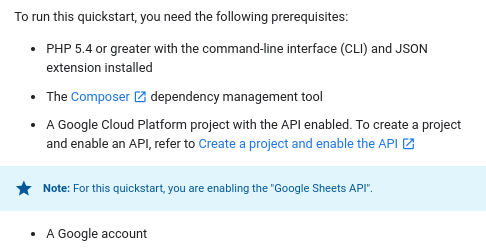
和
composer require google/apiclient:^2.0文档:
https://stackoverflow.com/questions/70078914
复制相似问题
腾讯云开发者

Copyright © 2013 - 2026 Tencent Cloud. All Rights Reserved. 腾讯云 版权所有
深圳市腾讯计算机系统有限公司 ICP备案/许可证号:粤B2-20090059  粤公网安备44030502008569号
腾讯云计算(北京)有限责任公司 京ICP证150476号 | 京ICP备11018762号