
颤振标杆溢出
颤振标杆溢出
提问于 2021-11-24 18:14:35
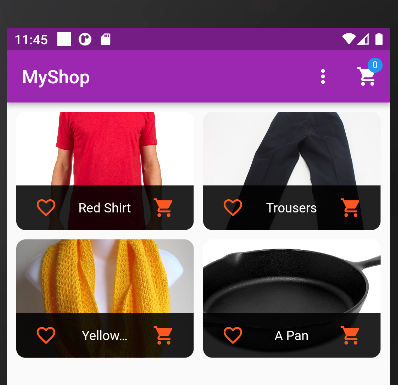
我遵循颤振的图解,但我在仿真器中的appbar上有一个溢出错误。当只有PopupMenyButton在的时候,应用程序很好地工作。然后,我添加了这个定制的徽章-小部件,它在appbar上返回一个堆栈小部件。我认为堆栈小部件(Badge)以某种方式覆盖了appbar,但我不知道如何约束它。
Error message:
Exception caught by rendering library ═════════════════════════════════
A RenderFlex overflowed by 99655 pixels on the right.
主要:
import 'package:flutter/material.dart';
import 'package:provider/provider.dart';
import 'package:shop_app/providers/cart.dart';

import 'providers/product.dart';
import './screens/product_detail_screen.dart';
import './screens/products_overview_screen.dart';
import './providers/products_provider.dart';

void main() => runApp(MyApp());

class MyApp extends StatelessWidget {
  @override
  Widget build(BuildContext context) {
    return MultiProvider(
      providers: [
        ChangeNotifierProvider(
          create: (ctx) => Products(),
        ),
        ChangeNotifierProvider(
          create: (ctx) => Cart(),
        ),
      ],
      child: MaterialApp(
        title: 'MyShop',
        theme: ThemeData(
          primarySwatch: Colors.purple,
          secondaryHeaderColor: Colors.deepOrange,
          fontFamily: 'Lato',
        ),
        home: ProductsOverviewScreen(),
        routes: {
          ProductDetailScreen.routName: (ctx) => ProductDetailScreen(),
        },
      ),
    );
  }
}
手推车:
import 'package:flutter/cupertino.dart';
import 'package:flutter/material.dart';

class CartItem {
  final String id;
  final String title;
  final int quantity;
  final double price;

  CartItem({
    required this.id,
    required this.title,
    required this.quantity,
    required this.price,
  });
}

class Cart with ChangeNotifier {
  late Map<String, CartItem> _items;

  Map<String, CartItem> get items {
    return {..._items};
  }

  int get itemCount {
    return _items == null ? 0 : _items.length;
  }

  void addItem(
    String productId,
    double price,
    String title,
  ) {
    if (_items.containsKey(productId)) {
      _items.update(
        productId,
        (existingCartItem) => CartItem(
            id: existingCartItem.id,
            title: existingCartItem.title,
            price: existingCartItem.price,
            quantity: existingCartItem.quantity + 1),
      );
    } else {
      _items.putIfAbsent(
        productId,
        () => CartItem(
          id: DateTime.now().toString(),
          title: title,
          price: price,
          quantity: 1,
        ),
      );
    }
    notifyListeners();
  }
}
产品:
import 'package:flutter/foundation.dart';

class Product with ChangeNotifier {
  final String id;
  final String title;
  final String description;
  final double price;
  final String imageUrl;
  bool isFavorite;

  Product({
    required this.id,
    required this.title,
    required this.description,
    required this.price,
    required this.imageUrl,
    this.isFavorite = false,
  });

  void toggleFavoriteStatus() {
    isFavorite = !isFavorite;
    notifyListeners();
  }
}
products_provider:
import 'package:flutter/material.dart';
import 'package:shop_app/providers/product.dart';
import 'package:shop_app/widgets/product_item.dart';

class Products with ChangeNotifier {
  List<Product> _items = [
    Product(
      id: 'p1',
      title: 'Red Shirt',
      description: 'A red shirt - it is pretty red!',
      price: 29.99,
      imageUrl:
          'https://cdn.pixabay.com/photo/2016/10/02/22/17/red-t-shirt-1710578_1280.jpg',
    ),
    Product(
      id: 'p2',
      title: 'Trousers',
      description: 'A nice pair of trousers.',
      price: 59.99,
      imageUrl:
          'https://upload.wikimedia.org/wikipedia/commons/thumb/e/e8/Trousers%2C_dress_%28AM_1960.022-8%29.jpg/512px-Trousers%2C_dress_%28AM_1960.022-8%29.jpg',
    ),
    Product(
      id: 'p3',
      title: 'Yellow Scarf',
      description: 'Warm and cozy - exactly what you need for the winter.',
      price: 19.99,
      imageUrl:
          'https://live.staticflickr.com/4043/4438260868_cc79b3369d_z.jpg',
    ),
    Product(
      id: 'p4',
      title: 'A Pan',
      description: 'Prepare any meal you want.',
      price: 49.99,
      imageUrl:
          'https://upload.wikimedia.org/wikipedia/commons/thumb/1/14/Cast-Iron-Pan.jpg/1024px-Cast-Iron-Pan.jpg',
    ),
  ];

  //var _showFavoritesOnly = false;

  List<Product> get items {
    //if (_showFavoritesOnly) {
    // return _items.where((ProductItem) => ProductItem.isFavorite).toList();
    //}
    return [..._items];
  }

  List<Product> get favoriteItems {
    return _items.where((prodItem) => prodItem.isFavorite).toList();
  }

  Product findById(String id) {
    return _items.firstWhere((prod) => prod.id == id);
  }

  //void showFavoritesOnly() {
  // _showFavoritesOnly = true;
  // notifyListeners();
  //}

  // void showAll() {
  //  _showFavoritesOnly = false;
  //  notifyListeners();
  // }

  void addProduct() {
    // _items.add(value);
    notifyListeners();
  }
}
product_detail_screen:
import 'package:flutter/material.dart';
import 'package:provider/provider.dart';
import 'package:shop_app/providers/products_provider.dart';
import '../providers/products_provider.dart';

class ProductDetailScreen extends StatelessWidget {
  const ProductDetailScreen({Key? key}) : super(key: key);

  static const routName = '/product-detail';
  @override
  Widget build(BuildContext context) {
    final productId = ModalRoute.of(context)!.settings.arguments as String;
    final loadedProduct = Provider.of<Products>(
      context,
      listen: false,
    ).findById(productId);

    return Scaffold(
      appBar: AppBar(
        title: Text(loadedProduct.title),
      ),
    );
  }
}
products_overview_screen:
  import 'package:flutter/material.dart';
        import 'package:provider/provider.dart';
    import 'package:shop_app/providers/cart.dart';

    import '../widgets/products_grid.dart';
    import '../providers/products_provider.dart';
    import '../widgets/badge.dart';

    enum FilterOptions {
      Favourites,
      All,
    }

    class ProductsOverviewScreen extends StatefulWidget {
      @override
      State<ProductsOverviewScreen> createState() => _ProductsOverviewScreenState();
    }

    class _ProductsOverviewScreenState extends `State<ProductsOverviewScreen> {`

  var _showOnlyFavorites = false;
  @override
  Widget build(BuildContext context) {
    return Scaffold(
      appBar: AppBar(
        title: const Text('MyShop'),
        actions: <Widget>[
          PopupMenuButton(
            onSelected: (FilterOptions selectedValue) {
              setState(() {
                if (selectedValue == FilterOptions.Favourites) {
                  _showOnlyFavorites = true;
                } else {
                  _showOnlyFavorites = false;
                }
              });
                },
                icon: Icon(
                  Icons.more_vert,
                ),
                itemBuilder: (_) => [
                  PopupMenuItem(
                    child: Text('Only Favorites'),
                    value: FilterOptions.Favourites,
                  ),
                  PopupMenuItem(
                    child: Text('Show All'),
                    value: FilterOptions.All,
                  ),
                ],
              ),
              Consumer<Cart>(
                builder: (_, cart, ch) => Badge(
                  child: ch as Widget,
                  value: cart.itemCount.toString(),
                  color: Colors.blue,
                ),
                child: IconButton(
                  icon: Icon(
                    Icons.shopping_cart,
                  ),
                  onPressed: () {},
                ),
              ),
            ],
          ),
          body: ProductsGrid(_showOnlyFavorites),
        );
      }
    }
products_grid:
import 'package:flutter/material.dart';
import 'package:provider/provider.dart';

import 'package:shop_app/providers/products_provider.dart';
import 'package:shop_app/widgets/product_item.dart';

class ProductsGrid extends StatelessWidget {
  final bool showFavs;

  ProductsGrid(this.showFavs);
  @override
  Widget build(BuildContext context) {
    final productsData = Provider.of<Products>(context);
    final products = showFavs ? productsData.favoriteItems : productsData.items;

    return GridView.builder(
      padding: const EdgeInsets.all(10.0),
      itemCount: products.length,
      itemBuilder: (ctx, i) => ChangeNotifierProvider.value(
        value: products[i],
        child: ProductItem(
            // products[i].id,
            //products[i].title,
            //products[i].imageUrl,
            ),
      ),
      gridDelegate: const SliverGridDelegateWithFixedCrossAxisCount(
          crossAxisCount: 2,
          childAspectRatio: 3 / 2,
          crossAxisSpacing: 10,
          mainAxisSpacing: 10),
    );
  }
}
product_item:
import '../providers/product.dart';
import '../providers/cart.dart';

class ProductItem extends StatelessWidget {
  // final String id;
  //final String title;
  //final String imageUrl;

  //ProductItem(this.id, this.title, this.imageUrl);

  @override
  Widget build(BuildContext context) {
    final product = Provider.of<Product>(context, listen: false);
    final cart = Provider.of<Cart>(context, listen: false);
    return ClipRRect(
      borderRadius: BorderRadius.circular(10),
      child: GridTile(
        child: GestureDetector(
          onTap: () {
            Navigator.of(context).pushNamed(
              ProductDetailScreen.routName,
              arguments: product.id,
            );
          },
          child: Image.network(
            product.imageUrl,
            fit: BoxFit.cover,
          ),
        ),
        footer: GridTileBar(
          backgroundColor: Colors.black87,
          leading: Consumer<Product>(
            builder: (ctx, product, _) => IconButton(
              icon: Icon(
                product.isFavorite ? Icons.favorite : Icons.favorite_border,
              ),
              color: Theme.of(context).secondaryHeaderColor,
              onPressed: () {
                product.toggleFavoriteStatus();
              },
            ),
          ),
          title: Text(
            product.title,
            textAlign: TextAlign.center,
          ),
          trailing: IconButton(
            icon: Icon(Icons.shopping_cart),
            onPressed: () {
              cart.addItem(product.id, product.price, product.title);
            },
            color: Theme.of(context).secondaryHeaderColor,
          ),
        ),
      ),
    );
  }
}
徽章:
     import 'package:flutter/material.dart';

class Badge extends StatelessWidget {
  const Badge({
    Key? key,
    required this.child,
    required this.value,
    required this.color,
  }) : super(key: key);

  final Widget child;
  final String value;
  final Color color;

  @override
  Widget build(BuildContext context) {
    return Stack(
      alignment: Alignment.center,
      children: [
        child,
        Positioned(
          right: 8,
          top: 8,
          child: Container(
            padding: EdgeInsets.all(2.0),
            // color: Theme.of(context).accentColor,
            decoration: BoxDecoration(
              borderRadius: BorderRadius.circular(10.0),
              color: color != null
                  ? color
                  : Theme.of(context).colorScheme.secondary,
            ),
            constraints: const BoxConstraints(
              minWidth: 16,
              minHeight: 16,
            ),
            child: Text(
              value,
              textAlign: TextAlign.center,
              style: TextStyle(
                fontSize: 10,
              ),
            ),
          ),
        )
      ],
    );
  }
}回答 1
Stack Overflow用户
回答已采纳
发布于 2021-11-24 19:23:38
正如您在模拟器中所看到的,错误是由于项目列表的后期初始化造成的。延迟更改为可空数据类型。
对您的Cart.dart:进行以下更改
class Cart with ChangeNotifier {
  Map<String, CartItem> ?_items;// <------_items can be null

  Map<String, CartItem> get items {
    return {..._items!};  //<-----added null check
  }

  int get itemCount {
    return _items == null ? 0 : _items!.length;//<----added null check
  }

  void addItem(
      String productId,
      double price,
      String title,
      ) {
    if (_items!.containsKey(productId)) {   //<----added null check
      _items!.update(  //<-----added null check
        productId,
            (existingCartItem) => CartItem(
            id: existingCartItem.id,
            title: existingCartItem.title,
            price: existingCartItem.price,
            quantity: existingCartItem.quantity + 1),
      );
    } else {
      _items!.putIfAbsent(   //<-----added null check
        productId,
            () => CartItem(
          id: DateTime.now().toString(),
          title: title,
          price: price,
          quantity: 1,
        ),
      );
    }
    notifyListeners();
  }
}
页面原文内容由Stack Overflow提供。腾讯云小微IT领域专用引擎提供翻译支持
原文链接:
https://stackoverflow.com/questions/70101068
复制相关文章
相似问题
腾讯云开发者

Copyright © 2013 - 2026 Tencent Cloud. All Rights Reserved. 腾讯云 版权所有
深圳市腾讯计算机系统有限公司 ICP备案/许可证号:粤B2-20090059  粤公网安备44030502008569号
腾讯云计算(北京)有限责任公司 京ICP证150476号 | 京ICP备11018762号