
计算语义分割图像中的类数
我有一个图像,它是一个语义分割算法的输出,例如这个。

我在网上看了看,尝试了很多代码,但到目前为止,没有一条对我有用。
人眼清楚地看到,这幅图像有5种不同的颜色:蓝色、黑色、红色和白色。
我试图用python编写一个脚本来分析图像并返回图像中的颜色数,但到目前为止,它还没有工作。图像中有许多像素,其中包含的值是上述颜色的混合。
我正在使用的代码如下,但我想了解是否有一个更容易的方式在您的意见,以实现这一目标。
我认为我需要实现某种具有以下逻辑的阈值:
- 和这个有相似的颜色吗?如果是,请不要增加颜色的计数
- ,这种颜色是否存在于N个像素以上?如果没有,请不要增加颜色的计数。
from PIL import Image

imgPath = "image.jpg"

img = Image.open(imgPath)
uniqueColors = set()

w, h = img.size
for x in range(w):
    for y in range(h):
        pixel = img.getpixel((x, y))
        uniqueColors.add(pixel)

totalUniqueColors = len(uniqueColors)

print(totalUniqueColors)

print(uniqueColors)
提前感谢!
回答 3
Stack Overflow用户
发布于 2021-11-29 09:04:32
我解决了我的问题,现在我能够计数来自语义分割数据集的图像中的颜色(图像必须是.png格式,因为它是无损格式)。
下面,我尝试解释我在解决方案的过程中发现了什么,以及我使用的代码,这些代码应该已经准备好使用了(您只需要更改要分析的图像的路径)。
我有两个主要问题。
色彩计数的第一个问题是图像的格式。我使用(在一些测试中)压缩映像的.jpeg图像。
因此,从这样的事情
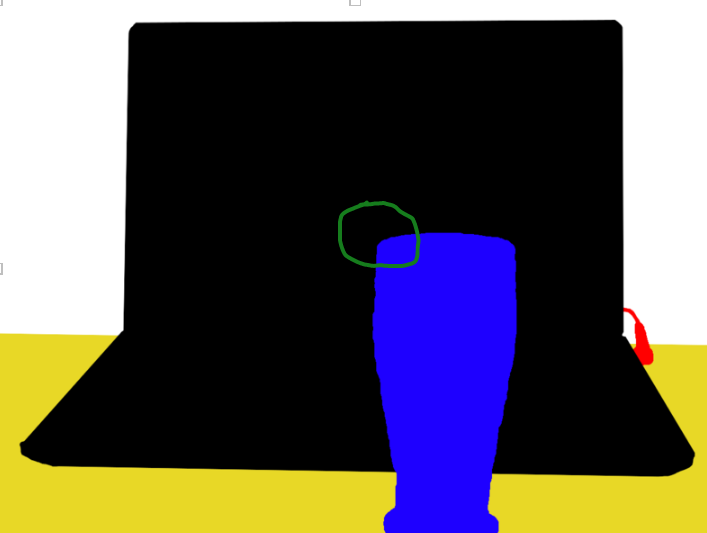
如果我放大玻璃的左上角(标记为绿色),我看到的是这样的东西。

这显然是不好的,因为它将引入比“肉眼可见”更多的颜色。
相反,对于带注释的图像,我有如下所示

如果我放大自行车的马鞍(标记为绿色),我就会看到这样的东西

第二个问题是,我没有将我的图像转换成RGB图像。
这一点在代码行中得到了注意:
img = Image.open(filename).convert('RGB')
代码在下面。当然,这不是最有效率的,但对我来说,它做的工作。如有任何改善其性能的建议,将不胜感激。
import numpy as np
from PIL import Image
import argparse
import os

debug = False

def main(data_dir):
    print("This small script allows you to count the number of different colors in an image")
    print("This code has been written to count the number of classes in images from a semantic segmentation dataset")
    print("Therefore, it is highly recommended to run this code on lossless images (such as .png ones)")
    print("Images are being loaded from: {}".format(data_dir))

    directory = os.fsencode(data_dir)
    interesting_image_format = ".png"

    # I will put in the variable filenames all the paths to the images to be analyzed
    filenames = []
    for file in os.listdir(directory):
        filename = os.fsdecode(file)
        if filename.endswith(interesting_image_format):
            if debug:
                print(os.path.join(directory, filename))
                print("Analyzing image: {}".format(filename))
            filenames.append(os.path.join(data_dir, filename))
        else:
            if debug:
                print("I am not doing much here...")
            continue
    # Sort the filenames in an alphabetical order
    filenames.sort()

    # Analyze the images (i.e., count the different number of colors in the images)
    number_of_colors_in_images = []
    for filename in filenames:
        img = Image.open(filename).convert('RGB')
        if debug:
            print(img.format)
            print(img.size)
            print(img.mode)
        data_img = np.asarray(img)
        if debug:
            print(data_img.shape)
        uniques = np.unique(data_img.reshape(-1, data_img.shape[-1]), axis=0)
        # uncomment the following line if you want information for each analyzed image
        print("The number of different colors in image ({}) {} is: {}".format(interesting_image_format, filename, len(uniques)))
        # print("uniques.shape[0] for image {} is: {}".format(filename, uniques.shape[0]))

        # Put the number of colors of each image into an array
        number_of_colors_in_images.append(len(uniques))

    print(number_of_colors_in_images)
    # Print the maximum number of colors (classes) of all the analyzed images
    print(np.max(number_of_colors_in_images))
    # Print the average number of colors (classes) of all the analyzed images
    print(np.average(number_of_colors_in_images))

def args_preprocess():
    # Command line arguments
    parser = argparse.ArgumentParser()
    parser.add_argument(
        "--data_dir", default="default_path_to_images", type=str, help='Specify the directory path from where to take the images of which we want to count the classes')
    args = parser.parse_args()
    main(args.data_dir)

if __name__ == '__main__':
args_preprocess()Stack Overflow用户
发布于 2021-11-27 00:11:36
有些地方出了问题--你的图像有1277种独特的颜色,而不是你建议的5种颜色。
您是否保存/共享了有损JPEG,而不是您对分类图像应该喜欢的无损PNG?
用Numpy计算唯一颜色的一种快速方法如下:
def withNumpy(img):
    # Ignore A channel
    px = np.asarray(img)[...,:3]
    # Merge RGB888 into single 24-bit integer
    px24 = np.dot(np.array(px, np.uint32),[1,256,65536])
    # Return number of unique colours
return len(np.unique(px24))Stack Overflow用户
发布于 2022-12-02 11:29:11
上面提到的.jpeg图像中的有损压缩和.png中的无损压缩似乎是一件很好的事情。但是您可以使用下面的代码从掩码中获取类的数量。
--这只适用于.png图像。没有在.jpeg图像上测试。
import cv2 as cv
import numpy as np

img_path = r'C:\Users\Bhavya\Downloads\img.png'
img = cv.imread(img_path)
img = np.array(img, dtype='int32')
pixels = []
for i in range(img.shape[0]):
    for j in range(img.shape[1]):
        r, g, b = list(img[i, j, :])
        pixels.append((r, g, b))
pixels = list(set(pixels))
print(len(pixels))
在这个解决方案中,我所做的是将输入图像中的一对像素值(RGB)附加到列表中,并将列表转换为设置,然后再转换为list。要设置的列表的第一次转换移除所有重复元素(这里是像素值)并给出唯一的像素值,下一次从set转换到list是可选的,只是为了在像素上应用一些未来的列表操作。
https://stackoverflow.com/questions/70122809
复制相似问题
腾讯云开发者

Copyright © 2013 - 2026 Tencent Cloud. All Rights Reserved. 腾讯云 版权所有
深圳市腾讯计算机系统有限公司 ICP备案/许可证号:粤B2-20090059  粤公网安备44030502008569号
腾讯云计算(北京)有限责任公司 京ICP证150476号 | 京ICP备11018762号