
迭代驱动器中的所有文件夹--将遗留存储选项迁移到云端
我有一个类似于下面的文件夹结构:
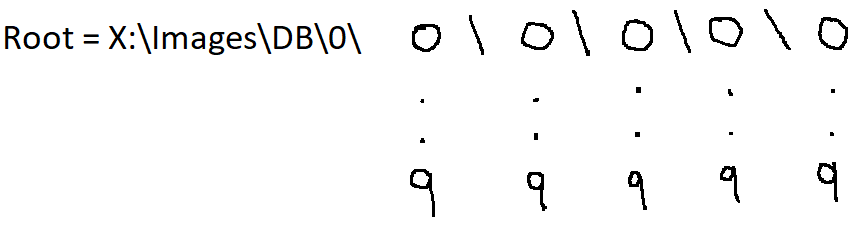
此结构用于存储图像。新图像被附加到最深的可用目录中。一个目录最多可以容纳100幅图像。
示例:
添加的前100幅图像将具有以下路径:
- X:\Images\DB\0\0\0\0\0\0\image_name.jpg
随机图像可能具有以下路径:
- X:\Images\DB\0\2\1\4\2\7\image_name.jpg
最后添加的100个图像将具有以下路径:
- X:\Images\DB\0\9\9\9\9\9\image_name.jpg
注:图像只存储在最深的目录中。
- X:\Images\DB\0\x\x\x\x\x\IMAGES_HERE
例如:X:\映像\DB\0\1\2\3中没有存储的图像
注:只有当图像存储在那里时,图像的最深文件夹路径才会存在。示例:
- X:\Images\DB\0\9\9\9\9\9
..。可能不存在(在我的情况下也不存在)。
我想要实现的是,从根目录开始,导航到图像的每一条可能的路径并运行一个命令。
我知道这方面的时间复杂性是按小时计算的,如果不是数日的话。这是一个遗留存储选项,命令将映像迁移到云端。
我已经成功地编写了一些函数,允许我访问当前最深的目录并执行一个命令,但是访问所有可能的路径增加了我正在苦苦挣扎的复杂性--我也是Python新手。
以下是代码:
# file generator
def files(path):
    for file in os.listdir(path):
        if os.path.isfile(os.path.join(path, file)):
            yield file

# latest deepest directory
def get_deepest_dir(dir):
    current_dir = dir
    next_dir = os.listdir(current_dir)[-1]

    if len(list(files(current_dir))) == 0:
        next_dir = os.path.join(current_dir, next_dir)
        return get_deepest_dir(next_dir)
    else:
        return current_dir

# perform command
def sync():
    dir = get_deepest_dir(root_dir)
    command = "<command_here>"
subprocess.Popen(command, shell=True)回答 2
Stack Overflow用户
发布于 2021-12-02 12:55:39
我使用下面的搜索csv / pdf文件。我留下了一个例子,说明我写了什么来搜索所有的文件夹。
python中的os.listdir - os.listdir()方法用于获取指定目录中所有文件和目录的列表。
os.walk - os.walk()方法,在python中通过自顶向下或自下而上的方式在目录树中生成文件名。
#Import Python Modules
import os,time
import pandas as pd

## Search Folder
##src_path ="/Users/folder1/test/"
src_path ="/Users/folder1/"
path = src_path

files = os.listdir(path)

for f in files:
    if f.endswith('.csv'):
        print(f)

for root, directories, files in os.walk(path, topdown=False):
    for name in files:
        if name.endswith('.csv'):
            print(os.path.join(root, name))
        ##    for name in directories:
        ## print(os.path.join(root, name))

for root, directories, files in os.walk(path):
    for name in files:
        if name.endswith('.pdf'):
            print(os.path.join(root, name))
        ## for name in directories:
## print(os.path.join(root, name))Stack Overflow用户
发布于 2021-12-02 14:44:02
感谢上面@NeoTheNerd的解决方案。适用于我的修改代码就在这里。
def all_dirs(path):
    for root, directories, files in os.walk(path, topdown=False):
        if sum(c.isdigit() for c in root) == 6:
            print("Migrating Images From {}".format(root))

all_dirs("X:\\Images\\DB\\0")https://stackoverflow.com/questions/70199462
复制相似问题
腾讯云开发者

Copyright © 2013 - 2026 Tencent Cloud. All Rights Reserved. 腾讯云 版权所有
深圳市腾讯计算机系统有限公司 ICP备案/许可证号:粤B2-20090059  粤公网安备44030502008569号
腾讯云计算(北京)有限责任公司 京ICP证150476号 | 京ICP备11018762号