
移动javaFX中的叠加元素
我在努力使我的javaFX程序变得更好。我想听听建议。
这里有一幅我所做的事情的草图:
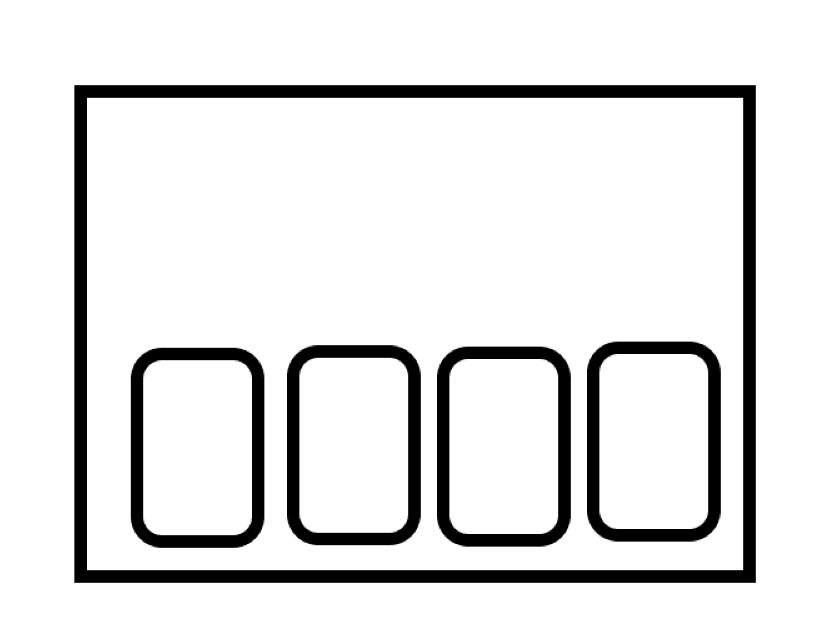
屏幕是一组图像(小矩形)。
我的目标是在点击一张卡片的时候,把它放在上面。
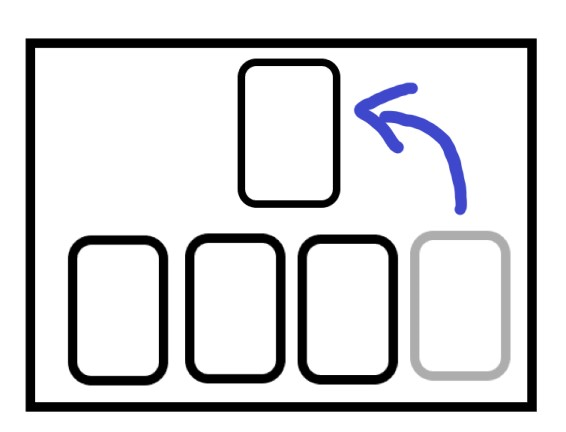
为此,我将主体竞争器设置为StackPane。我已经考虑过将卡片直接放到StackPane中,但是setLayoutX和setLayoutY方法似乎并没有移动我的图像。
我提出的解决方案是将我的StackPane倍数AnchorPane (每张卡一张)放入其中。每个AnchorPane都有StackPane contener的大小,并且包含一个独立卡。就这样,我可以设定每张卡的位置。
这个方法的问题是:因为每个AnchorPane都有主目录的大小,所以包含最后一张卡的AnchorPane放在AnchorPanes前面。
因此,当我点击我的最后一张卡,我完美地工作,但我不能点击其他的卡片,因为有一个无形的节点在他们前面。
如果有人能给我一些建议,那就太好了。
回答 1
Stack Overflow用户
发布于 2022-12-02 23:14:42
下面是一个例子。
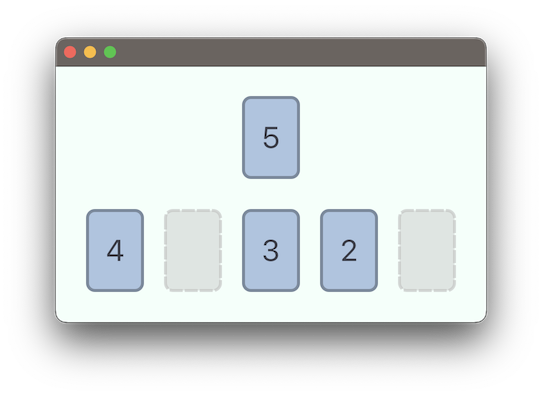
点击每一张牌来玩。在玩完所有的牌后,游戏会在点击桌面上的任何位置时重置。然后,一只新的手将被处理给球员。
它将占位符用于牌桌上的空牌位置。
对于布局,它使用VBox作为播放表,HBox用于手中的扑克牌。
import javafx.application.Application;
import javafx.geometry.Insets;
import javafx.scene.Parent;
import javafx.scene.Scene;
import javafx.scene.control.Label;
import javafx.scene.layout.*;
import javafx.scene.paint.Color;
import javafx.scene.shape.Rectangle;
import javafx.stage.Stage;

import java.util.ArrayList;
import java.util.Collections;
import java.util.List;
import java.util.stream.Collectors;
import java.util.stream.IntStream;

public class CardApp extends Application {
    private static final int NUM_CARDS = 5;

    private HBox hand;
    private VBox table;
    private Scene scene;

    @Override
    public void start(Stage stage) {
        scene = new Scene(deal());

        stage.setScene(scene);
        stage.show();
    }

    private Parent deal() {
        List<Card> cards =
                IntStream.rangeClosed(1, NUM_CARDS)
                        .mapToObj(Card::new)
                        .collect(Collectors.toCollection(ArrayList::new));
        Collections.shuffle(cards);

        hand = new HBox(20,
                cards.toArray(new Card[0])
        );

        table = new VBox(30,
                new CardPlaceholder(),
                hand
        );
        table.setStyle("-fx-background-color: mintcream;");
        table.setPadding(new Insets(30));

        // click on cards to play them.
        for (Card card: cards) {
            card.setOnMouseClicked(e -> {
                playCard(card, hand, table);

                // when all cards are played, click anywhere to re-deal on a new table.
                if (hand.getChildren().stream().noneMatch(c -> c instanceof Card)) {
                    table.setOnMouseClicked(me -> scene.setRoot(deal()));
                }
            });
        }

        return table;
    }

    private void playCard(Card card, HBox hand, VBox table) {
        int index = hand.getChildren().indexOf(card);
        hand.getChildren().set(index, new CardPlaceholder());
        table.getChildren().set(0, card);
        card.setOnMouseClicked(null);
    }

    static class Card extends StackPane {
        public Card(int value) {
            Rectangle background = new Rectangle(55, 80, Color.LIGHTSTEELBLUE);
            background.setStroke(Color.LIGHTSTEELBLUE.darker());
            background.setStrokeWidth(3);
            background.setArcWidth(15);
            background.setArcHeight(15);

            Label foreground = new Label("" + value);
            foreground.setStyle("-fx-font-size: 30; -fx-text-fill: rgb(60,63,74);");

            getChildren().setAll(background, foreground);
        }
    }

    static class CardPlaceholder extends StackPane {
        public CardPlaceholder() {
            Rectangle background = new Rectangle(
                    55, 80,
                    Color.SILVER.deriveColor(
                            0,1,1, .4
                    )
            );

            background.setStroke(
                    Color.SILVER.deriveColor(
                            0,1,1, .6
                    )
            );
            background.setStrokeWidth(3);
            background.setArcWidth(15);
            background.setArcHeight(15);
            background.getStrokeDashArray().addAll(10d, 5d);

            getChildren().setAll(background);
        }
    }
}
为了简单地回答这个有限的问题,所有东西都在一个文件中。对于一个更实质性的应用程序,游戏逻辑和游戏模型将从UI中分离出来(使用MVC),布局可以用FXML完成,样式设计将通过CSS完成。
https://stackoverflow.com/questions/74659481
复制相似问题
腾讯云开发者

Copyright © 2013 - 2026 Tencent Cloud. All Rights Reserved. 腾讯云 版权所有
深圳市腾讯计算机系统有限公司 ICP备案/许可证号:粤B2-20090059  粤公网安备44030502008569号
腾讯云计算(北京)有限责任公司 京ICP证150476号 | 京ICP备11018762号