
UiDevice.hasObject方法在UiAutomator中耗时过长
UiDevice.hasObject方法在UiAutomator中耗时过长
提问于 2022-11-30 16:20:30
我编写了一个自动测试用例来测试Tiktok
在测试中,在切换到下一个视频之前,我将检查当前的视频类型,并做一些事情。
Log.i(TAG, "check if it's a vr video")
val byRule = By.clazz("android.view.View").descContains("点击体验VR直播,按钮")
if(device.hasObject(byRule)){
     Log.i(TAG, "vr video")
     device.findObject(byRule)?.click()
    SystemClock.sleep(time*1000L)
    device.pressBack()
} else {
    Log.d(TAG, "no")
}
第一次运行代码时,UiDevice.hasObject方法将立即返回,但是第二次运行速度非常慢,大约需要10秒。
谁能告诉我为什么?
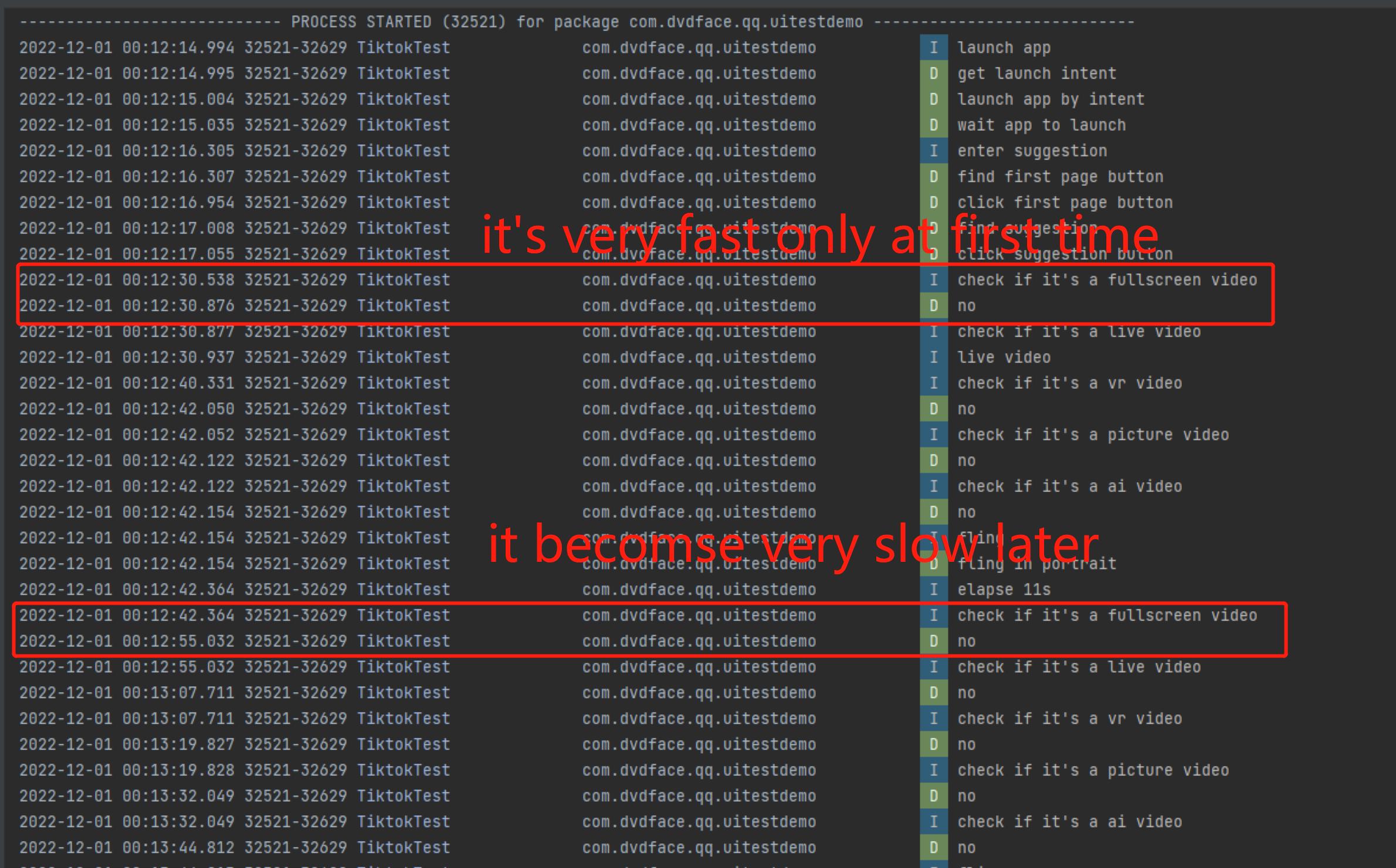
完整代码在这里
package com.dvdface.qq.uitestdemo

import android.content.Context
import android.content.Intent
import android.os.SystemClock
import android.util.Log
import android.view.Surface
import androidx.test.core.app.ApplicationProvider
import androidx.test.platform.app.InstrumentationRegistry
import androidx.test.ext.junit.runners.AndroidJUnit4
import androidx.test.filters.LargeTest
import androidx.test.uiautomator.*
import org.junit.After
import org.junit.Test
import org.junit.runner.RunWith
import org.junit.Assert.*
import org.junit.Before

private const val TIMEOUT = 5000L
private const val PKG_NAME = "com.ss.android.ugc.aweme"


private const val TAG = "TiktokTest"

/**
 * Instrumented test, which will execute on an Android device.
 *
 * See [testing documentation](http://d.android.com/tools/testing).
 */
@RunWith(AndroidJUnit4::class)
class DouYinTest {


    private lateinit var device:UiDevice
    private lateinit var context:Context

    @Before
    fun setUp() {

        // init device
        device = UiDevice.getInstance(InstrumentationRegistry.getInstrumentation())

        // init context
        context = ApplicationProvider.getApplicationContext<Context>()
        assertNotNull(context)
    }

    @After
    fun tearDown() {

    }

    @Test
    @LargeTest
    fun fastFlingLiveVideos() {

        // launch
        launch(PKG_NAME)

        // click suggestion menu
        gotoSuggestionMenu()

        // fling video
        flingVideo(true, 5, 2*60*60)
    }

    /**
     * watch video by fling gesture
     *  videos have many categories:
     *      short video
     *      fullscreen video
     *      live video
     *      VR video
     *      picture video
     *      ai video
     *      reminder video
     * Params:
     * enter - whether to enter play page by click full screen watch / landscape watch / VR watch
     * time - how long to play in single video, in seconds
     * duration - how long to test, in seconds
     * Returns:
     *  None
     */
    private fun flingVideo(enter:Boolean=false, time:Int=3, duration:Long=14400) {

        val actionsForVideos = listOf<()->Unit>(
            {
                // fullscreen video
                Log.i(TAG, "check if it's a fullscreen video")
                val byRule = By.clazz("android.widget.LinearLayout").descContains("全屏观看,按钮")
                if(device.hasObject(byRule)) {
                    Log.i(TAG, "fullscreen video")
                    device.findObject(byRule)?.click()
                    SystemClock.sleep(time*1000L)
                    device.pressBack()
                } else {
                    Log.d(TAG, "no")
                }
            },  {
                // live video
                Log.i(TAG, "check if it's a live video")
                val byRule = By.clazz("android.widget.TextView").text("点击进入直播间")
                if(device.hasObject(byRule)){
                    Log.i(TAG, "live video")
                    device.findObject(byRule)?.click()
                    SystemClock.sleep(time*1000L)
                    device.pressBack()
                } else {
                    Log.d(TAG, "no")
                }
            },  {
                // vr video
                Log.i(TAG, "check if it's a vr video")
                val byRule = By.clazz("android.view.View").descContains("点击体验VR直播,按钮")
                if(device.hasObject(byRule)){
                    Log.i(TAG, "vr video")
                    device.findObject(byRule)?.click()
                    SystemClock.sleep(time*1000L)
                    device.pressBack()
                } else {
                    Log.d(TAG, "no")
                }
            },  {
                // picture video
                Log.i(TAG, "check if it's a picture video")
                val byRule = By.clazz("android.widget.LinearLayout").hasChild(By.clazz("android.widget.TextView").text("图文"))
                if(device.hasObject(byRule)) {
                        Log.i(TAG, "picture video")
                        SystemClock.sleep(time*1000L)
                } else {
                    Log.d(TAG, "no")
                }
            },  {
                // ai video
                Log.i(TAG, "check if it's a ai video")
                val byRule = By.clazz("android.widget.TextView").textContains("特效")
                if(device.hasObject(byRule)){
                    Log.i(TAG, "ai video")
                    SystemClock.sleep(time*1000L)
                } else {
                    Log.d(TAG, "no")
                }
            }
        )

        val startTime = SystemClock.elapsedRealtime()
        while((SystemClock.elapsedRealtime() - startTime) < duration * 1000L) {

            // according to video type , do something
            if(enter) {
                actionsForVideos.forEach{
                    it()
                }
            }

            // next
            fling()

            Log.i(TAG, "elapse ${(SystemClock.elapsedRealtime() - startTime)/1000}s")
        }

    }

    /**
     * fling gesture
     * Params:
     *  step - steps to fling, more steps more slower, default 6
     * Returns:
     *  none
     */
    private fun fling(step:Int = 6) {

        Log.i(TAG, "fling")
        when(device.displayRotation) {
            Surface.ROTATION_0, Surface.ROTATION_180 -> { Log.d(TAG, "fling in portrait"); device.swipe(500, 1400, 500, 800, step) }
            Surface.ROTATION_90, Surface.ROTATION_270 ->  { Log.d(TAG, "fling in landscape"); device.swipe(1200, 800, 1200, 300, step) }
            else -> Log.e(TAG, "unknown direction")
        }
    }

    /**
     * goto suggestion menu
     * Params:
     *  None
     * Returns:
     *  None
     */
    private fun gotoSuggestionMenu() {

        // click suggestion menu
        Log.i(TAG, "enter suggestion")

        Log.d(TAG, "find first page button")
        device.findObject(By.clazz("android.widget.TextView").textStartsWith("首页").descContains("首页,按钮"))?.let {
            Log.d(TAG, "click first page button")
            it.click()
        }

        Log.d(TAG, "find suggestion")
        device.findObject(By.clazz("android.widget.TextView").textStartsWith("推荐").descContains("推荐,按钮"))?.let {
            Log.d(TAG, "click suggestion button")
            it.click()
            it.wait(Until.descContains("已选中"), TIMEOUT)
        }
    }


    /**
     * launch app by clear Intent.FLAG_ACTIVITY_CLEAR_TASK
     * Params:
     *  package - package to launch
     *  timeout - launching timeout, default 5000 ms
     * Returns:
     *  None
     */
    private fun launch(packageName:String, timeout:Long=5000) {

        Log.i(TAG, "launch app")

        // get launch intent
        Log.d(TAG, "get launch intent")
        var intent = context.packageManager.getLaunchIntentForPackage(packageName)

        // intent can't be null
        assertNotNull(intent)

        intent?.apply {
            addFlags(Intent.FLAG_ACTIVITY_CLEAR_TASK)
        }

        // start app
        Log.d(TAG, "launch app by intent")
        context.startActivity(intent)

        // wait app
        Log.d(TAG, "wait app to launch")
        device.wait(Until.hasObject(By.pkg(packageName).depth(0)), timeout)

    }
}回答 1
Stack Overflow用户
发布于 2022-12-04 07:12:04
通过查看日志,我发现它是由以下代码引起的:
我的测试用例使用androidx.test.uiautomator
- androidx.test.uiautomator是一个测试库,它的源代码是https://androidx.tech/artifacts/test.uiautomator/uiautomator/2.2.0
。
- 在androidx.test.uiautomator中有一个Configurator类,可以用来配置这个库中运行的参数:
这个Configurator是单例的,我们可以通过Configurator.getInstance()获得它的实例
- 我们可以通过调用setWaitForXXXXTimeout方法更改等待时间以更改等待时间。
    /**
     * Sets the timeout for waiting for the user interface to go into an idle
     * state before starting a uiautomator action.
     *
     * By default, all core uiautomator objects except {@link UiDevice} will perform
     * this wait before starting to search for the widget specified by the
     * object's {@link UiSelector}. Once the idle state is detected or the
     * timeout elapses (whichever occurs first), the object will start to wait
     * for the selector to find a match.
     * See {@link #setWaitForSelectorTimeout(long)}
     *
     * @param timeout Timeout value in milliseconds
     * @return self
     * @since API Level 18
     */
    public Configurator setWaitForIdleTimeout(long timeout) {
        mWaitForIdleTimeout = timeout;
        return this;
    }


    /**
     * Sets the timeout for waiting for a widget to become visible in the user
     * interface so that it can be matched by a selector.
     *
     * Because user interface content is dynamic, sometimes a widget may not
     * be visible immediately and won't be detected by a selector. This timeout
     * allows the uiautomator framework to wait for a match to be found, up until
     * the timeout elapses.
     *
     * @param timeout Timeout value in milliseconds.
     * @return self
     * @since API Level 18
     */
    public Configurator setWaitForSelectorTimeout(long timeout) {
        mWaitForSelector = timeout;
        return this;
    }

    /**
     * Sets the timeout for waiting for an acknowledgement of an
     * uiautomtor scroll swipe action.
     *
     * The acknowledgment is an <a href="http://developer.android.com/reference/android/view/accessibility/AccessibilityEvent.html">AccessibilityEvent</a>,
     * corresponding to the scroll action, that lets the framework determine if
     * the scroll action was successful. Generally, this timeout should not be modified.
     * See {@link UiScrollable}
     *
     * @param timeout Timeout value in milliseconds
     * @return self
     * @since API Level 18
     */
    public Configurator setScrollAcknowledgmentTimeout(long timeout) {
        mScrollEventWaitTimeout = timeout;
        return this;
    }


   /**
     * Sets the timeout for waiting for an acknowledgment of generic uiautomator
     * actions, such as clicks, text setting, and menu presses.
     *
     * The acknowledgment is an <a href="http://developer.android.com/reference/android/view/accessibility/AccessibilityEvent.html">AccessibilityEvent</a>,
     * corresponding to an action, that lets the framework determine if the
     * action was successful. Generally, this timeout should not be modified.
     * See {@link UiObject}
     *
     * @param timeout Timeout value in milliseconds
     * @return self
     * @since API Level 18
     */
public Configurator setActionAcknowledgmentTimeout(long timeout)页面原文内容由Stack Overflow提供。腾讯云小微IT领域专用引擎提供翻译支持
原文链接:
https://stackoverflow.com/questions/74630986
复制相关文章
相似问题
腾讯云开发者

Copyright © 2013 - 2026 Tencent Cloud. All Rights Reserved. 腾讯云 版权所有
深圳市腾讯计算机系统有限公司 ICP备案/许可证号:粤B2-20090059  粤公网安备44030502008569号
腾讯云计算(北京)有限责任公司 京ICP证150476号 | 京ICP备11018762号