
Azure图资源管理器虚拟机实例查看vmAgentVersion
Azure图资源管理器虚拟机实例查看vmAgentVersion
提问于 2022-11-29 08:44:41
我正在尝试使用天蓝色图形和kusto查询来获得vm的代理版本。
使用REST API,我们可以使用"/instanceView“来获取vmAgent.vmAgentVersion
但是使用,instanceView仅限于"PowerState“。
我找不到任何办法让库斯托知道这个信息。有什么建议吗?
resources
| where type == "microsoft.compute/virtualmachines" 回答 1
Stack Overflow用户
发布于 2022-11-30 05:21:56
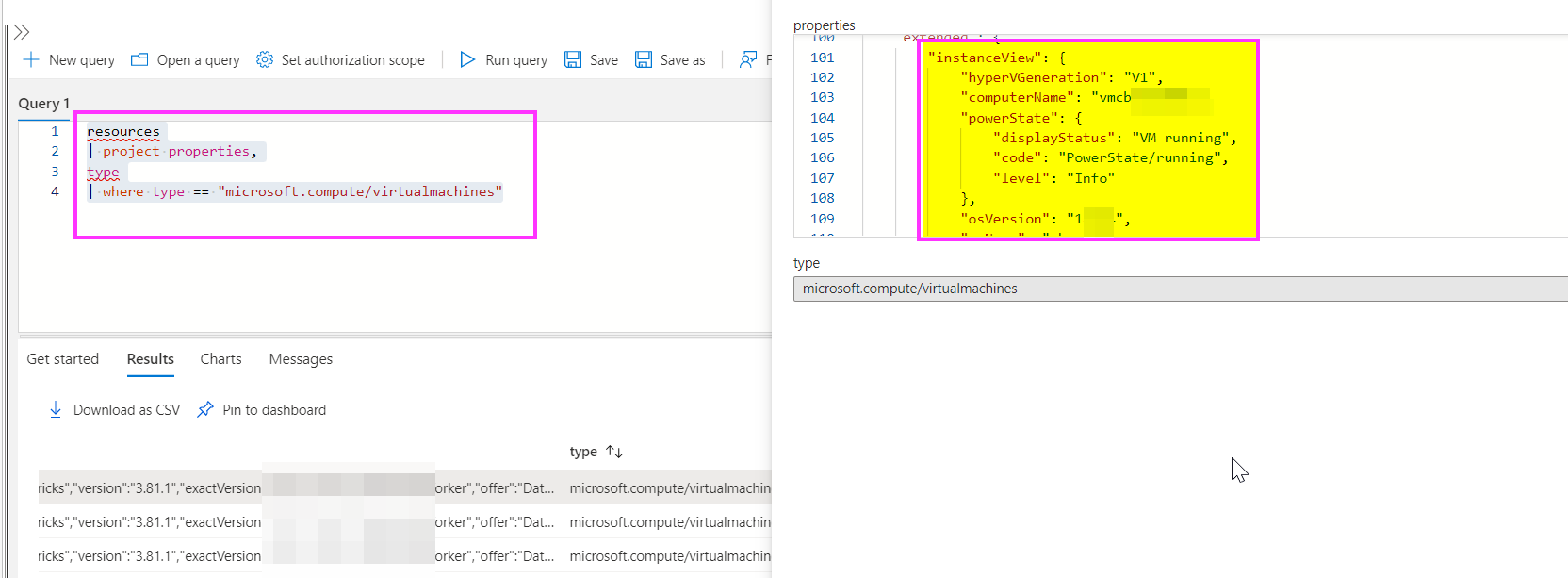
使用Azure资源图资源管理器,您将得到:
resources
| project properties,
type
| where type == "microsoft.compute/virtualmachines"
输出:
instanceView": {
            "hyperVGeneration": "V1",
            "computerName": "ceuubfcv",
            "powerState": {
                "displayStatus": "VM running",
                "code": "PowerState/running",
                "level": "Info"
            },
            "osVersion": "18.04",
            "osName": "ubuntu"
        }
    },
    "vmId": "76vvgtchiufd4e"
}
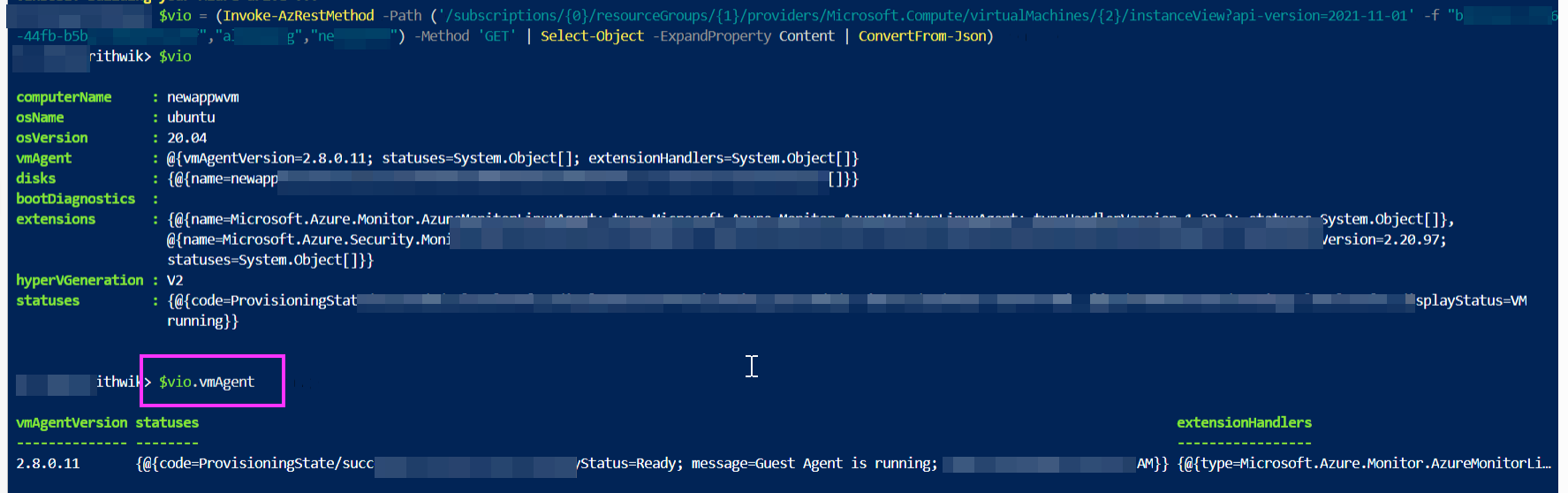
或者,您可以使用下面的PowerShell命令获取vm版本代理,我遵循了Microsoft-Document和@Rakhesh sasidharan的博客
$vio = (Invoke-AzRestMethod -Path ('/subscriptions/{0}/resourceGroups/{1}/providers/Microsoft.Compute/virtualMachines/{2}/instanceView?api-version=2021-11-01' -f "XX","YY","ZZ") -Method 'GET' | Select-Object -ExpandProperty Content | ConvertFrom-Json)
$vio
$vio.vmAgent
XX-订阅ID YY-Resourcegroup ZZ- VM名称
使用KQL,我发现下面的查询可以获得代理id和vm的一些细节:
VMComputer 因此,您可以使用Rest、资源图和powershell来获取Vm的详细信息。使用KQL,所有详细信息都不会被检索到AFAIK。
页面原文内容由Stack Overflow提供。腾讯云小微IT领域专用引擎提供翻译支持
原文链接:
https://stackoverflow.com/questions/74611261
复制相关文章
相似问题
腾讯云开发者

Copyright © 2013 - 2026 Tencent Cloud. All Rights Reserved. 腾讯云 版权所有
深圳市腾讯计算机系统有限公司 ICP备案/许可证号:粤B2-20090059  粤公网安备44030502008569号
腾讯云计算(北京)有限责任公司 京ICP证150476号 | 京ICP备11018762号